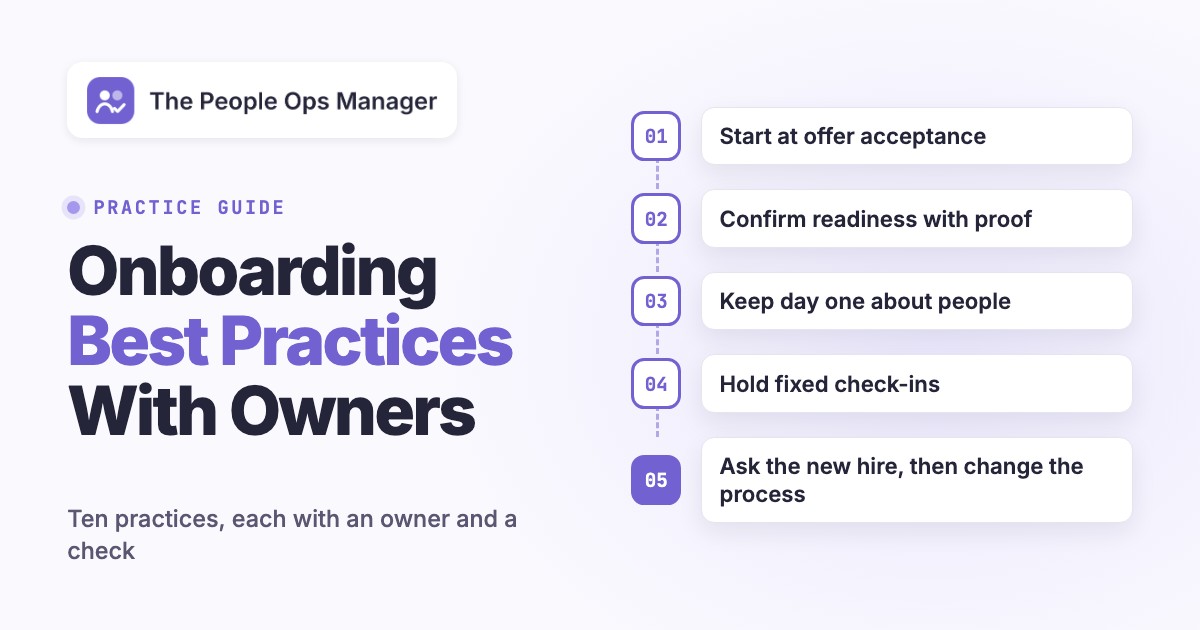
Employee onboarding best practices are the repeatable actions that get a new hire from signed offer to productive work: contact before day one, paperwork done on time, accounts and equipment ready, a clear first week, regular check-ins and a way to learn what went wrong. Most published lists agree on those actions. What they leave out is who does each one, how early it has to start and how you'd notice it failed.
This guide gives you ten practices in three phases, and each one comes with an owner, a lead time, the failure it prevents and a check you can run. It's written for HR and People Ops teams at US companies, where hiring managers and IT carry half of the work, yet rarely see the whole plan. If you need the full step-by-step flow, the onboarding process guide covers the stages, and the onboarding checklist turns them into task lists.
- Start at offer acceptance. Contact before day one, finished paperwork and a named person to ask are what a new hire notices first.
- Treat three deadlines as fixed: Form I-9 Section 1 by the first day, Section 2 within three business days, and the state new hire report within 20 days of hire.
- Order tasks by dependency (identity, then account, then access, then software) and check readiness with proof two business days before the start.
- Give the manager a first-week plan, add a buddy who isn't the manager, and hold check-ins at the end of week one and at days 30, 60 and 90.
- Measure what you can count: share of starters ready on day one, day-one blockers, check-ins held, a day-30 pulse and 90-day retention.
What Are the Best Employee Onboarding Practices?
The best employee onboarding practices are ten actions across three phases. Before day one, you start at offer acceptance, meet the legal deadlines, order tasks by dependency and confirm readiness with proof. In the first week, you keep day one about people, give the manager a plan and add a buddy. From day 8 to day 90, you hold fixed check-ins, write goals with the hire and ask for feedback you then act on.
The table puts the ten side by side, so you can see who owns each and what goes wrong when nobody does. Don't try to adopt all ten in one month; it's fine to start with the three that hurt most.
| Practice | Owner | When it starts | What it prevents |
|---|---|---|---|
| 1. Start at offer acceptance | HR | Within one business day of the signed offer | Weeks of silence before the start date |
| 2. Meet the legal deadlines | HR and payroll | Before day one | Missed I-9 and new hire reporting dates |
| 3. Order tasks by dependency | HR with IT | When the start date is fixed | Equipment with no account, access with no identity |
| 4. Confirm readiness with proof | HR | Two business days before the start | "It's done" that nobody checked |
| 5. Keep day one about people | Manager | Day one | A first day spent on forms and logins |
| 6. Give the manager a first-week plan | Manager | Before day one | A new hire with nothing to work on |
| 7. Assign a buddy | Manager | Before day one | Questions with nobody safe to ask |
| 8. Hold fixed check-ins | Manager, HR reminder | End of week one, then days 30, 60 and 90 | Problems that surface at resignation |
| 9. Write 30-60-90 goals with the hire | Manager | Week one | Guessing what "good" means |
| 10. Ask the hire, then change the process | HR | Day 30 and day 90 | The same failure for every later hire |
Why Do Onboarding Practices Matter More Than Onboarding Programs?
Most companies have an onboarding program on paper, and few new hires rate it highly. Gallup reports that only 12% of employees strongly agree that their organization does a great job onboarding new employees. In a separate Gallup piece, only 29% of new hires said they felt fully prepared and supported to excel in their role. The 12% figure dates from 2019 and Gallup has repeated it since, so read it as a long-running pattern, not this year's number.
That's a wide gap, and it doesn't come from a missing welcome email. It comes from tasks that sit between teams: the laptop is ordered but the account isn't, the manager hasn't planned week one, and HR doesn't find out until day one. That's why the practices below name an owner for each task, rather than a team. Here's the catch: a shared task with no single owner isn't owned at all.
Before Day One: Four Practices That Decide Whether the Start Works
The first four practices happen before the new hire walks in, and they're the ones other guides cover least. Three different teams touch them, so they're also where onboarding most often slips, but they're cheap to fix once somebody owns them.
Start at offer acceptance
Send a short preboarding message within one business day of the signed offer: start date and time, where to go or how to join, who the new hire can ask, and what the first week looks like. Add the buddy's name and the manager's welcome note once they're confirmed. Fails when the hire hears nothing between the signed offer and the first morning. Check: every starter has a named contact and a written first-week outline at least five business days before the start date.
Meet the legal deadlines before day one
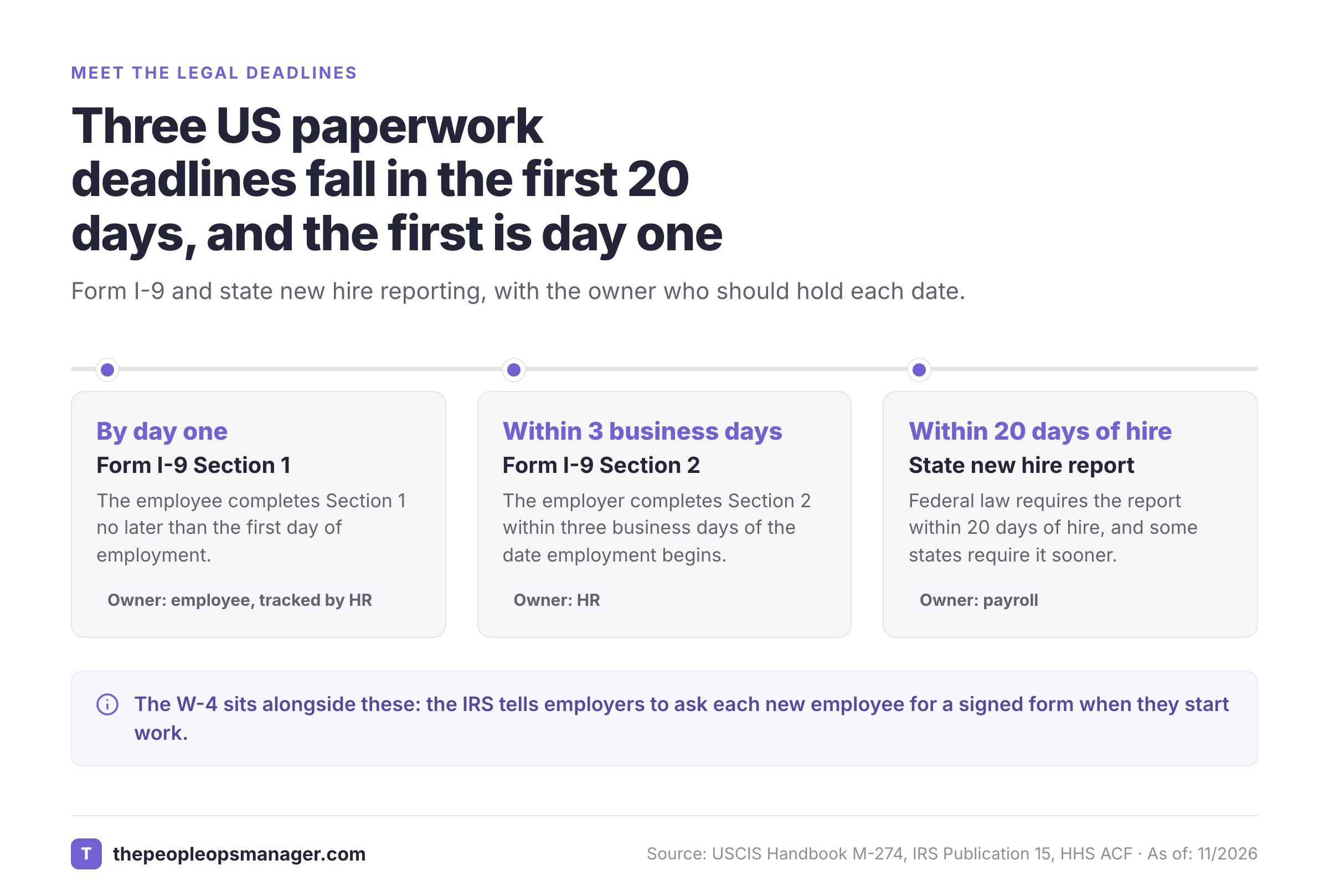
In the US, three deadlines drive the paperwork. The employee must complete Form I-9 Section 1 no later than the first day of employment, and you must complete Section 2 within three business days of the date employment begins. The IRS tells employers to ask each new employee for a signed Form W-4 when they start work. Federal law requires you to report new hires to the state within 20 days of hire, and some states require it sooner. Fails when documents are requested by email attachment on day one and Section 2 is nobody's task. Check: at the end of business day three, the count of open Section 2 forms is zero.
Order tasks by dependency, not by team
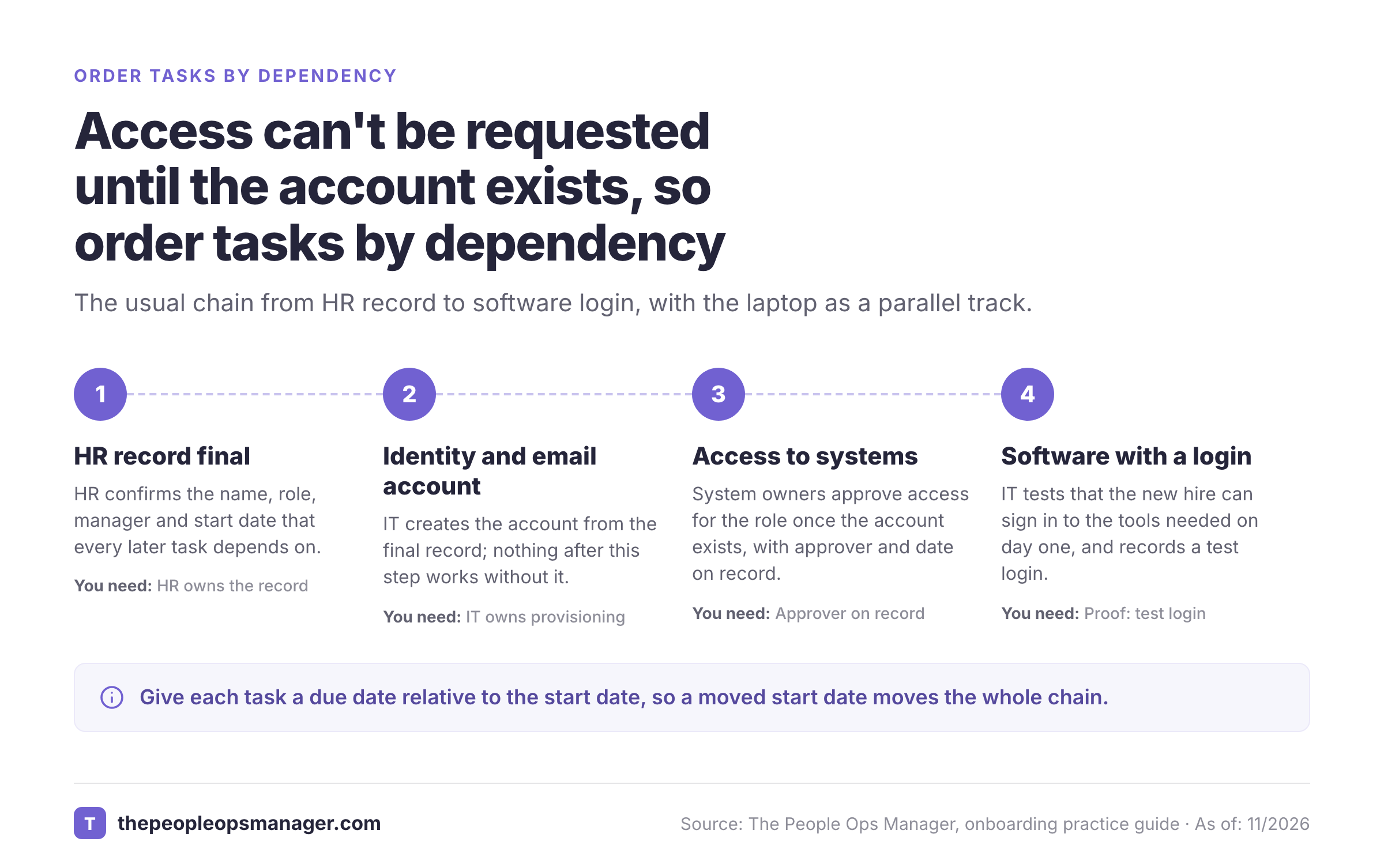
Write down which task can't start until another finishes. The usual chain is HR record, then identity and email account, then access to systems, then software that needs a login, with the laptop as a parallel track. Give each task a due date relative to the start date instead of a date on the calendar, so a moved start date moves everything. Take lead times from your last five hires, not from a template. If you don't have them yet, they're easy to reconstruct from ticket dates. Fails when access is requested before the account exists, or a laptop arrives with nobody to set it up. Check: every task in the plan has an owner, a due date relative to the start and a named predecessor.
Confirm readiness with proof
Two business days before the start, HR walks the list and asks each owner for evidence, not reassurance. A laptop's ready when the serial number is recorded and a test login worked. Access is ready when the approver and date are on record. Anything without proof goes on a short at-risk list with an owner and a new date. That list's the only thing People Ops should be chasing. Fails when readiness means somebody said it's done in a chat thread. Check: every day-one item on the list carries a proof entry before the start.
Day One and Week One: Three Practices for the First Five Days
By day one, forms should already be done, so the first day can go to people and expectations instead. The three practices here are mostly the manager's, and they don't need a budget.
Keep day one about people, not forms
A workable day one has five parts: a welcome from the manager, a test that every login works, a one-to-one on the first-week plan, introductions to the team and a lunch or call with the buddy. Anything that must be signed but isn't urgent can wait for the first week. Don't let the first morning disappear into IT tickets. Fails when the new hire spends the morning on IT tickets because nobody tested the accounts, and that's easy to avoid. Check: the new hire completes a real task in their main tool before the end of day one.
Give the manager a first-week plan
Before day one, the manager writes what the new hire will do each day of week one, including one small real assignment that finishes by Friday. Gallup found employees were 3.4 times as likely to say their onboarding was successful when the manager took an active role. Fails when the manager is travelling or booked and the hire waits for direction, even though the plan was easy to write. Check: by Friday, the new hire can name their top three priorities for the next month.
Assign a buddy who isn't the manager
Pick a peer who's been at the company for several months, tell them before day one and block time in their calendar for the first two weeks. A buddy answers the small questions that feel too minor for a manager, such as where to find things, how decisions really get made and who to ask. Fails when the buddy learns of the role on day one or has no time. Check: the buddy has at least three chats on the calendar in the first two weeks.
Days 8 to 90: Three Practices That Keep the Hire From Drifting
After the first week, onboarding isn't a project anymore, but a rhythm. The SHRM onboarding page notes that onboarding can last up to 12 months, and the SHRM Foundation's guidance on onboarding new employees says new hires get about 90 days to prove themselves. The practices below cover that window.
Hold fixed check-ins
Put four one-to-ones on the calendar as soon as the offer's accepted: the end of week one, day 30, day 60 and day 90. Use the same three questions every time, so you can compare answers across hires: what's going well, what's unclear and what's blocking you. HR sends the reminder and checks the meeting happened. Fails when check-ins are "as needed" and the first honest conversation is the exit interview. Check: the share of scheduled check-ins held, tracked by HR.
Write 30-60-90 goals with the hire
In week one, agree on what the hire should have learned, delivered or taken over by day 30, 60 and 90. Keep to two or three outcomes per period, written as things you can observe, so there's no argument at day 90. A 30-60-90 plan template gives you the format. Fails when goals are written by the manager alone and revealed at the first review. Check: the goals exist in writing by the end of week one and both people can state them.
Ask the new hire, then change the process
Send a short survey at day 30 and day 90 that asks what was missing, what was confusing and which handoff hurt most. Review the answers for every cohort and change one thing. Don't try to fix everything at once; you'll lose track of what worked. Log the change, so the next starter gets the fix. Fails when surveys are collected and filed. Check: each review produces at least one logged change to a task, an owner or a lead time.
Who Owns Each Onboarding Best Practice?
Every practice needs one named owner, even when several teams contribute. The timeline shows the order in which the owners act for a standard office hire starting on a Monday. Use your own lead times where you have them, because the ones shown are examples, not benchmarks.
- HRSend the preboarding message and confirm the start date, manager and buddy. Proof: sent message in the HR record. Within 1 business day of acceptance
- HRCreate the task plan with predecessors and relative due dates. Proof: plan with an owner on every task. When the start date is fixed
- ITCreate the account, then request access, then prepare the laptop. Proof: serial number and a test login. By the due dates in the plan
- ManagerWrite the first-week plan and a first small assignment. Proof: plan shared with HR. Before day one
- HRRun the readiness check and chase anything without proof. Proof: at-risk list with owners. 2 business days before start
- Employee and HRComplete I-9 Section 1 and the W-4. Proof: forms on file. By day one
- HRComplete I-9 Section 2. Proof: signed Section 2. Within 3 business days of day one
- PayrollFile the state new hire report. Proof: confirmation from the state directory. Within 20 days of hire, sooner in some states
- ManagerHold the check-ins and the goals conversation. Proof: notes with HR. Week one, days 30, 60 and 90
Why Do Onboarding Best Practices Fail at the Handoffs?
Best practices fail at the handoffs, not because the practice is wrong, but because nobody owns the gaps between teams. Practices two to four involve HR, IT, payroll and the hiring manager, and each team sees only its own task. Nobody sees the chain. When IT and HR don't coordinate, access requests stall, laptops arrive without accounts and the new hire loses the first days. A manager can write a perfect week-one plan and still see it collapse because the account request waited on a record HR hadn't finalized.
The table shows the typical waits and what breaks when one team slips. Check these first when day one goes badly. They're the usual suspects.
| Handoff | Who waits on whom | What breaks |
|---|---|---|
| HR record to identity | IT waits on HR for the final name, start date and role | No email account, so access can't be requested |
| Identity to access | Managers and system owners wait on IT | Access approvals stall, and the hire sits in the wrong groups |
| Equipment to setup | IT waits on delivery or procurement | Laptop on backorder, with no loaner planned |
| Offer to payroll | Payroll waits on HR for tax forms and bank details | Missed new hire report or a late first paycheck |
| Manager to HR | HR waits on the manager for the plan and buddy | A first day without agenda |
How Do Best Practices Change for Remote and Hybrid Hires?
For remote and hybrid hires, the ten practices stay the same, but lead times grow and day one moves onto a screen. Here's what changes.
- Ship equipment early and track it. Plan for delivery to arrive before the start date, confirm receipt and keep a loaner or a spare ready, because a laptop that arrives late is a lost first week.
- Plan I-9 verification before the start. The employer must still complete Section 2 within three business days. USCIS offers remote examination of documents as an optional alternative for employers that participate in E-Verify in good standing, and the employer must offer it consistently at a hiring site. Everyone else examines documents in person, or through an authorized representative, and that can't happen if nobody's near the hire.
- Put day one on the calendar in blocks. A remote day one needs a schedule with video calls, because there's no hallway to walk through. Don't assume the office routine works over video; it doesn't.
- Choose a buddy in the same time zone. A buddy who's asleep when questions arise doesn't help.
- Set anchor days for hybrid hires. Plan the in-office days around the introductions and the manager one-to-one, not around the paperwork.
How Do You Know an Onboarding Practice Is Working?
You can measure onboarding success with five counts: the share of starters ready on day one, day-one blockers, check-ins held, a day-30 pulse and 90-day retention. A practice is working when you can count its result. Pick a handful of measures, define them in writing and review them every month, because a measure nobody defined gets argued about, not used.
| Measure | How to count it | What a bad number tells you |
|---|---|---|
| Ready on day one | Share of starters with every day-one item verified at the two-day check | Practices 3 and 4 aren't happening |
| Day-one blockers | Number of tasks still open on the first morning, by owner | Which team's handoff to fix first |
| Check-ins held | Check-ins held divided by check-ins scheduled | Practice 8 is optional in practice |
| Day-30 pulse | Average answer to "I know what is expected of me" on a five-point scale | Goals or the first-week plan are unclear |
| 90-day retention | Hires still employed at day 90 divided by hires in the cohort | Something went wrong earlier than you saw |
Track these per cohort, not as a company average, since one bad quarter of hiring can hide inside a good year. Two or three measures are plenty at first, and you'll learn more from a simple count you actually review than from a dashboard nobody opens. The onboarding process guide has more on measurement.
Where The People Ops Manager Fits
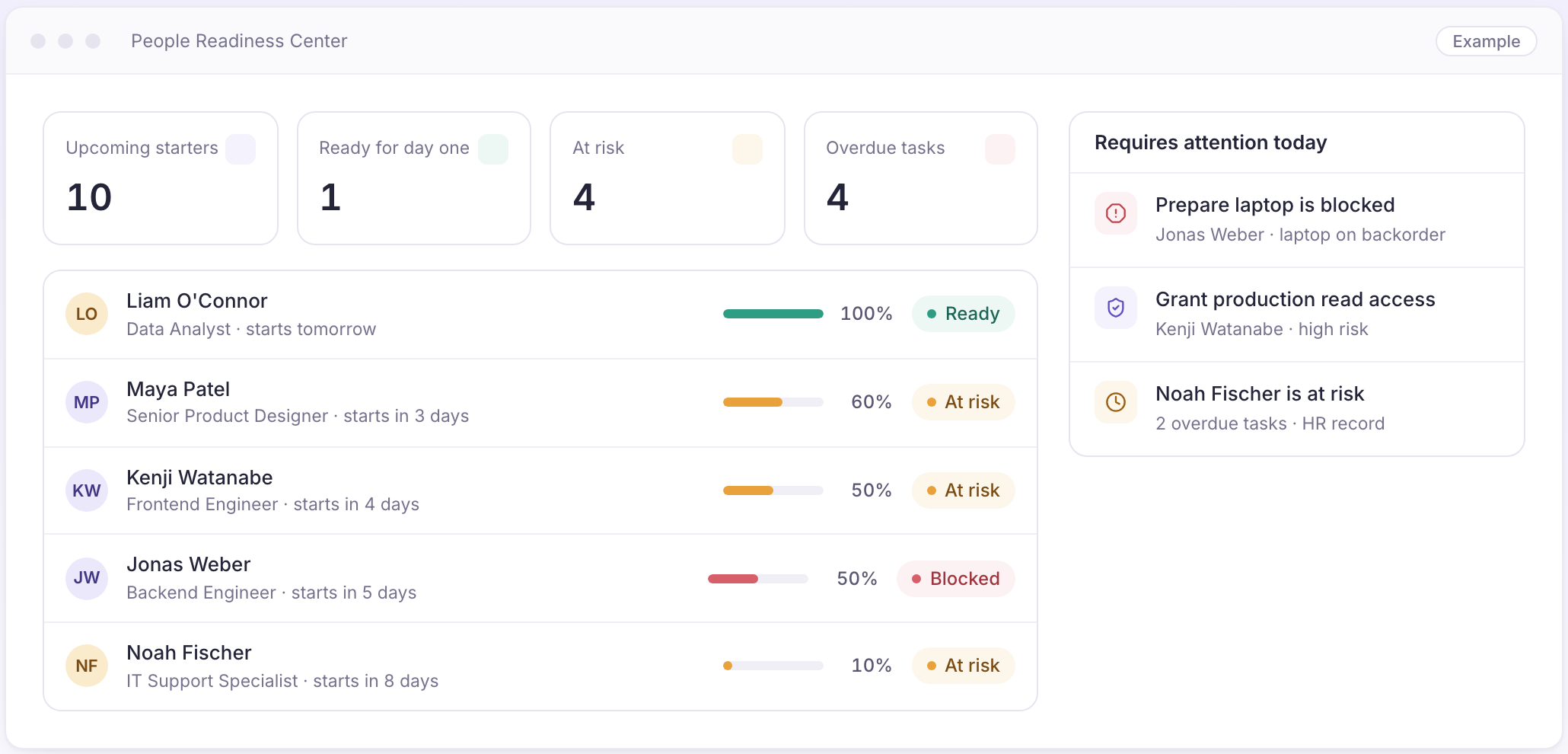
The People Ops Manager covers practices three and four, and the visibility behind the handoff table above. It coordinates onboarding across HR, IT, finance and hiring managers, shows who's ready for day one and what's blocked, and routes access changes through recorded approvals. It works alongside your HRIS and doesn't replace one, and it doesn't handle I-9 forms, training or surveys, so it's not a substitute for any of them. If your starters already arrive ready every time, you don't need a tool: a spreadsheet and the onboarding checklist are enough. If you want to compare tools, see the best employee onboarding software.
Employee Onboarding Best Practices FAQ
What are the best practices for employee onboarding?
The best practices for employee onboarding are to start at offer acceptance, meet the I-9, W-4 and new hire reporting deadlines, order tasks by dependency, confirm readiness with proof, keep day one about people, give the manager a first-week plan, assign a buddy, hold check-ins at the end of week one and at days 30, 60 and 90, write goals with the hire, and survey new hires so you can change the process.
What are the three most important elements of successful onboarding?
The three most important elements of successful onboarding are clarity, connection and readiness. Clarity means the hire knows what's expected. Connection means the hire knows people and has someone to ask. Readiness means accounts, equipment and paperwork are done before day one. The SHRM Foundation's four Cs of compliance, clarification, culture and connection cover the same ground.
What is the 30-60-90 onboarding rule?
It's a planning format, not a rule, and nobody's enforcing it. You agree on what the new hire should have learned, delivered or taken over by day 30, day 60 and day 90, and review progress at each point. Keep two or three observable outcomes per period.
When should onboarding start, and how long should it last?
Onboarding should start when the candidate accepts the offer, not on day one. Formal onboarding commonly runs for the first 90 days, and SHRM notes that it can last up to 12 months depending on the role. Plan check-ins at the end of week one and at days 30, 60 and 90, then decide with the manager whether more are needed.
What is the difference between onboarding best practices and an onboarding checklist?
Best practices say what to do, who owns it and how to tell it worked. A checklist lists the individual tasks that carry those practices out. Use the practices to design the process and the checklist to run it for each hire.
Who's responsible for onboarding?
HR, IT and the hiring manager each own part of onboarding. HR owns the plan, the paperwork and the readiness check. IT owns accounts, access and equipment. The hiring manager owns the first-week plan, goals and check-ins. Every task still needs one named owner.