An onboarding process flowchart maps a new hire's journey from accepted offer to a confirmed, productive start. The useful version shows the owner of each task, the handoff that unlocks the next task and the route to take when something isn't ready. It isn't just a prettier employee checklist.
Use the editable diagram, owner matrix and exception rules below to build a flow that HR, IT, payroll and hiring managers can follow. The example's built for US employers, but your own legal requirements, screening policy and equipment lead times should control the final version. Here's the plan: you'll see the diagram first, then the owner matrix and the exception rules.
- Start at offer acceptance and assign one People Ops coordinator to track the whole process.
- Run screening, payroll preparation, equipment provisioning and manager preparation in parallel where policy permits.
- Use decision diamonds for unresolved screening, missing equipment and failed day-one access checks.
- Record an owner, due date, evidence link and fallback for each handoff.
- Close the process after the manager confirms role readiness and the coordinator records remaining actions.
What should an onboarding process flowchart show?
An onboarding process flowchart should show tasks, owners, dependencies, decision points and completion evidence. A swimlane diagram separates HR, IT, payroll, the hiring manager and the employee, while arrows show which work can proceed in parallel and which work must wait.
A plain checklist answers whether a task was completed, but it can't tell you whether the next owner accepted it. A flowchart also answers who needs the result, what happens when the result's late and which team has the next move. That's really useful when a signed offer triggers work in several systems at once.
You don't need complicated notation. Use four familiar shapes: a rounded start or end, a rectangle for a task, a diamond for a decision and an arrow for the handoff. Don't make a decision diamond for every task. Reserve it for a question that changes the next action, such as whether the laptop arrived or whether a required screening step needs review.
Each handoff needs a named recipient. A status like "sent to IT" isn't proof that IT accepted the request. Record the receiving owner, the requested completion time and the evidence that the task is done. Without that, you won't see the bottlenecks that an email thread hides.
Copy this employee onboarding process flowchart
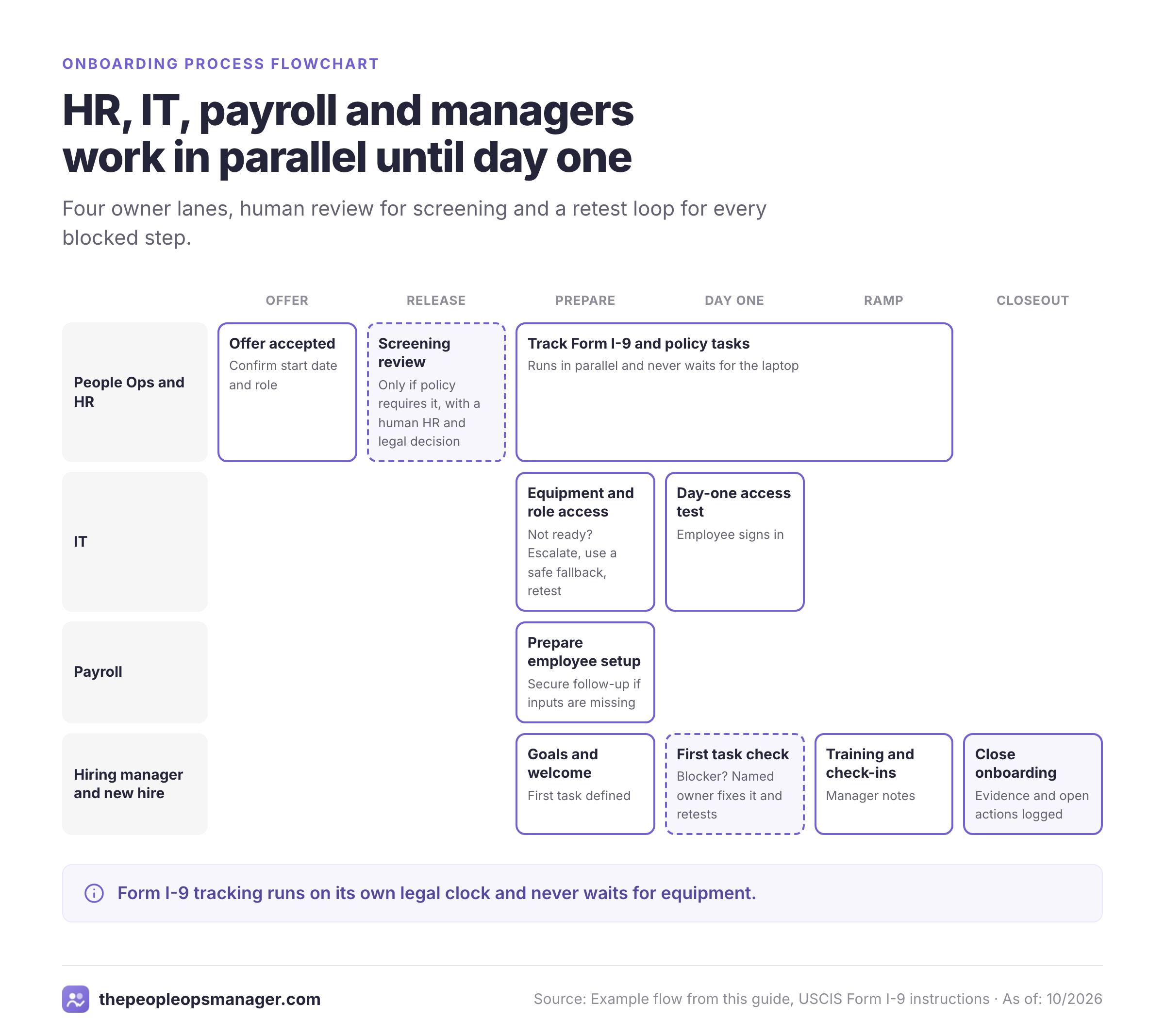
This employee onboarding process flowchart starts when the candidate accepts an offer, then branches into HR, IT, payroll and manager work. It rejoins at a day-one readiness check and continues through role training and a documented closeout. The branch for a screening exception calls for human review rather than an automatic adverse decision.
The image below shows the flow at a glance, and the code under it is an editable Mermaid flowchart. Paste the code into a Mermaid-compatible editor, or redraw the nodes as editable shapes in your own diagram tool. It's an operational example, not a statement that every company must follow the same order.
flowchart TD
    subgraph HR[People Ops and HR]
      A([Offer accepted])
      B[Confirm start date and role]
      C{Screening required by policy?}
      D[Follow approved screening process]
      E{Screening issue?}
      F[HR and legal review]
      G{Cleared to proceed?}
      H([Pause and resolve through approved process])
      I[Release approved onboarding work]
      M[Track Form I-9 and policy tasks]
    end
    subgraph IT[IT]
      J[Prepare equipment and role access]
      N{Equipment and access ready?}
      O[Escalate, use safe fallback and retest]
    end
    subgraph PAY[Payroll]
      K[Prepare employee setup]
    end
    subgraph MGR[Hiring manager and new hire]
      L[Prepare goals and welcome]
      P[Day-one welcome and access test]
      Q{Employee can perform first task?}
      R[Named owner resolves blocker and retests]
      S[Role training and manager check-ins]
      T[Close onboarding with evidence and open actions]
    end
    A --> B --> C
    C -- Yes --> D --> E
    E -- Yes --> F --> G
    G -- No --> H
    G -- Yes --> I
    E -- No --> I
    C -- No --> I
    I --> J --> N
    I --> K
    I --> L
    I --> M
    N -- No --> O --> N
    N -- Yes --> P
    K --> P
    L --> P
    P --> Q
    Q -- No --> R --> Q
    Q -- Yes --> S --> T
    M --> T
The HR compliance branch runs alongside operational preparation. It doesn't wait for the laptop to arrive. Form I-9 deadlines aren't postponed just because a laptop is late. The diagram deliberately keeps those obligations visible without treating payroll, screening and I-9 as the same approval.
Which teams own each onboarding step?
The onboarding process works best with one coordinator and distinct task owners. People Ops owns the cross-team timeline, while IT confirms access, payroll confirms setup and the hiring manager confirms role readiness. The new hire owns the information and actions only they can supply.
The matrix is a reusable working template, but it isn't a universal deadline schedule. Its due entries are example planning targets, not regulatory deadlines. Don't reuse them without checking your hardware lead times, payroll cutoff and approved hiring process.
| Onboarding process flowchart phase | Step | Owner | Trigger | Due | Evidence | Decision | If blocked | Status |
|---|---|---|---|---|---|---|---|---|
| Offer | Offer accepted | People Ops | Signed acceptance | At acceptance | Acceptance record | Start date agreed? | Confirm date with manager | Open |
| Setup | Confirm start date | People Ops | Offer accepted | Same workday | Approved start date | Date stable? | Notify every owner of change | Open |
| Screening | Review required checks | HR | Approved screening request | Before authorized start | Restricted completion status | Issue needs review? | Route to HR and legal | Open |
| IT | Order equipment | IT | Approved role and address | Before day one | Shipment or inventory record | Delivery confirmed? | Arrange approved loaner | Open |
| IT | Provision role access | IT | Manager-approved access list | Before day one | Access ticket | Access works? | Escalate and retest | Open |
| Payroll | Prepare payroll record | Payroll | Valid employee data | Before payroll cutoff | Payroll setup confirmation | Inputs complete? | Contact employee securely | Open |
| HR | Track Form I-9 | HR | Offer accepted and start date | Statutory deadline | Restricted I-9 completion record | Sections complete? | Follow authorized correction process | Open |
| Manager | Set first-week goals | Hiring manager | Start date confirmed | Before day one | Written goals | First task defined? | Clarify with team lead | Open |
| Manager | Assign welcome owner | Hiring manager | Team notified | Before day one | Calendar invitation | Buddy available? | Name backup contact | Open |
| Day one | Test equipment and access | IT and employee | Employee starts | Day one | Confirmed login test | Can work? | Named owner fixes issue | Open |
| Day one | Run welcome and orientation | Hiring manager | Employee arrives | Day one | Agenda and attendance | Questions resolved? | Schedule follow-up | Open |
| Ramp | Review role progress | Hiring manager | First tasks completed | Agreed check-in | Notes and next actions | Support needed? | Adjust training plan | Open |
| Close | Confirm handoff closure | People Ops | Required tasks resolved | Agreed closeout | Owner approvals and open-item log | Any blockers remain? | Keep case open with owner | Open |
Don't paste personal documents into the shared matrix. Store only the task state and a restricted reference to the authorized HR or payroll record. A shared project board shouldn't become an uncontrolled copy of identity documents, bank details or screening reports. That's a common mistake, and it's easy to avoid.
- People OpsConfirm offer acceptance, role and start date At acceptance
- HRRun any approved screening workflow and track Form I-9 Before and after start, as applicable
- ITOrder equipment, approve access and test a fallback Before day one
- PayrollCollect payroll inputs and confirm setup Before payroll cutoff
- Hiring managerSet first tasks, welcome plan and check-ins Before and after day one
- New hireComplete assigned forms and test access As requested, within applicable deadlines
- People OpsClose completed handoffs and log remaining owners At agreed closeout
How do you build an onboarding flowchart from scratch?
Build an onboarding flowchart by listing actual work, grouping it by owner, drawing dependencies and adding failure routes. Start with the last few hires rather than an idealized HR policy. The gaps between those experiences reveal the decisions your diagram needs to make visible.
Choose a clear start and finish
Use offer accepted as the start. Define finish as documented role readiness plus a list of any open actions, not merely the first orientation meeting.
Interview the teams doing the work
Ask HR, IT, payroll, facilities and hiring managers what triggers their task, what they need first and how they confirm completion.
Create swimlanes for accountable owners
Put each action in the lane of the person who can complete it. Give cross-team coordination a single named owner.
Draw dependencies and parallel work
Connect steps that truly depend on each other. Let equipment ordering, payroll preparation and manager planning run concurrently when policy allows.
Add real decision branches
Draw the no path for unresolved screening, late hardware, missing payroll inputs and failed access. Every no path needs an owner and a rejoin or stop point.
Test the flow with a changed start date
Move a fictional start date and check whether every affected owner receives the update. Revise the chart until no handoff depends on an untracked message.
Publish the owner matrix beside the chart
Keep the diagram compact, but put due dates, ticket links, restricted evidence references and escalation contacts in a separate tracker.
You can't judge a flowchart only by how it looks. Hand it to a manager who didn't design it. Ask them to identify the person who's responsible for a missing laptop, a payroll data issue and an employee who can't log in. If the chart can't answer those questions, it isn't ready to operate. That's the whole point of the exercise.
Where should onboarding decision branches go?
Onboarding decision branches belong at points where a failed condition changes the next step. The most useful branches cover screening exceptions, date changes, equipment readiness and the employee's ability to perform a first task. Each branch should say who makes the decision and what evidence closes it.
What happens when the start date changes?
A start-date change should reopen every task with a date-dependent deadline. People Ops confirms the new date, sends the change to payroll, IT and the manager, then checks whether shipping, orientation and compliance schedules need revision.
Don't rely on the manager forwarding the original email. The coordinator should update one record and require each receiving owner to acknowledge the change. A confirmed change isn't complete until the affected owners have accepted the revised plan.
What happens when a screening issue appears?
A screening issue should route to a restricted HR review, not to an automatic rejection node. The EEOC's background-check guidance says employment decisions using background information must comply with federal nondiscrimination law. When an outside reporting company supplies the check, additional Fair Credit Reporting Act procedures apply, including written permission before obtaining the report.
The flowchart should say "HR and legal review" and link to the company's approved policy. Don't expose screening details to IT or the broader hiring team. Their status can remain "hold" without revealing sensitive information.
What happens when equipment or access isn't ready?
An equipment or access failure should route to IT with an approved workaround and a new test. A loaner device, supervised orientation or rescheduled technical exercise may keep the first day useful, but a workaround mustn't bypass security controls.
The manager should know which work is safe to assign during the delay. A ticket isn't closed until the employee can do the work. If the role requires a restricted system, don't describe a temporary personal account as a valid fallback. The employee's first successful login and first task give better completion evidence than a ticket marked "done".
What happens when payroll information is missing?
A payroll-input issue should route to payroll for a secure employee follow-up. The manager shouldn't collect banking or tax details through a team chat, and HR shouldn't mark payroll ready because a form was emailed without confirming receipt.
Keep a visible blocker such as "payroll setup awaiting employee input" while restricting the underlying record. You don't need the employee's tax data to know who should follow up. Escalate against the real payroll cutoff rather than inventing a universal due date for every employer.
Which US compliance deadlines belong in the flowchart?
A US onboarding flowchart should track employment verification, withholding setup and applicable new-hire reporting separately from operational tasks. Use the employer's legal and payroll specialists to confirm state rules and special cases. The following federal source points are a starting reference, not a substitute for legal advice.
When must Form I-9 be completed?
Form I-9 Section 1 is due no later than the employee's first day of employment, and the employee may complete it after accepting an offer but before starting. Employers generally complete Section 2 within three business days after the employee's first day. For employment lasting fewer than three business days, Section 2 is due no later than the first day, according to the USCIS Form I-9 instructions.
USCIS also says employees choose which acceptable documents to present. Your flowchart should track completion and authorized review, but it shouldn't tell employees to bring one particular document. Store the form in the approved restricted location and log completion in the shared tracker without copying the identity evidence.
Where do Form W-4 and state reporting fit?
The IRS Employer's Tax Guide for 2026 tells employers to ask new employees for a signed Form W-4 when they start work. The IRS also says employers must report new hires to a designated state registry. Because the reporting route and timing depend on the jurisdiction, put a state-specific task in the payroll lane instead of hard-coding a single deadline into every flowchart.
A missing Form W-4 doesn't mean payroll can invent the employee's withholding election. The IRS publishes a default withholding treatment when a new employee hasn't supplied the form. Payroll should apply its current procedure and keep the manager's diagram focused on the completion state.
Is E-Verify part of every onboarding process?
E-Verify isn't a universal step for every US employer. Where an employer participates, it's got separate case-creation rules that need their own task and owner. The E-Verify guidance indicates that a case is generally created after Form I-9 is complete and within three business days of the first day of employment; confirm the current rule and any exceptions with the program administrator before treating that branch as complete.
How should HR and IT handle a missed onboarding handoff?
A missed onboarding handoff needs an owner, a recovery action, a new commitment and a retest. The process should show both the employee-facing impact and the team responsible for resolving it. A generic "blocked" label isn't enough.
Consider a new hire whose laptop shipment hasn't arrived on the planned morning. IT confirms the shipment state, checks whether an approved loaner is available and gives the manager a realistic time for the next test. The manager chooses work that doesn't require unavailable access. People Ops records the owner and updated expectation, then confirms the employee can perform the intended task before closing the blocker.
The same pattern works when the start date moves. It doesn't require a new software platform. People Ops changes the source record, payroll checks its cutoff, IT checks the delivery address and the manager rebooks the welcome. If one team hasn't acknowledged the update, the workflow stays open rather than assuming the handoff succeeded.
Use a small exception log with these fields: affected task, blocker category, owner, employee impact, next action, next check time and evidence of resolution. Don't put sensitive screening details or payroll identifiers in that log. The shared view needs to show what to do next, not why a protected HR record exists.
How do you keep the onboarding flowchart current after each hire?
Keep the onboarding flowchart current by treating it as an operating procedure with a named editor and a small change log. Review exceptions after a hire closes, then update the branch or owner that caused confusion. Don't redraw the entire process because one manager prefers a different welcome meeting.
Start by separating policy changes from execution fixes. A new legal requirement, screening rule or access approval policy needs review by the authorized owner before the chart changes. A broken ticket handoff or outdated shipping lead time can usually be corrected by the teams doing the work. The coordinator should know which type of change they're handling.
For each revision, record the problem observed, the affected node, the old owner or rule, the approved replacement and the date the change takes effect. That makes it possible to explain why two employees followed different versions of the flow. A short change record also helps the next People Ops coordinator avoid reopening a decision that was already settled.
A useful review meeting begins with the exception log rather than the diagram itself. Ask whether the employee waited for access, whether payroll had to chase missing data, whether the manager had a real first task and whether any owner got surprised by a changed date. Then inspect only the nodes linked to those failures.
Version control matters more than graphic polish. Keep one approved flowchart linked from the onboarding tracker. Archive the prior version for reference and mark the active one clearly. If teams keep local screenshots of an old diagram, they'll follow obsolete steps even after the central document changes.
When a new application is added to the employee's role, IT should update the role access checklist and the access test. The chart may still need only one "Provision role access" node. When a new approval changes who may authorize that access, however, the diagram needs a new decision or handoff because the process itself changed.
The closeout owner should verify that the latest changes appear in both the diagram and the owner matrix. If they don't match, the revision isn't finished. Otherwise the visual and the working tracker will disagree, and managers won't know which one to trust.
How does a remote or hybrid onboarding flowchart change?
A remote onboarding flowchart needs additional shipping, identity-verification logistics and access-testing handoffs. You can't assume the employee has a working corporate login. The same owner lanes still apply, but the employee can't walk over to an IT desk when a device or authenticator fails. The fallback should be planned before the start date.
Add a shipping address confirmation and a secure equipment-delivery check. IT should verify that the employee can sign in using the approved authentication method and can reach the specific applications needed for the first task. The manager should have a phone or video contact method that doesn't depend on the corporate account already working.
Remote Form I-9 procedures require their own compliance review. Don't assume a video call is an acceptable replacement for every document examination method. The authorized HR specialist should use the current USCIS rules and any permitted alternative procedure applicable to that employer.
For hybrid hires, add building access and onsite arrival instructions to the facilities lane. A device arriving at home doesn't prove a building badge will work on the first office day. Treat those as separate readiness checks and keep their evidence separate.
How do you measure whether the onboarding flowchart works?
Measure the onboarding flowchart by handoff reliability and employee readiness, not by the number of boxes completed. Start with a few operational metrics that expose preventable delays. Review them with the teams who own the failed steps rather than turning the chart into a scorecard for the new hire.
| Onboarding process flowchart metric | Definition | Evidence | Useful response |
|---|---|---|---|
| Day-one access readiness | Share of starters who can perform their assigned first task on day one | Employee login test and manager confirmation | Fix recurring access or shipping blockers |
| On-time handoff rate | Share of tasks accepted by the next owner by the agreed time | Task timestamps and acknowledgments | Adjust ownership or lead time |
| Blocker resolution time | Time between a blocker being recorded and a successful retest | Exception log | Improve escalation and fallback paths |
| Payroll setup readiness | Share of hires whose setup is confirmed by the payroll cutoff | Restricted payroll confirmation | Improve secure input collection |
| Manager ramp check-ins | Share of planned check-ins completed with a next action | Manager notes | Clarify role goals and coaching |
These are suggested operational measures, not published industry benchmarks. You don't need a large analytics project. Start with a small sample of recent hires and identify the recurring handoff that deserves attention. Don't worry about perfect numbers, because you'll refine them as you go. Don't compare departments until the definition of "ready" is consistent across roles.
An illustrative manager cadence might include a first-week check, then day 30, day 60 and day 90 conversations. Those dates are planning choices, not federal compliance deadlines. For a short-term or seasonal role, a different cadence may be more useful.
What checklist makes the flowchart usable for every hire?
A reusable onboarding checklist should validate the diagram's handoffs before each new hire begins. It should capture the real owner, acceptance of the handoff and the next action for exceptions. Keep the checklist beside the chart so the team doesn't have to guess which version is current.
- Offer accepted and start date confirmed
- People Ops coordinator and hiring manager named
- Screening workflow and restricted review owner confirmed if applicable
- Equipment ordered with delivery or approved fallback
- Role-based access list approved and test owner assigned
- Payroll setup owner and cutoff confirmed
- Form I-9 responsibilities and applicable deadlines assigned
- Employee welcome and first task scheduled
- Day-one login and first-task test planned
- Exception routes include owner, recovery action and retest
- Manager check-ins and closeout criteria agreed
- Sensitive records stored outside the shared status tracker
Review the checklist when the role changes, a new system gets introduced or the start date moves. If the chart says a task is complete but nobody can point to the confirmation, reopen the handoff. The point isn't to produce more documentation, and it definitely isn't to add boxes. It's to prevent the employee from becoming the person who discovers an internal dependency.
Where does onboarding coordination software fit?
Onboarding coordination software fits between the systems that already own employee records and the teams completing work. It can help track who accepted a handoff, what remains blocked and which approval is outstanding. It shouldn't be confused with the HRIS, payroll system or Form I-9 process itself.
A dedicated coordination layer can be useful when HR, IT and finance each have their own task queues. If a small team has reliable ownership and follow-up in one tracker, it may not need another tool. Choose based on the missing handoff, not the number of features on a product page.
Frequently asked questions about onboarding process flowcharts
An onboarding process flowchart should stay short enough to explain in a meeting while preserving real ownership and exception routes. These answers cover the practical choices teams face when turning a diagram into an operating process.
What is an employee onboarding process flowchart?
An employee onboarding process flowchart is a diagram of tasks, owners, decisions and handoffs from an accepted offer through a documented readiness check. It shows what happens when a step is blocked, not just the normal sequence.
What are the main stages of onboarding?
The main stages in this example are offer confirmation, approved screening where applicable, preboarding setup, day-one readiness, role training and closeout. Your company's legal and operational requirements may change the sequence.
Who should own an onboarding flowchart?
People Ops should usually coordinate the overall onboarding flow, while IT, payroll and the hiring manager own their assigned tasks. Give each handoff a receiving owner and an escalation path.
Should onboarding use a flowchart or a checklist?
Use both. The flowchart shows dependencies and decisions, while the checklist tracks each hire's task completion and evidence.
How do you show an onboarding exception?
Show an exception as a decision branch with a named reviewer, recovery action and return or stop point. Keep sensitive screening and payroll details out of the shared diagram.
When does onboarding end?
Onboarding ends at the closeout milestone your organization defines, after the manager confirms role readiness and People Ops records any remaining actions. Day-one orientation alone isn't a reliable completion test.
The flowchart pairs well with a detailed employee onboarding checklist and a reusable new hire onboarding template. Teams that want to standardize both ends of the employee lifecycle can also review the employee offboarding checklist.