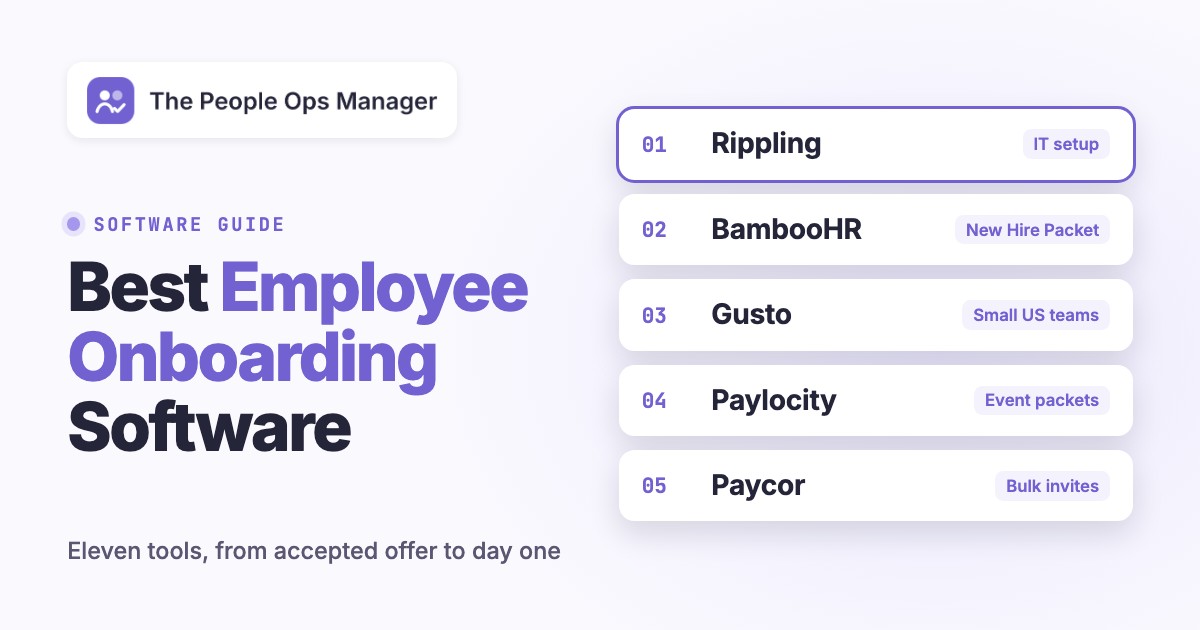
The best employee onboarding software depends on which onboarding step breaks most often at your company. Rippling fits teams that want accounts, apps and laptops triggered by the same hire event as the paperwork. BambooHR and Gusto fit small US teams that want new hire packets and I-9s next to the employee record. Paylocity and Paycor fit mid-sized US employers that hire in batches. Deel fits global teams, and Workday fits enterprises already on Workday HCM. Enboarder, Click Boarding and WorkBright sit on top of an HRIS and fix one hard part: multi-team journeys, high-volume paperwork or remote I-9 verification.
Each entry walks through what happens inside the tool between the accepted offer and the first weeks. It names who owns each step, what reviewers complain about and who should skip it.
- tools compared
- 11
- document a Form I-9 flow in the product
- 9 of 11
- create accounts or ship devices themselves
- 4
- published price per employee per month
- $5 to $25
Our Picks by Onboarding Job
 Best when IT setup keeps slippingRipplingAccounts, apps and laptops are triggered by the same hire event as the paperwork.
 Best for small US teamsGustoNew hire packets and I-9s next to the employee record, on Gusto payroll.
 Best for mid-sized batch hiringPaylocityEvent packets, with identity and device setup sold as IT add-ons on the same record, unlike BambooHR or Paycor.
 Best for global teamsDeelEOR, contractors and US hires, while signing waits until contract approvals are done.
 Best if you run Workday HCMWorkdayOnboarding Plans run inside Workday HCM, but onboarding isn't sold on its own.
 Best for remote I-9 verificationWorkBrightA guided authorized representative and automatic E-Verify cases on a phone, but no account provisioning.
 Our product · for the gaps between toolsThe People Ops ManagerShows, per starter, which task is blocked and who owns it, but doesn't replace your HRIS.
Best Employee Onboarding Software at a Glance
Nine of the eleven tools document a Form I-9 flow inside the product (Enboarder as an add-on), and four create accounts or ship devices themselves: Rippling, Gusto, Paylocity and Deel, the last two through IT add-ons. Prices are as published on vendor sites in October 2026.
| Tool | Best for | I-9 handling | IT setup | Published price (USD) | User rating |
|---|---|---|---|---|---|
| Rippling | HR, IT and devices from one hire event | Digital W-4 and state forms; E-Verify not documented publicly | Native app provisioning and laptop shipping | From $8 per employee per month plus a base fee | 4.7 (14,044) |
 BambooHR BambooHR | Small and mid-sized HR teams | Built-in I-9 and E-Verify (Mitratech) | Manual IT tasks | Core from $10 per employee per month | 4.4 (7,164) |
| Gusto | Small US teams on Gusto payroll | Digital I-9; Remote I-9 and E-Verify per submission below Premium | Work email on all plans; app accounts on Plus and Premium | Simple $49 per month plus $6 per person | 4.6 (13,418) |
| Paylocity | Mid-sized US employers wanting HR and IT in one vendor | I-9 task with E-Verify once enabled | Separate Access Management and Asset Management products | Not published | 4.4 (6,285) |
 Paycor Paycor | Mid-sized companies onboarding groups | Online I-9 and E-Verify from the Essential bundle | Task lists; identity via a partner | Not published | 7.5/10 (TrustRadius, 777) |
 HiBob HiBob | Mid-sized, multi-country teams | I-9 as a workflow task; E-Verify via a partner | Tasks; provisioning through Okta | Not published | 4.6 (Capterra, 179) |
| Deel | Global teams with EOR, contractors and US hires | In-app I-9 for EOR, Global Payroll and PEO hires | Deel IT ships devices; automatic app access on the top IT tier | HR from $5 per employee per month | 8.9/10 (TrustRadius, 89) |
| Workday | Enterprises on Workday HCM | Electronic I-9 with optional E-Verify integration | Provisioning groups requested by HR | Not published | 7.8/10 (TrustRadius, 674) |
 Enboarder Enboarder | Multi-stakeholder journeys on top of an HRIS | US compliance module (I-9, W-4, E-Verify) as an add-on | ServiceNow or Jira tickets | Quote only | 4.9 (Capterra, 16) |
 Click Boarding Click Boarding | High-volume hiring at 500+ employees | Built-in I-9 and E-Verify plus state forms | Through integrations | Not published | 3.5 (Capterra, 4) |
| WorkBright | Hourly, seasonal and remote hires on mobile | Remote I-9 with a guided authorized representative; automatic E-Verify cases | None | Software not published; managed I-9 at $25 per record | 4.8 (Capterra, 188) |
| The People Ops Manager Our product | Coordinating onboarding and offboarding across HR, IT, finance and hiring managers | None: stores no identity documents | Tracks IT tasks; access changes wait for a recorded approval | Invite-only | No reviews yet |
Prices, plan names and review counts checked on October 13, 2026. Ratings are from G2 out of 5 unless marked TrustRadius (out of 10) or Capterra (out of 5).
What Is Employee Onboarding Software?
Employee onboarding software is a system that runs the steps between a signed offer and a new hire's productive first weeks. It collects paperwork, assigns tasks to HR, IT and managers, sets up access and tracks what's done.
Most products cover five jobs. They collect new hire paperwork such as the W-4, Form I-9 and direct deposit details, usually with e-signature. They assign checklists to the new hire and to everyone who owes that person something. They trigger or request setup work such as accounts, apps and laptops. They deliver welcome content and first-week plans. And they report who is complete and who is stuck.
The subject here is software for onboarding new employees. Customer onboarding tools, which guide new customers through a product, are a different category.
How We Compared These Onboarding Tools
We compared these employee onboarding tools on the steps that usually stall a start date. For each one we read the pricing page, the onboarding product page and the help-center or admin docs, plus user reviews on TrustRadius, Capterra and G2. Tools made the list by how often current US onboarding guides name them and by fit for People Ops teams, not by whether a pricing page happened to load. We didn't run hands-on trials, and prices, plan names and review counts were checked on October 13, 2026.
Six criteria shaped the shortlist and the order of each entry.
- Paperwork and Form I-9: We checked which forms the new hire signs before day one, who completes I-9 Section 2 and whether E-Verify is native, an add-on or a partner.
- Tasks outside HR: We looked for tasks that IT, finance and the hiring manager own, with due dates set from the start date.
- Accounts and devices: A tool scored higher when it creates accounts or ships laptops itself instead of opening a ticket or sending a reminder.
- Integrations: We noted the ATS hand-off, payroll sync, identity providers such as Okta and Microsoft Entra ID and chat tools.
- What users report: Each entry gives the rating, the review count and the most common complaint.
- Price transparency: We recorded whether a price is published and which fees sit outside it.
HR and Payroll Suites With Onboarding Built In
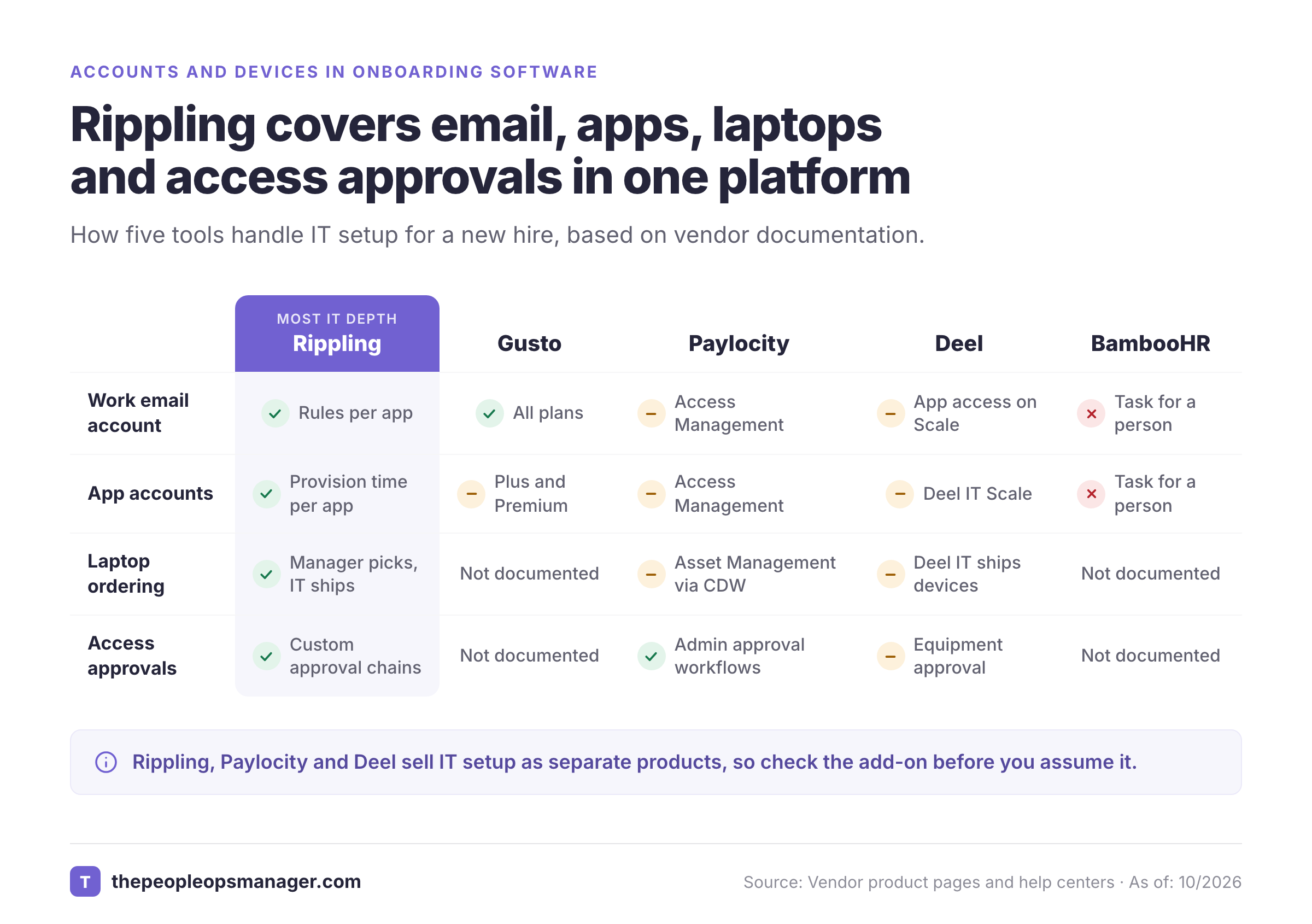
HR and payroll suites start onboarding from the employee record, so data entered once flows into payroll and benefits. For a payroll-specific comparison, see our guide to the best payroll software. They differ most in how far they reach into IT. The matrix compares how five of the tools handle work email, app accounts, laptops and access approvals.
Rippling
Rippling is a US workforce platform that runs HR, payroll, IT and finance on one employee record.
It's the strongest pick here when IT setup is the step that keeps slipping.
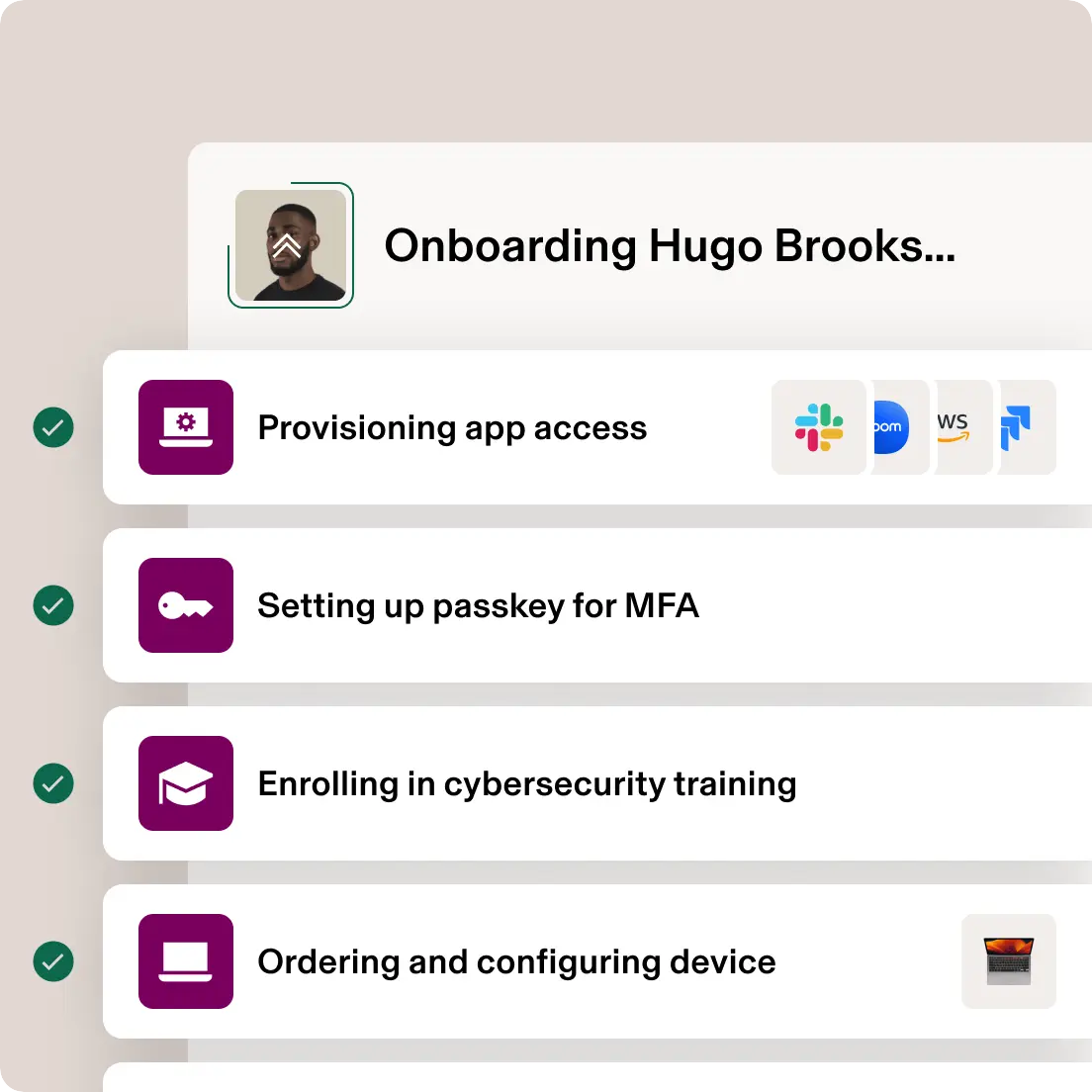
How onboarding runs in Rippling. A hiring manager enters title, salary and start date, and Rippling generates the paperwork for review and e-signature. The new hire completes the W-4 and state tax forms electronically. IT sets access rules once: an "Engineering" rule can add GitHub and the #engineering-team Slack channel to everyone hired into that department. The manager picks a laptop from an IT-approved catalog inside the same new hire flow, and IT, the manager and the new hire can all track the shipment.
What stands out for People Ops:
- Provision timing per app. Admins choose whether an app account is created when the offer letter is signed, on the start date, a fixed time before it or at hire.
- Alerts on stalled steps. Rippling's onboarding automation guide suggests an alert when a laptop hasn't shipped 2 to 3 days before the start date. A second alert tells HR and the hiring manager if work authorization is still pending.
- Approval chains for access. Its identity product keeps access in sync with HR data "with custom approval chains, policies, and workflows."
Price. Plans start at $8 per employee per month with an unpublished monthly base fee, and IT products are priced separately, so you'll need a quote.
- IT setup is the step that keeps slipping: accounts, apps and laptops are triggered by the same hire event as the paperwork
- you only need paperwork and checklists for a few hires a year. You'd be paying for a platform you won't use.
- you need E-Verify: we found no public page describing an E-Verify feature, so ask before you assume it's there
- Users like
- automated onboarding and IT asset management, per TrustRadius reviewers
- Users dislike
- a navigation that's hard for new users, the recurring complaint on TrustRadius
- Source: G2, 14,044 reviews
- Starting price
- From $8 per employee per month plus a base fee
- Integrations
- 600+, including Greenhouse (hired candidates populate Rippling), Okta, Slack and Google Workspace
BambooHR
BambooHR is an HRIS for small and mid-sized companies, and its onboarding is built around one object: the New Hire Packet.
How onboarding runs in BambooHR. After a candidate signs the offer in BambooHR's ATS, HR hires them and the application data pre-fills the new employee form. HR picks a packet template by location or department, attaches the documents to e-sign and sends it. The new hire gets temporary, limited access to complete personal details, tax forms and signatures. BambooHR sends reminders two weeks, one week and three days before the hire date. Internal tasks such as "Create Work Email" or "Issue Security Badge" go to named employees with due dates relative to the hire date.
What stands out for People Ops:
- I-9 and E-Verify inside the flow. BambooHR offers built-in I-9 and E-Verify workflows powered by Mitratech for on-site, remote and hybrid hires.
- All plans include it. New Hire Packet, onboarding checklists and e-signatures are ticked on Core, Pro and Elite.
- Packet rules to know. BambooHR's help docs (2025) say a packet only sends if the hire date is in the future or less than 14 days past. Onboarding documents can be signed in the web app but not the mobile app.
Price. Core starts at $10 per employee per month on the plan cards, though the FAQ on the same page says $10.25 above 25 employees. Companies with 25 or fewer employees pay a flat $250 per month for Core.
- you're a small US team that wants new hire packets and I-9s next to the employee record
- IT provisioning is your bottleneck. BambooHR assigns the "create work email" task to a person, whereas Rippling and Gusto create the account itself.
- Users like
- ease of use, the most-tagged strength on G2 (1,526 mentions)
- Users dislike
- limited features and customization, the most-tagged complaints on G2. TrustRadius reviewers add thin reporting and a wish for more third-party integrations
- Source: G2, 7,164 reviews

- Starting price
- Core from $10 per employee per month
- Integrations
- More than 150, including Greenhouse, Checkr for background checks, Slack and Google, Microsoft and SAML single sign-on
Gusto
Gusto is US payroll software with HR and onboarding added, built for small businesses that already pay their team there.
How onboarding runs in Gusto. An admin adds the person, optionally sends an offer letter and enters work location, start date, manager and pay. The new hire gets a self-onboarding link to enter personal, tax and bank details and e-sign the W-4 and I-9. Once the offer is signed, an onboarding checklist appears. Its default tasks cover the I-9, a buddy, the work email, software accounts and new hire check-ins.
What stands out for People Ops:
- Remote I-9 with the employee's own reviewer. The new hire picks an authorized representative who completes Section 2 remotely, with location sharing confirming they're together. Gusto states Section 1 is due by the first day and Section 2 within 3 business days of the start date.
- App provisioning by plan. Work email in Google Workspace or Microsoft 365 is on all plans, while accounts in 19 apps such as Slack, GitHub and Okta need Plus or Premium.
- State new hire reporting. Gusto files the state report when the admin selects it, and the filing can't be recalled.
Price. Simple is $49 per month plus $6 per person, Plus is $80 plus $12 and Premium is $180 plus $22. Remote I-9 costs $20 per submission and E-Verify $5 more below Premium.
- you're a small US team that wants new hire paperwork and I-9s next to the employee record and already runs payroll on Gusto
- you hire outside the US: provisioning doesn't cover international employees
- you need manager approvals before an offer goes out, which Deel handles and Gusto doesn't. We found no offer approval chain.
- Users like
- the onboarding and hiring tools, singled out by TrustRadius reviewers
- Users dislike
- rigid custom reports and long callback waits for phone support, the recurring complaints on TrustRadius
- Source: G2, 13,418 reviews

- Starting price
- Simple $49 per month plus $6 per person
- Integrations
- 153 apps in the Gusto app directory, including ATS tools such as Ashby and background checks through Checkr
Paylocity
Paylocity is a US HR and payroll vendor whose onboarding runs on event packets.
Unlike BambooHR or Paycor, it sells identity and device setup as add-on IT products on the same employee record.
How onboarding runs in Paylocity. HR builds an event packet from tasks that every packet must include (position, pay rate, tax setup, withholding forms, work location) and launches it. The new hire gets a welcome email or text and completes handbooks, compliance documents and direct deposit in the mobile pre-boarding flow. State withholding forms are assigned from the work location. Hiring managers sit in a "Supervisors and Provisioners" group that sees only their direct reports' tasks and can reassign or approve them.
What stands out for People Ops:
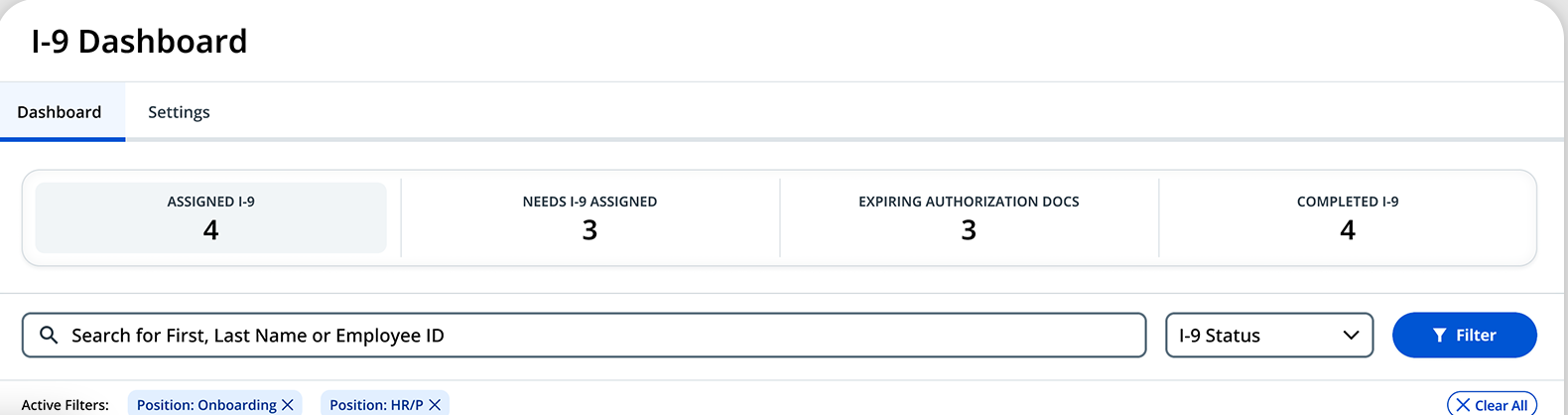
- E-Verify as part of the I-9 task. It's enabled through your account manager after you sign an MOU and complete the E-Verify training, per Paylocity's admin docs.
- IT products on the same record. Access Management, powered by OneLogin, creates email and Active Directory accounts from the employee record with admin approval workflows. Asset Management lets new hires pick IT-approved devices during pre-boarding through a CDW storefront.
- Edits don't reach live events. Changing a packet doesn't affect events already launched, so plan template changes between cohorts.
Price. Paylocity doesn't publish prices; its pricing page is a quote form.
- you're a mid-sized US employer that hires in batches and wants HR and IT setup from one vendor
- you want one price for HR and IT. Access Management and Asset Management are separate products on top of the core suite.
- Users like
- automated new hire onboarding, per TrustRadius reviewers
- Users dislike
- hard-to-customize reporting and uneven support, the most common complaints on TrustRadius
- Source: G2, 6,285 reviews
- Starting price
- Not published
- Integrations
- Hundreds of marketplace partners, including Slack, Okta, ServiceNow, Microsoft Entra ID and Greenhouse
Paycor
Paycor is an HR and payroll platform, now a standalone business unit of Paychex.
It's strongest when recruiters hand over whole groups of hires at once, because onboarding starts from a hired candidate in Paycor Recruiting and supports bulk invites.
How onboarding runs in Paycor. A recruiter marks the candidate hired in Paycor Recruiting and transfers them to onboarding, carrying over contact data, pay rate, job title and the offer letter. HR sends the registration email from the Pending New Hires screen, or invites a whole group in bulk. The new hire works through welcome, personal and tax steps, a tax credit screening step and I-9 verification on mobile. HR approves the data before it flows into payroll.
What stands out for People Ops:
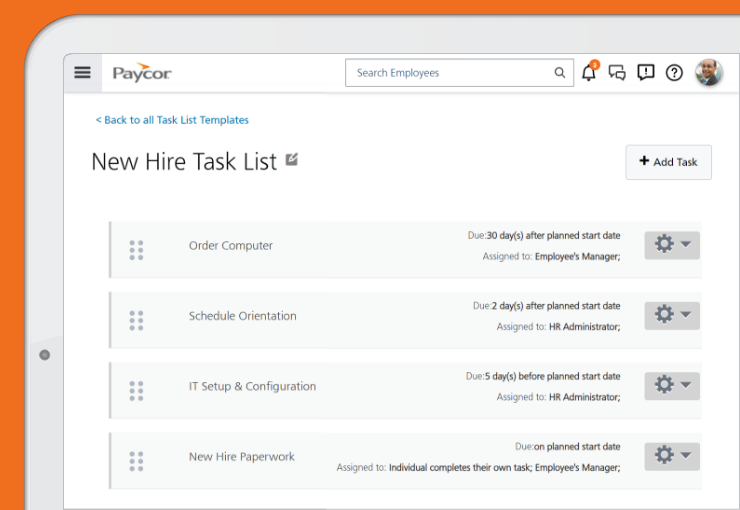
- Task lists with owners and relative dates. Paycor's own product screenshots show tasks such as "IT Setup & Configuration" due 5 days before the planned start date, assigned to a role rather than a person.
- Bundle gating. Onboarding, online I-9 and E-Verify start at the Essential bundle, not Basic.
- Attachments arrive late. Documents carried over from Recruiting only appear after onboarding is complete.
Price. Paycor shows plans only after a pricing form, so treat the price as not published and get a quote per bundle.
- recruiters hand over whole groups of hires at once: onboarding starts from a hired candidate in Paycor Recruiting and supports bulk invites
- your team leans on support to configure workflows. Support speed is the most common complaint in recent reviews.
- Users like
- it standardizes onboarding
- Users dislike
- slow customer support, cited by 45% of reviewers
- Source: TrustRadius, 777 ratings
- Starting price
- Not published
- Integrations
- 320+ apps and tech partners, with background checks from Sterling and others and IT onboarding through an Aquera identity integration
HiBob
HiBob (the product is called Bob) is an HR platform for mid-sized, often multi-country companies.
HiBob's onboarding focuses on tasks and the new hire's first impression rather than compliance paperwork.
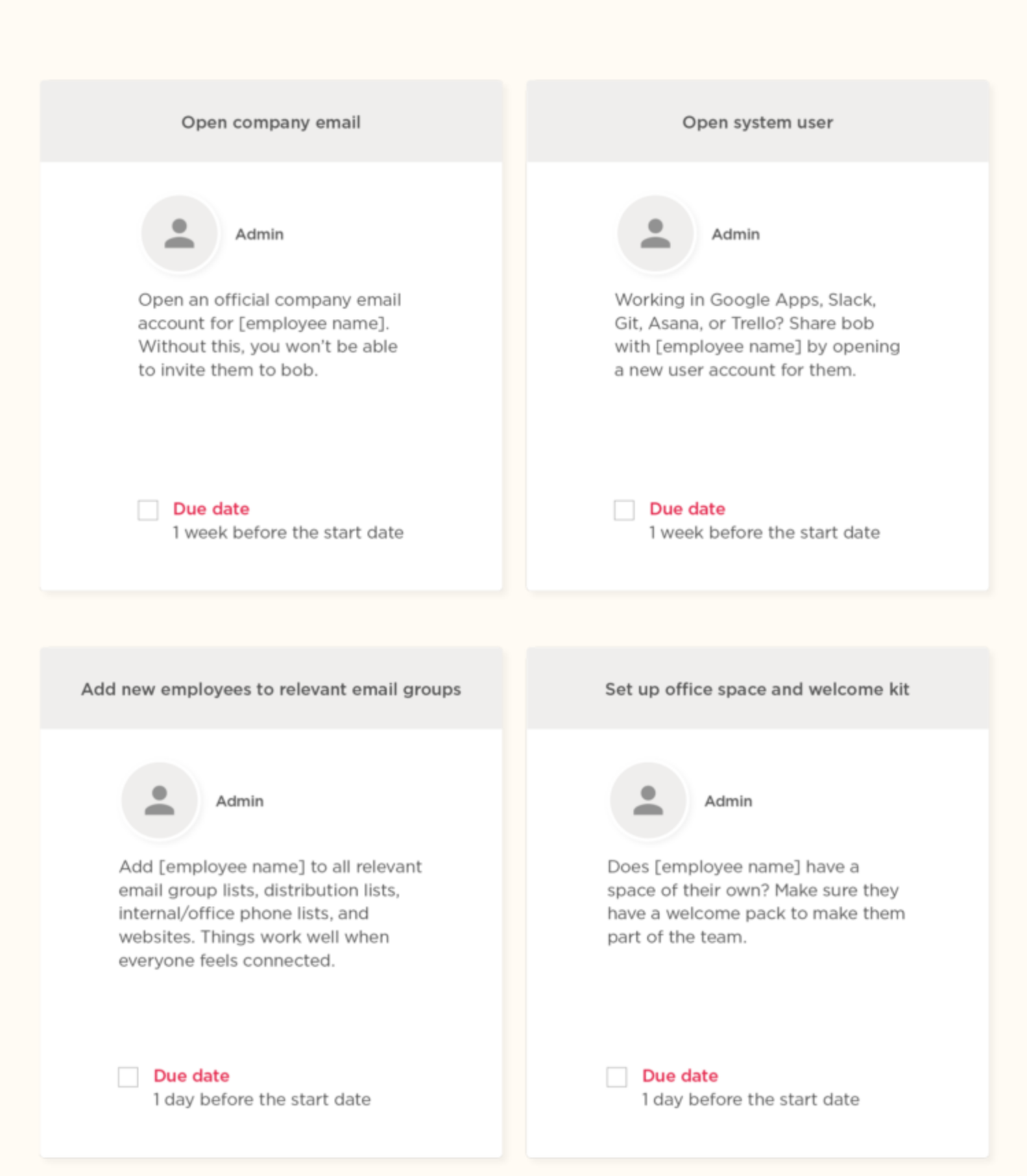
How onboarding runs in HiBob. A candidate marked hired in Greenhouse or HiBob's own hiring module arrives as a pending hire, and HR completes the new hire flow. About a week before the start date, the new hire is invited to sign the contract with eSign and enter bank and contact details. Task lists then fire relative to the start date. An admin opens the company email and system accounts, the manager nominates a buddy and posts a welcome shoutout, and US hires get an I-9 task.
What stands out for People Ops:
- Workflows in the base plan. HiBob states that onboarding workflows are part of Core, with conditional logic by region and worker type and approval paths inside the workflow.
- Manager tasks built in. Buddy nomination, shoutouts and first 1:1s are standard task types, which suits teams that care about the social side.
- Compliance through partners. I-9 and E-Verify run through the Verified First integration, not natively.
Price. HiBob quotes per employee for Core plus any modules and doesn't publish prices.
- you're a mid-sized, multi-country company that cares about the new hire's first impression and the social side of onboarding
- you hire mostly hourly US staff and want I-9 and E-Verify handled natively. You'll be stitching in a partner for the part that carries legal risk.
- Users like
- collaboration across teams in one tool
- Users dislike
- slow reports and a clunky time-off module in recent reviews
- Source: Capterra, 179 reviews
- Starting price
- Not published
- Integrations
- Greenhouse, Okta (Bob as the HR source for provisioning), Slack for new joiner announcements and a US payroll module built on Gusto's embedded engine
Global and Enterprise Onboarding Platforms
Global and enterprise platforms solve onboarding at a scale where contracts, countries or business-process rules matter more than a checklist.
Deel
Deel is a global HR, payroll and Employer of Record platform.
It's the natural pick when your new hires sit in several countries or arrive as contractors first.
How onboarding runs in Deel. HR creates the contract in Deel, and Deel proposes the earliest start date that onboarding requirements allow. Optional extras such as leased equipment or a background check go on the contract. The contract then passes through your configured approvals and signers in order, and signing is blocked until approvals are done. Only then is the employee invited to complete onboarding tasks on their home dashboard. One of them is an equipment request that's typically due 10 days before the start date and approved by the manager or IT admin.
What stands out for People Ops:
- I-9 with a nominated representative. For EOR, Global Payroll and PEO employees in the US, the new hire completes Section 1 and names a representative who gets an email to complete Section 2. The client can switch this off and assign a default representative.
- Checklists by country and role. Custom onboarding tasks can be filtered by worker type, hiring country and job title.
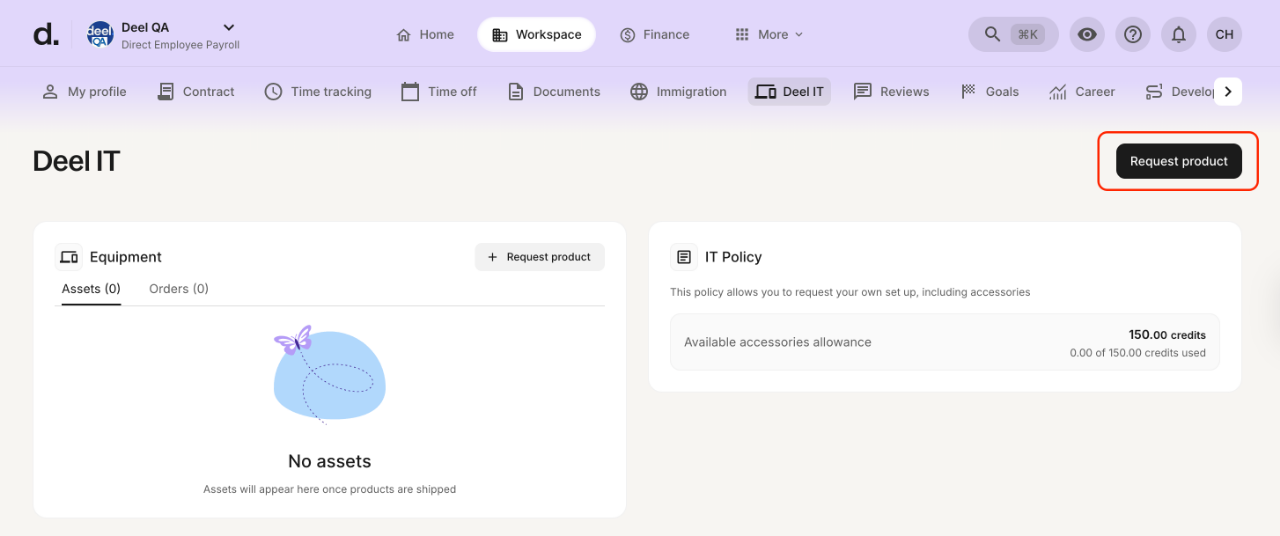
- IT is a separate product. Deel IT ships pre-configured devices aligned to start dates, but automatic app access is only in the Scale tier.
Price. Deel HR starts at $5 per employee per month (Core), US payroll is $29 per employee per month, and Deel IT runs $49 to $149 per user per month.
- your new hires sit in several countries or arrive as contractors first
- you're a US-only employer that needs E-Verify. We found no Deel E-Verify integration, and the I-9 flow is documented for EOR, payroll and PEO employees only.
- Users like
- it cuts onboarding time for international hires
- Users dislike
- limited reporting and fees
- Source: TrustRadius, 89 ratings
- Starting price
- HR from $5 per employee per month
- Integrations
- 200+ in Deel's marketplace, with native ATS connections to Ashby, Greenhouse, Lever, Workday and Workable and Okta SCIM provisioning
Workday
Workday is an enterprise HCM suite, and its onboarding lives inside Workday HCM as Onboarding Plans.
It's mainly for organizations that already run Workday.
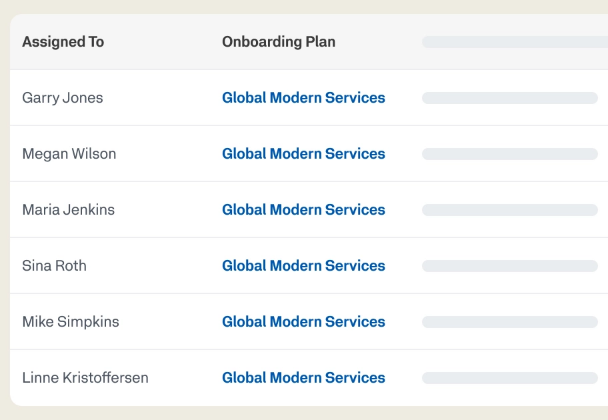
How onboarding runs in Workday. An admin adds an Onboarding Plan Assignment step to the Offer, Employment Agreement or Hire business process. When the hire reaches that step, the plan is assigned by audience rules such as region or job area. The hiring manager gets an Onboarding Setup task to add a welcome message, people to meet and helpful contacts, and admins can force-complete it if managers don't act. The new hire sees a Day 1 Overview card and staged tasks, and managers see overdue onboarding tasks in their insights hub.
What stands out for People Ops:
- Staged plans tied to the hire date. Up to 10 stages per plan, each delivered relative to the hire date, and a person can have only one active plan.
- Electronic I-9 with E-Verify. Workday can send I-9 data to E-Verify automatically and close the case on success, per its Form I-9 docs.
- Provisioning groups. HR or managers request third-party app access through provisioning groups instead of IT tickets.
Integrations. Native Workday Recruiting, the Workday Marketplace and certified partner integrations. Several plan sections need extra SKUs: Required Learning needs Learning, Connect with a Coworker needs Talent Optimization and Journeys needs the Journeys SKU.
Price. Workday doesn't publish prices for Workday onboarding or HCM.
- your organization already runs Workday HCM
- you aren't buying Workday HCM. Onboarding isn't sold on its own.
- you want social sign-on in external preboarding, which it doesn't support
- Users like
- it's the source of truth for HR data
- Users dislike
- limited reporting flexibility and hard customization
- Source: TrustRadius, 674 ratings
- Starting price
- Not published
Onboarding Specialists That Sit on Top of Your HRIS
Onboarding specialists keep the employee record in your HRIS and take over one hard part of onboarding: the journey, the paperwork volume or the I-9.
Enboarder
Enboarder is an onboarding orchestration platform that sits above your HR and IT stack.
It's built for companies where the manager, IT, a buddy and HR all need nudging on time.
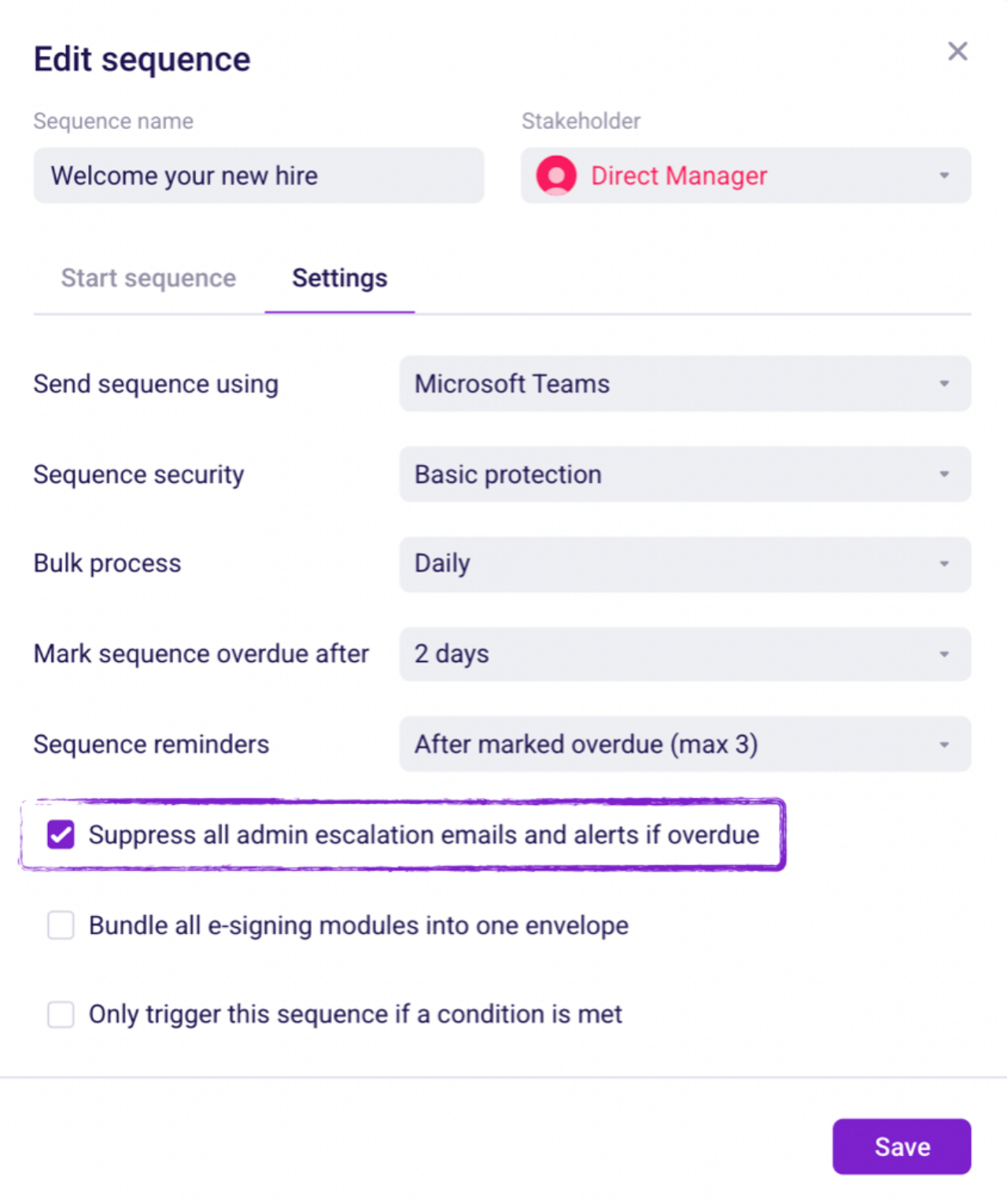
How onboarding runs in Enboarder. The journey launches when your ATS moves a candidate to "offer accepted" or when Greenhouse marks them hired. Each workflow is anchored on the start date and built from timed sequences, and each sequence goes to one stakeholder. The new hire gets forms and e-sign before day one, the manager and IT get setup tasks and the buddy gets an intro. Sequences overdue by 1 to 10 days trigger an escalation email, and after day one the journey can hand off to a 30-60-90 enablement workflow.
What stands out for People Ops:
- No logins for stakeholders. Sequences go by email, SMS, Slack, Microsoft Teams or Workplace, and by default open without a password.
- IT tickets, not accounts. A webhook module opens a ServiceNow or Jira ticket such as "Laptop provisioning" with the manager and buddy attached. Enboarder doesn't create the accounts itself.
- US compliance module. I-9 (standard, authorized representative or E-Verify) and W-4 with automatic re-verification journeys 30, 60 or 90 days before documents expire. It's set up by Enboarder and isn't on by default.
Price. Quote only, with compliance listed as an add-on.
- the manager, IT, a buddy and HR all need nudging on time
- you want to keep your HRIS and fix the multi-team journey on top of it
- your onboarding is one short sequence. A staffing-company reviewer notes that Enboarder is tailored to longer, multi-step timelines.
- Users like
- the reminders to hiring leaders
- Users dislike
- a clunky content editor and important features that are hard to find, per a TrustRadius reviewer
- Source: Capterra, 16 reviews
- Starting price
- Quote only
- Integrations
- Help-center guides cover Greenhouse, Lever, Workday, SAP SuccessFactors, BambooHR, ADP, ServiceNow, Jira, Slack, Teams and Microsoft Entra ID. Most integrations quote up to 4 weeks to build.
Click Boarding
Click Boarding is an onboarding platform for mid-market and enterprise HR teams that hire at volume, and it sits between the ATS and the HRIS.
Unlike WorkBright, it also runs offboarding and internal transitions.
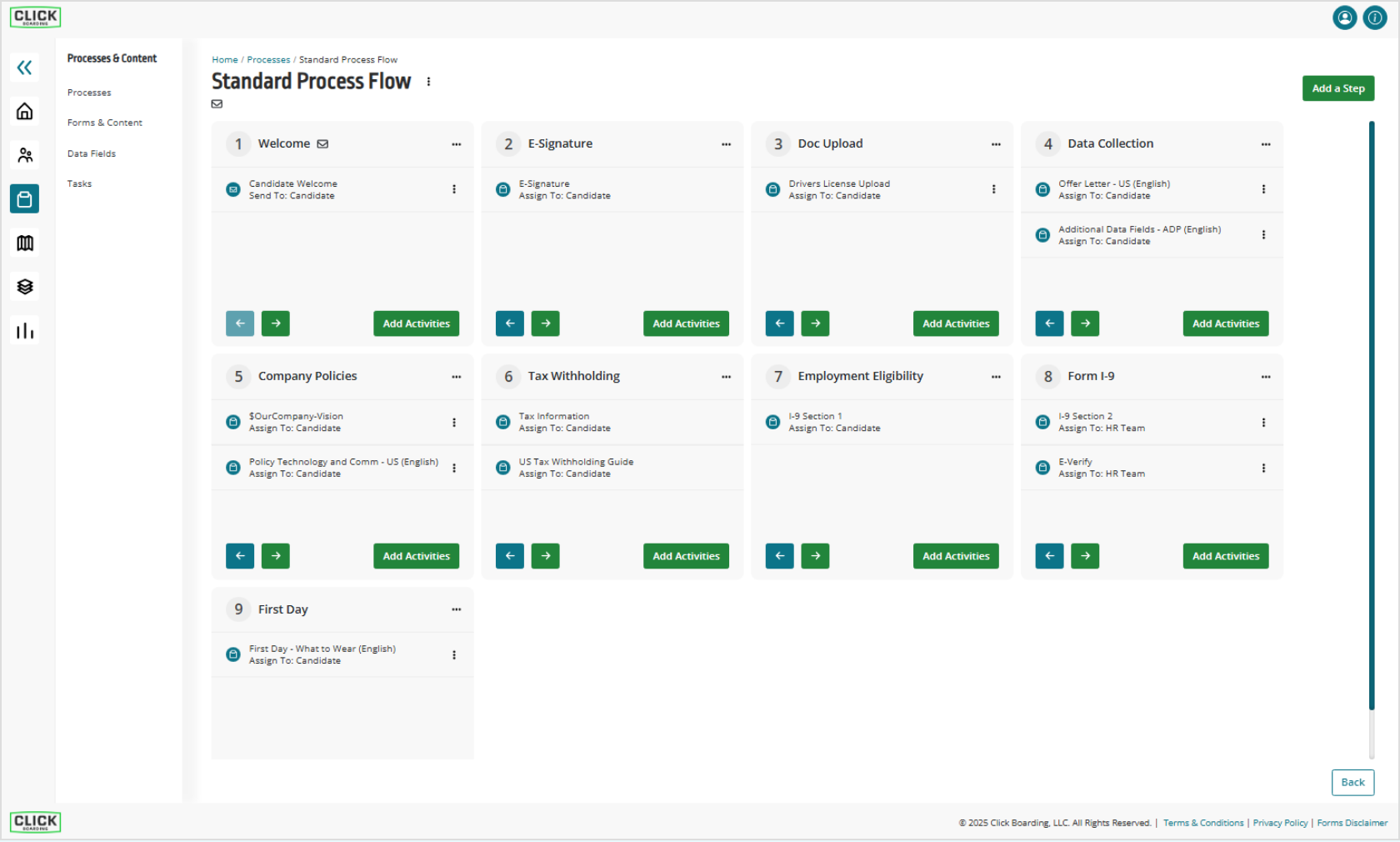
How onboarding runs in Click Boarding. New hire data arrives from the ATS and a process flow is assigned by location or employee type. Flows are linear, and each step is marked either for the candidate or for the HR team. In the standard flow, the candidate handles welcome, e-signature, document upload, policies, tax withholding and I-9 Section 1. The HR team completes Section 2 and E-Verify from its Action Center, and completed data is pushed to the HRIS.
What stands out for People Ops:
- State forms maintained for you. The standard library includes state notices such as CA pay rate, NY pay rate, IL wage and MA paid leave, plus Form 8850.
- Action Center for HR. Overdue items turn red, and tasks can go to one person or the HR team, with up to 15 subtasks each.
- Link timing to plan around. Employee registration links stay active for 45 days, team member links for 5 days.
Price. Not published, and the demo form starts at 500 employees.
- you hire at volume and want high-volume paperwork handled between the ATS and the HRIS
- you also want offboarding and internal transitions, which WorkBright doesn't run
- you have fewer than a few hundred employees or run on Slack. The sales motion and integrations target larger HR and talent teams.
- Users like
- the I-9 and E-Verify integration (only four reviews, too few to show a pattern)
- Users dislike
- one multi-state employer reports forms defaulting to the home state
- Source: Capterra, 4 reviews
- Starting price
- Not published
- Integrations
- 250+, with logos for ADP, Workday, UKG, SAP SuccessFactors, BambooHR, ServiceNow and background-check vendors, plus Employee and Admin apps for Microsoft Teams. We found no Slack integration.
WorkBright
WorkBright is an onboarding paperwork and I-9 compliance tool for employers that hire hourly, seasonal or remote staff.
It's the narrowest tool in this list on purpose, and for remote I-9 verification it's flat-out the most thorough.
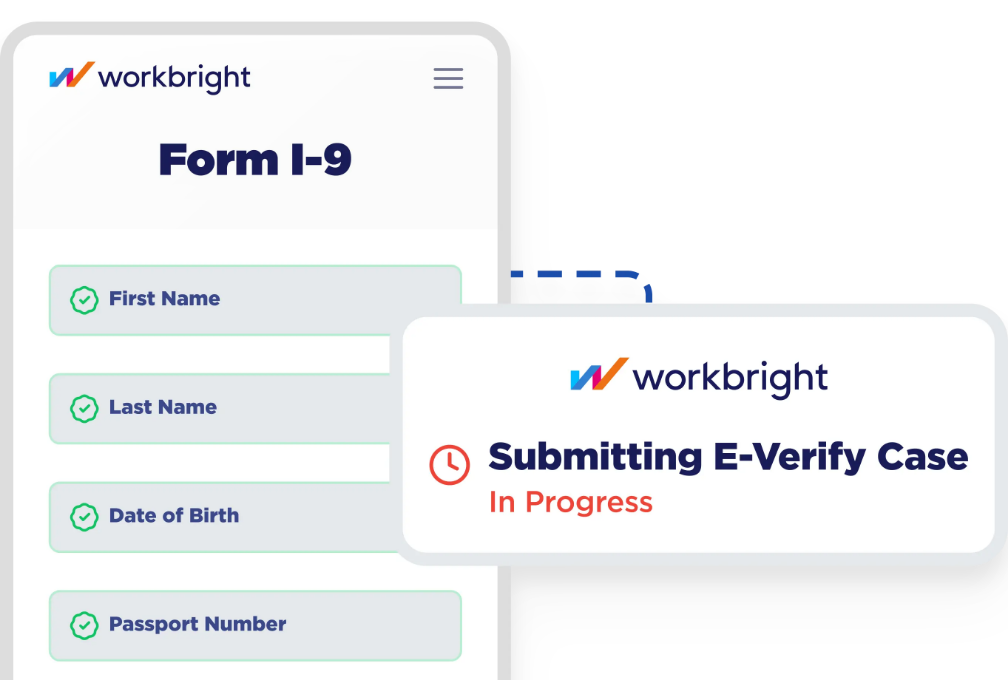
How onboarding runs in WorkBright. Onboarding launches by text or email when the offer is accepted, or from your ATS. Federal forms are assigned by staff type and other forms by group (role, location or department). The new hire completes everything on a phone, with I-9 reminders 10, 5, 2 and 1 days before the deadline. For remote hires, an authorized representative is walked through Section 2 while geolocation confirms they're with the employee, and signing Section 2 starts the E-Verify case automatically.
What stands out for People Ops:
- Three Section 2 paths. Remote verification, in-person review and the DHS alternative procedure with live video inspection.
- Checks before submission. WorkBright runs over 150 automated compliance checks, OCR on documents and fraud screening, and warns admins when in-person review is more than three days past the start date.
- Forms kept current. 200+ state tax forms with updates, bulk assignment by role or location and a kiosk mode for in-person onboarding.
Price. Software licenses come in bundles of 50, renewed yearly, with no published price. WorkBright+, the managed I-9 service, is $25 per I-9 record with a $25,000 annual minimum.
- you hire hourly, seasonal or remote staff and remote I-9 verification is the hard part
- you need onboarding tasks for IT and managers. WorkBright doesn't provision accounts or assign cross-team checklists, so pair it with an HRIS or orchestration tool instead.
- Users like
- I-9 compliance and automatic E-Verify submission, credited by an HR generalist
- Users dislike
- the same reviewer misses an integration with their HRIS, Paylocity
- Source: Capterra, 188 reviews
- Starting price
- Software not published; managed I-9 at $25 per record
- Integrations
- 200+ no-code integrations to HRIS platforms such as ADP, Workday and UKG, plus an open API and Zapier
Is Sapling HR Still Available?
Sapling HR is no longer sold to new customers as far as public sources show. Kallidus acquired Sapling in 2021, but kallidus.com has no Sapling product, pricing or demo page today. The old Sapling marketing page has redirected to the Kallidus homepage since early 2025. Existing customers still log in and get updated help articles in the Kallidus help center. Some guides still list Sapling as a current option, so check with Kallidus sales before you shortlist it.
Who Owns Each Onboarding Step?
HR owns the paperwork, IT owns accounts and devices, the hiring manager owns the first-week plan and the new hire owns their own forms. Onboarding software differs in how much of that it automates. The I-9 deadlines are non-negotiable, while most other dates are yours to set. Mapping your steps against this timeline shows which category of tool covers your gaps.
- Recruiter or HROffer letter and e-signature. Automated by BambooHR, Gusto, Rippling, Click Boarding and Deel Before acceptance
- New hireW-4 and state withholding. Automated by Gusto, Rippling, Paylocity, Click Boarding and WorkBright Before first payroll
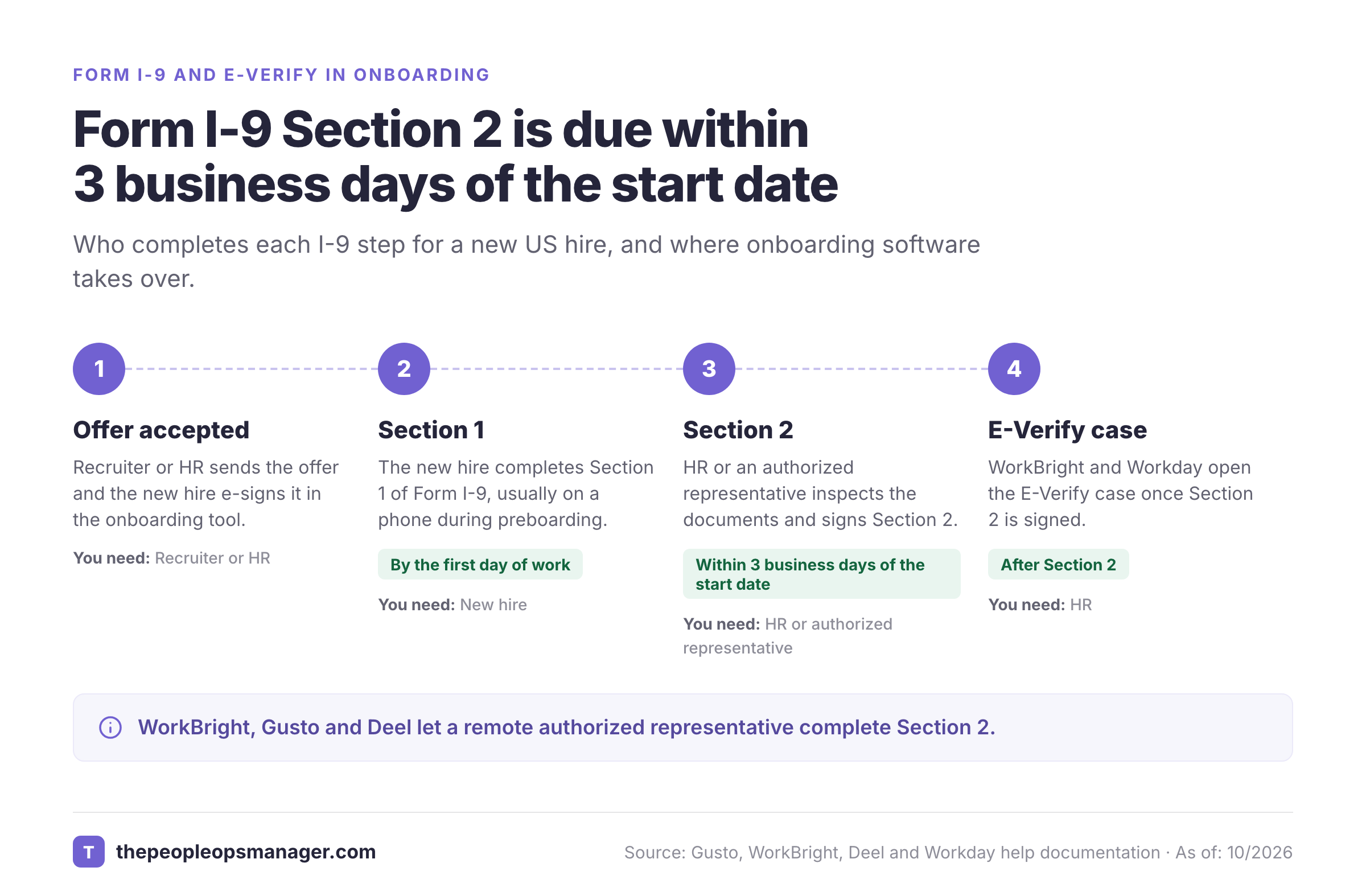
- New hireForm I-9 Section 1. Covered by all eleven tools, natively or through a partner By the first day of work
- HR or an authorized representativeForm I-9 Section 2. Automated by WorkBright, Gusto, Deel, Click Boarding and Workday Within 3 business days of the start date
- HRE-Verify case. Automated by WorkBright, Workday, Click Boarding, Paylocity, BambooHR, Gusto and Paycor After Section 2
- ITWork email and app accounts. Automated by Rippling, Gusto, Paylocity and Deel, with a ticket from Enboarder Before or on the start date
- IT, with the manager choosingLaptop and devices. Automated by Rippling, Deel and Paylocity Shipped before the start date
- Hiring managerFirst-week plan and buddy. Automated by Workday, Enboarder, HiBob and Gusto The week before the start date
- Manager and HR30, 60 and 90 day check-ins. Automated by Enboarder, Paylocity, Gusto and HiBob First 90 days
Form I-9 carries the only hard legal deadlines in that list, and the timeline below shows who signs what and when.
Which Type of Onboarding Software Fits Your Team?
Pick the type first and the vendor second.
- HR and payroll suites (Rippling, BambooHR, Gusto, Paylocity, Paycor, HiBob): onboarding is a module on the employee record. Choose one when paperwork and payroll setup are the main pain.
- Global and enterprise platforms (Deel, Workday): choose one when countries, contract types or enterprise business processes drive onboarding.
- Journey orchestration (Enboarder): sits on your HRIS and keeps managers, IT and buddies on schedule.
- Volume and compliance tools (Click Boarding, WorkBright): built for teams that process many hires and can't afford I-9 mistakes.
Training is a separate decision. Most teams keep courses in an LMS and link them from the onboarding checklist, and Workday sells its learning section as an extra SKU.
One gap remains that none of these products closes on its own: a coordination layer across teams. Your HRIS may hold the record while IT, finance and managers work in other tools. Then the missing piece is knowing, per starter, which task is blocked and who owns it.
Do You Need Onboarding Software If You Already Have an HRIS?
You need dedicated onboarding software if onboarding tasks happen in places your HRIS doesn't reach. An HRIS holds the employee record and usually offers checklists and e-signatures. It rarely tracks whether the laptop shipped, whether access was approved before the account existed or whether the manager finished the first-week plan.
If your hires are few and every task belongs to HR, the onboarding module in your HRIS is enough. If tasks regularly wait on IT, finance or managers and People Ops spends time chasing them, add a specialist tool or a coordination layer.
Is Onboarding HR?
HR usually owns the onboarding process, though not all of its tasks. HR owns the offer, the contract, the paperwork and the overall experience. IT owns accounts and devices, finance owns payroll setup and the hiring manager owns the first-week plan, which is why onboarding software needs to assign tasks outside HR.
Does Workday Have an Onboarding Tool?
Workday has an onboarding tool, but only as part of Workday HCM. Workday Onboarding Plans assign staged content and tasks from the offer or hire step, and the older Onboarding Dashboard is scheduled for retirement in release 27R1. Organizations that don't run Workday HCM compare the other tools in this guide instead.
What Is Paycor Onboarding?
Paycor Onboarding is the new hire module of Paycor's HR and payroll platform, which Paychex acquired in April 2025. It moves hires over from Paycor Recruiting, collects forms and I-9 data on mobile and lets HR approve the data before it reaches payroll.
How Much Does Employee Onboarding Software Cost?
Employee onboarding software is priced per employee per month, as a base fee plus a per-person fee, as a flat monthly fee for small teams, per submission or by custom quote. Published per-employee prices for the suites in this guide run from $5 to $25 per employee per month before add-ons, while most mid-market and enterprise tools quote only.
| Pricing model | Tools in this guide | What to ask for |
|---|---|---|
| Per employee per month | BambooHR, Deel HR | Which plan includes onboarding and I-9 |
| Base fee plus per person | Gusto, Rippling | The base fee in writing |
| Flat monthly fee for small teams | BambooHR (25 employees or fewer) | When the flat fee ends |
| Per submission | Gusto Remote I-9 and E-Verify, WorkBright managed I-9 | Your expected yearly I-9 volume |
| Per IT user | Deel IT | Which tier includes app access |
| Custom quote | Paylocity, Paycor, HiBob, Workday, Enboarder, Click Boarding | A written quote with implementation and add-ons |
What Adds to the Cost Beyond the Seat Price?
Compliance and IT add-ons add the most to the seat price. Remote I-9 and E-Verify are per-submission fees on Gusto's lower plans and a separate module at Enboarder and WorkBright. IT setup is its own product at Rippling, Paylocity and Deel. Workday charges extra SKUs for learning and journey sections of an onboarding plan. Integrations can cost money too: Enboarder's ADP connector is $30 per month, invoiced by ADP.
How Long Does Onboarding Software Take to Set Up?
Setting up onboarding software takes from a few days for a suite you already use to several weeks for a specialist tool that needs integrations. Enboarder quotes up to 4 weeks per integration for scoping, development and testing, and Click Boarding handles setup in-house rather than through consultants. Inside an existing suite, the time goes into templates. You'll set up packets or plans per location and role, task owners and the I-9 method per work location.
Employee Onboarding Best Practices for 2026
Good onboarding software follows a sound process, and these six practices show up in how the better tools are built.
- Start before day one. Send paperwork and welcome content after the offer is accepted, so day one isn't spent on forms.
- Name an owner for every task. A task assigned to "IT" waits longer than one assigned to a person with a due date.
- Date tasks from the start date. BambooHR, Gusto, Paycor and Workday all schedule tasks relative to it, so a moved start date moves the whole plan. Hourly teams also need the first shifts scheduled, which our employee scheduling software comparison covers.
- Sequence dependencies. Access can't be approved before the account exists. Build the order into the checklist.
- Verify instead of assuming. Count a laptop as ready when someone confirms it's set up, not when the ticket closes.
- Review after every cohort. Look at which tasks were late and which team was waiting.
Employee Onboarding Software Buyer Checklist
Copy this table into your evaluation notes and ask each vendor the same questions, so you compare answers instead of sales pitches.
| Area | Question to ask | Evidence to request |
|---|---|---|
| Paperwork | Which forms can the new hire e-sign before day one? | Demo of the onboarding flow on a phone |
| I-9 Section 2 | Who completes Section 2 for remote hires? | The authorized representative flow |
| E-Verify | Is E-Verify native, an add-on or a partner? | Price per submission in writing |
| Cross-team tasks | Can IT and managers get tasks dated from the start date? | Sample checklist with non-HR owners |
| Provisioning | Does the tool create accounts or open a ticket? | List of supported apps and the plan they need |
| Data | Does it sync with our HRIS or replace it? | Integration documentation and build time |
| Pricing | What is the total for our headcount, with add-ons? | Written quote with implementation fee |
| Reporting | Can we see which hires are blocked and why? | Sample report |
| Exit | How do we export our data if we leave? | Export documentation |
Frequently Asked Questions
What is the best employee onboarding software for small businesses?
For small US businesses, Gusto and BambooHR are the usual starting points, because both publish prices and put new hire paperwork, I-9 and the employee record in one place. Small teams hiring abroad should look at Deel instead.
Is there free employee onboarding software?
None of the eleven tools in this guide has a free plan, but Connecteam offers a Small Business Plan that's free for up to 10 users. Rippling also runs a startup program with 6 months of free access for eligible US VC-backed startups.
How much does employee onboarding software cost?
Onboarding software for a 50-person US company usually costs a few hundred dollars a month on a published plan, before per-hire fees. Remote I-9 and E-Verify are often billed per new hire, and tools built for mid-market and enterprise buyers quote only. Get a written total for your headcount and yearly hiring volume.
Can onboarding software handle I-9 forms and e-signatures?
Most onboarding software handles e-signatures, and many tools also run Form I-9, but the Section 2 step differs. WorkBright and Gusto guide a remote authorized representative, Click Boarding and Workday route Section 2 to HR, and HiBob relies on a partner. Ask who completes Section 2 for a remote hire before you sign.
Does onboarding software connect to an existing HR system?
Specialist onboarding tools are built to connect to an existing HRIS, though build time varies. Enboarder, Click Boarding and WorkBright all push data to HRIS platforms such as Workday and ADP, and Enboarder quotes up to 4 weeks per integration. Ask for the exact connector to your HRIS in writing.