Gusto is a strong choice for a US small business that wants payroll, benefits, and new-hire paperwork in one system. It's less convincing as the sole control center for a complex onboarding process involving IT, hiring managers, facilities, and external approvals. Its biggest buying question isn't whether it can run payroll. It's whether the HR workflows you need are included in the plan you can afford.
This Gusto review evaluates the current product from a People Ops perspective: what happens between an accepted offer and a ready employee, where accountability remains with your team, what the plans actually cost, and which limitations to test before committing. It's a desk-based review of current product documentation, published pricing, and user feedback, not a claim that we operated a Gusto account ourselves.
- Best fit: US employers seeking integrated payroll, employee self-service, benefits, and practical onboarding administration.
- Main advantage: hiring documents and payroll setup sit close to the employee record.
- Main caution: cross-functional day-one readiness still requires explicit HR, IT, and manager ownership.
- Current published plans start at $49 plus $6 per person monthly; higher tiers add time tools and support.
- Don't choose a plan until you've tested your actual I-9, document, provisioning, approval, and exception workflows.
Our verdict: Is Gusto worth it for People Ops?
Yes, for payroll-led People Ops teams with relatively straightforward US hiring workflows. Gusto combines payroll processing, employee onboarding, benefits administration, and a set of HR tools that can eliminate repeated entry across separate systems. Its published pricing also makes an initial budget more transparent than a quote-only sales process.
But the product should be judged on two distinct jobs. The first is recording and processing employee information. The second is coordinating the people responsible for a successful start. Gusto documents both new-hire checklists and software account setup, so it's more than a payroll calculator. That doesn't prove every approval, equipment handoff, or third-party task in your organization is automatically completed. You still need a named owner and a way to verify completion.
Choose Gusto when: payroll and tax administration are the operational center, your hiring process is repeatable, and you want employees to complete common documents through self-service. Look more carefully when: you need advanced cross-department dependency management, highly customized approval chains, complex entity structures, or specialized workforce operations. Those are evaluation criteria, not blanket claims that Gusto can't support a particular company. If you can't name who confirms each handoff, that's the gap to close first.
What does Gusto do well?
Payroll, taxes, and employee self-service
Gusto's Simple plan advertises unlimited payroll runs and tax filings and payments. For a People Ops team, the useful part is that a new hire's information can move into the payroll workflow without rebuilding the employee record in a disconnected spreadsheet. Employees can complete onboarding information and review their own payroll materials. The operational benefit is fewer manual handoffs, provided your team has defined who checks each submission.
The distinction between automated processing and accountable review matters. A system can calculate a paycheck and still depend on someone to confirm the correct work state, start date, compensation, withholding information, and employment classification. Build a payroll cut-off review into the hiring workflow rather than treating an accepted invitation as proof that every field is correct.
For a multi-state workforce, plan selection is consequential. Gusto currently describes Simple as basic payroll in one state and Plus as supporting multi-state payroll. If a second state is on your hiring roadmap, evaluate Plus before committing to a lower initial price. Ask about registration responsibilities and local requirements rather than assuming a plan upgrade means you won't need compliance advice.
Offer letters, forms, and onboarding checklists
Gusto's hiring product describes job postings, personalized offer letters, custom onboarding checklists, document signing, and app provisioning. Its help center confirms that administrators can view a new hire's checklist, track invitation status, and manage tasks. The default employee checklist can include inviting the employee, completing Form I-9, assigning a buddy, adding a work email, creating software accounts, and scheduling check-ins.
That's a useful foundation for a small People Ops function. A new hire can receive paperwork without an HR coordinator emailing files individually, while the administrator can see tasks that are still open. Gusto also notes that a checklist associated with an offer letter appears after the candidate signs the offer. That timing matters when you measure preboarding readiness: an absent checklist may mean the offer hasn't been accepted, not that someone forgot to create tasks.
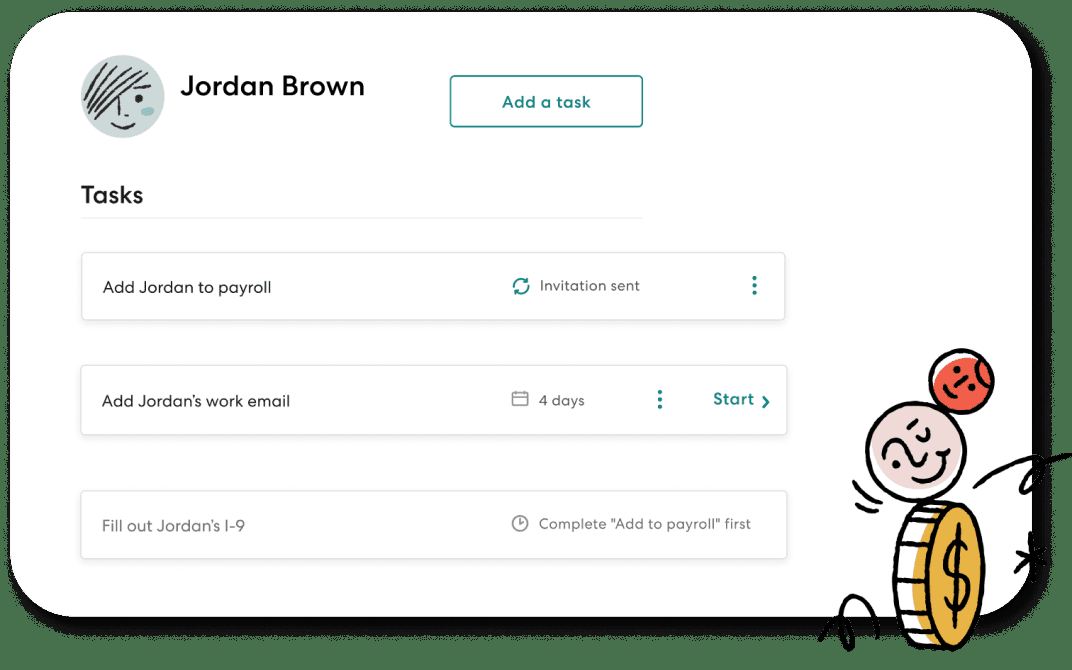
The checklist isn't a substitute for a cross-functional escalation process. If IT hasn't approved a laptop or a hiring manager hasn't named a buddy, record the accountable person, deadline, and next action. An onboarding task marked complete should mean the employee can actually use the tool or attend the session, not merely that a request was submitted.
Benefits administration and connected workflows
Gusto supports health insurance administration, with no separate Gusto administration fee when using its broker; employers still pay premiums. It also lists retirement and tax-advantaged benefit options with additional plan-specific costs. This makes payroll and benefits coordination attractive, but the total benefits budget isn't the same as the base payroll subscription.
The integration story deserves practical testing. Gusto documents a QuickBooks Online connection that can sync payroll data into accounting entries. Its hiring page also describes ATS integrations. Before treating any connector as a solved workflow, map the direction of data flow, the authoritative system for each field, and what happens when an employee changes a start date after an offer is accepted.
Where does Gusto fall short?
Advanced HR features change the price
A small team may start with Simple and discover that the workflow it wants belongs on Plus. Gusto's help center explicitly limits custom documents to Plus or Premium. Its pricing page lists time tracking and scheduling with Plus and provides a separate Time & Attendance Plus option for Simple. A team that wants handbook acknowledgments, scheduling, and faster pay should calculate the complete configuration rather than compare headline base fees alone. Don't stop at the base fee: your bill depends on which add-ons you pick.
This isn't an argument to buy the highest tier. It's a reason to write down the specific outcome you need. For example, a signed employee handbook is a different requirement from merely storing a PDF in a profile. Ask whether the plan supports the signature or acknowledgment workflow, not just whether it has document storage. That's clearly the question that separates the tiers for this use case.
Customer support and exceptions need scrutiny
Gusto describes basic phone and chat support during business hours, with a paid priority option for Simple and Plus. Premium includes a dedicated account-support arrangement. If your payroll cutoff falls outside the support window, test how urgent issues are routed and how quickly your team can obtain an actionable response. A service-level expectation should be confirmed in your contract, not inferred from a marketing label.
User feedback adds a useful warning, although it can't predict your experience. On the G2 pros-and-cons page checked November 1, 2026, the automated theme summary showed 548 mentions of poor customer support and 454 mentions of payroll issues. The same page showed 5,185 mentions of ease of use. These are overlapping, algorithmically grouped mentions, not percentages of customers or a controlled satisfaction study. Read the underlying G2 Gusto reviews and ask Gusto to demonstrate its escalation path for a failed payroll or a misclassified hire.
Payroll onboarding is not the whole day-one experience
A hire may have completed payroll forms while still lacking a device, security approval, workspace access, or a manager's first assignment. Gusto includes checklist items for several of these activities, but completion evidence still depends on how the organization uses them. Treat Gusto as the place where payroll and relevant onboarding tasks are managed, then explicitly decide where IT tickets, approval records, and readiness evidence live.
If the hiring manager can't answer whether a new employee can do their first meaningful task, the process isn't finished. That's a coordination gap, not necessarily a missing payroll feature. The fix might be better task ownership, an integration, or a separate lightweight coordination layer rather than a replacement payroll platform.
How much does Gusto cost in 2026?
Gusto currently publishes three core US payroll plans: Simple at $49 plus $6 per person monthly, Plus at $80 plus $12, and Premium at $180 plus $22. These are regular published rates checked November 1, 2026, not a guaranteed quote. They exclude add-ons, benefit premiums, and any separately priced services. The plan-by-plan detail lives in our Gusto pricing guide.
- Simple$49 + $6/person per month
- Single-state payroll
- Unlimited payroll runs
- Tax filings and payments
- Basic PTO policies
- Plus$80 + $12/person per month
- Multi-state payroll
- Time tracking and scheduling
- Next-day pay
- Contractor invoice management
- Premium$180 + $22/person per month
- Premium account support
- HR guidance and tools
- Business Compliance
- Same-day and instant pay subject to terms
US list pricing checked November 1, 2026. Add-ons and benefit premiums may increase the bill.
What would a team actually pay?
The table applies the published base-plus-person formula to three illustrative headcounts. It assumes every listed person is billable under the relevant plan, and excludes all add-ons, benefits, taxes, and negotiated discounts. Confirm the definition of a billable person for your workforce before treating the figures as a quote.
| Plan | 10 people / month | 25 people / month | 50 people / month |
|---|---|---|---|
| Simple | $109 | $199 | $349 |
| Plus | $200 | $380 | $680 |
| Premium | $400 | $730 | $1,280 |
At 25 people, moving from Simple to Plus adds $181 per month at list price. That difference can be rational if multi-state payroll or included time tools eliminate separate work, but it isn't automatically worth paying for a team that needs neither. At the same headcount, Premium is $350 per month above Plus before other services. Price the actual support and compliance needs, not the label.
Which extras can change the budget?
Gusto lists next-day pay for Simple at $15 per month plus $3 per person, while it's included in Plus and Premium. Time & Attendance Plus is listed for Simple at $6 per person monthly after a trial. Priority Support on Simple and Plus is $30 per month plus $3 per person. Gusto also lists remote I-9 verification at $20 per submission on lower plans, with an additional $5 per E-Verify submission when applicable; Premium includes these listed services. The exact workflow and eligibility should be confirmed before relying on the fee alone.
Benefits can materially change the bill. Gusto says brokered health insurance administration carries no separate administration fee, but premiums remain payable. Using an outside health insurance broker through its integration is listed at $6 per eligible employee monthly. It also lists a $200 annual service charge for its tax-advantaged account group, plus participant fees. Don't interpret a payroll subscription price as a fully loaded benefits budget.
How well does Gusto handle the employee onboarding process?
A useful way to review Gusto is to follow a real hire from accepted offer to productive first week. If you're still designing that journey, start with our employee onboarding process and the employee onboarding checklist. This ownership model is a recommended operating design; it doesn't claim that Gusto enforces each approval.
- Recruiter / hiring managerConfirm accepted offer, start date, compensation and employment type Before onboarding invitation
- People OpsCreate employee record, assign forms, verify invitation and document status Preboarding
- EmployeeComplete requested personal and tax information through approved secure workflows Before or at start, as applicable
- Authorized employer representativeReview Form I-9 documents and complete employer section by the applicable deadline Start date and required deadline
- IT / securityApprove and verify device, identity and least-privilege application access Before first productive task
- Payroll / financeReview pay setup, first payroll cutoff, benefits deductions and exceptions Before first payroll
- ManagerConfirm buddy, first assignment, access and initial check-in Day one and first week
The I-9 handoff still belongs to the employer
Gusto says it helps create, complete, and store Form I-9, but doesn't file that form with the government. Under the standard US rule, an employee completes Section 1 no later than the first day of employment, and the employer completes Section 2 within three business days of the start date. There are exceptions, including very short hires. Use the USCIS Form I-9 guidance for the controlling rules, and have a designated employer representative verify completion. Don't mark an I-9 complete because an invitation was sent.
E-Verify isn't part of the I-9 itself; it's a separate process. Gusto says enrolled employers can submit cases from their account, with a listed submission fee on lower plans. Whether an employer must participate depends on applicable law and contract obligations. Have your compliance owner confirm enrollment and case timing; the add-on fee doesn't answer the legal question.
A real-world exception: the start date moves
Suppose an employee accepts an offer, completes tax forms, and then postpones their start. People Ops should update the authoritative date, notify payroll, confirm the I-9 schedule, ask IT to move access activation, and have the manager reset the orientation. The important test is whether each owner receives the new date and acknowledges the changed task. A clean employee profile is necessary, but it doesn't alone prove that all downstream owners acted.
A second exception: a required document is missing
A checklist can show a document as outstanding. It can't decide whether a particular exception is legally acceptable. People Ops should identify the document, the relevant rule, the deadline, and the person authorized to resolve it. Keep sensitive identity and tax records in approved systems. In the coordination log, store a restricted evidence reference and status, not copies of IDs or account credentials.
What do Gusto customers say?
Ease of use is the strongest visible positive theme, while support and payroll exceptions deserve the most careful diligence. The G2 summary observed on November 1, 2026 listed 13,860 reviews and a 4.6/5 aggregate rating. Its largest favorable themes concerned interface usability, payroll ease, and setup. Negative themes included missing features, support, payroll issues, login issues, and mobile customization.
That doesn't mean a buyer has a 4.6/5 chance of success or that every negative review describes a current defect. Review populations are self-selected, and some comments describe product versions that aren't current. The actionable approach is to turn each complaint into a demonstration scenario. For support, request the escalation path. For payroll, test an off-cycle correction. For missing features, verify the exact document or reporting workflow. For login issues, test your security and account-recovery process.
Use review platforms to generate questions and the vendor's current documentation to confirm capabilities.
What should you test before buying Gusto?
Run a pilot around a realistic employee journey, not a polished feature tour. Ask the vendor to demonstrate these steps with your intended plan and integrations. The goal is to expose a failed handoff while it's still inexpensive to fix. Don't settle for a feature tour; one messy case teaches you more.
Build a real cost sheet
Use your headcount, work states, contractor mix, benefits and desired add-ons. Request a written quote and identify every recurring and event-based fee.
Walk an accepted offer into payroll
Create a sample hire, send an invitation, check the employee view, and confirm who reviews the entered data before payroll.
Test a delayed start and a missing form
Change the start date after invitation. Observe what updates automatically and what requires a manual owner, then inspect reminders and evidence.
Verify IT and manager handoffs
Request an application account and a device, assign a buddy, and prove the employee can complete a first task. Record approvals outside Gusto when necessary.
Simulate a payroll exception
Ask how to correct a late timesheet, wrong pay rate, or failed deposit. Record the support channel, escalation owner and decision deadline.
- Plan includes the exact states and worker types we employ
- Quote identifies base, per-person, benefits and add-on fees
- Offer acceptance creates the expected onboarding workflow
- HR can tell what's been sent from what's been completed
- I-9 employer verification has a named owner and deadline
- IT access is approved and tested, not just requested
- Manager receives a reliable day-one readiness status
- Payroll cutoff and exception escalation are documented
- Required custom documents work on the chosen plan
- Our accounting and hiring integrations handle date changes
- We can export the records and evidence we need if we leave
How does Gusto compare with alternatives?
The useful comparison isn't a universal winner list. It's the operating model your team needs. Evaluate each shortlisted provider against the same sample hire and payroll exception, and don't assume features or prices without checking the current plan.
| Primary need | What to prioritize | Gusto buying implication |
|---|---|---|
| US payroll plus standard onboarding | Payroll accuracy, forms, benefits, employee self-service | Strong candidate; validate state coverage and plan |
| Complex global employment | Employer-of-record arrangements, local compliance, worker classification | Assess specialist global employment providers separately |
| Deep HRIS configuration | Data model, approval routing, reporting, permissions | Test complex cases rather than relying on the feature list |
| Shift-heavy workforce | Scheduling, time clocks, overtime rules, labor forecasting | Compare dedicated workforce tools and integration depth |
| Cross-team day-one readiness | IT approvals, equipment, manager tasks, dependency escalation | Keep a separate owner and evidence process if needed |
Direct head-to-head comparisons are in BambooHR vs Gusto and Rippling vs Gusto; for the wider category, see best payroll software. Gusto may coexist with an HRIS, an applicant tracking system, or a task-coordination layer. Before replacing any system, define the system of record for employee identity, compensation, access approvals, and onboarding progress. Two tools that both show a green completion status can still disagree about whether the employee can work.
Final recommendation
Shortlist Gusto if your highest-friction People Ops work is getting employees into payroll and benefits correctly. Its documented onboarding features aren't trivial and merit a pilot, and the published prices let you model a realistic budget. The case weakens when you treat payroll automation as proof that the full employee experience is ready. Gusto doesn't have to be everything; it just has to fit the job you've given it. A pilot is how you find out, and it's certainly cheaper than discovering a misfit after you've signed.
Use a specific hire, a specific payroll exception, and a specific cross-team approval as your buying test. If Gusto's payroll and document steps hold up, keep it in contention. If the remaining problem is ownership across HR, IT, and managers, solve that process explicitly rather than expecting a payroll system to make it disappear.
Frequently asked questions
Is Gusto good for small businesses?
Yes, it's a credible option for US small businesses that want payroll, benefits, and standard onboarding in one place. It isn't automatic, though: fit depends on state coverage, required HR features, and the complete monthly cost.
How much does Gusto cost per month?
Gusto's published US payroll plans start at $49 plus $6 per person for Simple, $80 plus $12 for Plus, and $180 plus $22 for Premium, checked November 1, 2026. Add-ons and benefits can increase the bill.
Does Gusto handle employee onboarding?
Yes, Gusto handles onboarding. It documents offer letters, self-onboarding, employee forms, checklists, and software account setup. Employers still need to verify that legal, IT, and manager tasks are completed, and shouldn't assume a sent checklist means finished work.
Does Gusto complete Form I-9 automatically?
Gusto supports creating and completing the form, but the employer remains responsible for verification and applicable deadlines. The product says it stores rather than files Form I-9 with the government.
Is Gusto Simple enough for multi-state payroll?
Gusto currently describes Simple as single-state payroll and Plus as multi-state payroll. Teams hiring across state lines shouldn't guess: check the plan and registration needs before subscribing.
What is the biggest drawback of Gusto?
For People Ops buyers, the biggest risk is assuming a completed payroll setup proves that IT access, equipment, approvals, and manager preparation are complete. Separately, published user reviews raise support and exception-handling questions you'll want to test.