A day one onboarding checklist lists what People Ops, the hiring manager, IT and payroll must have ready, and what a new employee should be able to do, by the end of the first working day. A good one is short enough to run on a busy morning and specific enough to expose missing access, unclear ownership and administrative blockers before they cost the employee a day.
This guide gives you a copyable template with owners and completion signals, a sample first-day timeline, an access smoke test, the US paperwork rules that shape day one, and a way to measure whether it worked. It works for office, remote and hybrid hires. Here's the split: everything before arrival belongs in the preboarding checklist; the weeks after day one are covered in the employee onboarding checklist and the 30-60-90 day onboarding plan.
- Prepare the device, accounts and a first assignment before the employee arrives.
- Give every task one accountable owner and a completion signal that can be checked.
- Test access with the employee in the room or on the call; it's the proof that counts. A closed ticket only shows that someone acted.
- End the day with a blocker list that has owners and dates, plus a plan for tomorrow.
What belongs on a day one onboarding checklist?
A day one checklist has two parts that need different owners. The first is the employee experience: a welcome, an understandable schedule, working equipment, access to the tools needed for the first assignment, a conversation with the manager, an explanation of how to get help, and an achievable outcome before the day ends. The second is the internal operation: employment records, payroll setup, required acknowledgments and access provisioning.
Keeping the owners apart avoids two common failures: employees sit through presentations while a critical account is still disabled, and a working account gets mistaken for finished payroll or identity verification. Each part gets its own owners and its own completion evidence, so it's clear who's checking what.
Day one onboarding checklist template
The template below puts the checklist into one table per phase. Copy it into the system your teams already use, or download it as a document or spreadsheet. Add rows for anything specific to your company, but don't let a phase grow past a dozen lines; if everything's a task, nothing's a priority. Replace the grey example values with your own; they're only there to show the level of detail that works.
Day one onboarding checklist template
One row per task, one accountable owner per row, and a completion signal that never requires copying sensitive data into the checklist. Grey values are an example.
- Employee identifier
- HR-20418HR record number, never a tax or ID number
- Role and team
- Support Specialist, Customer Support
- Start date and time
- Monday, 9:00, Central time
- Work arrangement
- Remote, laptop shipped
- Hiring manager
- Dana Whitfield
- Buddy
- Priya Nair
- People Ops owner
- Sam Ortiz
- First assignment and reviewer
- Triage 10 sample tickets, reviewed by Dana at 15:00
| Task | Owner | Done when | Status |
|---|---|---|---|
| Start time, location or video link, and contact sent | People Ops | Message logged in the HR system | Complete |
| Laptop received or staged; sign-in tested with a test account | IT | Test sign-in result recorded | Complete |
| Accounts for the first assignment created with role-level access | IT | Access owner approval recorded | In progress |
| First assignment, reviewer and day-one agenda confirmed | Hiring manager | Calendar invitations sent | In progress |
| Buddy briefed on what to cover and what not to decide | Hiring manager | Buddy acknowledged | Not started |
| Forms assigned through the approved HR system | People Ops | System shows assigned | Not started |
| Task | Owner | Done when | Status |
|---|---|---|---|
| Welcome at start time; schedule walked through | Hiring manager | Employee confirms the plan | Not started |
| Device sign-in, multifactor and core tool smoke test | IT | Pass or blocker recorded per system | Not started |
| Manager conversation: role, priorities, decision rights | Hiring manager | Next check-in agreed | Not started |
| Buddy introduction and team introductions | Buddy | Introductions made | Not started |
| Required forms started in the HR system; questions routed | People Ops | Status shows submitted or scheduled | Not started |
| First assignment started with a defined output | Hiring manager | Output reviewed by the named reviewer | Not started |
| End-of-day check-in: clear, confusing, blocked | Hiring manager | Blocker list with owners and dates | Not started |
| Task | Owner | Done when | Status |
|---|---|---|---|
| Blockers recorded with an owner and a next action | Hiring manager | Blocker list shared with People Ops | Not started |
| Tomorrow's plan sent to the employee | Hiring manager | Message sent | Not started |
| Unfinished administrative tasks handed over with deadlines | People Ops | Handoff note with dates | Not started |
| Employee knows whom to ask for help and how | Buddy | Employee confirms the contacts | Not started |
Notice what the template doesn't contain: no tax numbers, no passport details, no bank data and no medical information. It records a status such as "submitted in the HR system" and a responsible owner. The documents themselves stay in the approved HR platform, where they're already access controlled.
What should be ready before the employee arrives?
Start with the work the person must do, not the paperwork the company collects. The hiring manager defines the first meaningful assignment, the expected output and who reviews it. People Ops confirms the start time, work location, preferred name, pronunciation and time zone, plus any accessibility arrangements the employee has chosen to share. IT confirms the laptop, charger, authentication method, core applications and support channel. Facilities or the remote-work coordinator confirms building access, or that the shipment arrived.
Nobody should have to discover on the morning of the start date that the employee can't sign in. Do a test sign-in with a test account the day before. Then give the employee one named contact and one backup. Keep sensitive records in the approved HR system rather than in a shared onboarding spreadsheet. If the gap between offer and start is long, most of this belongs earlier; the preboarding checklist has the countdown.
Who owns each day one task?
One directly responsible owner sits beside every line, even when several teams contribute. An owner is accountable for confirming completion, not for performing every step. That stops a task from being marked done just because someone has sent a request.
| Task area | Accountable owner | Done when |
|---|---|---|
| Overall process and handoffs between teams | People Ops | Every line has a status and the blocker list is current |
| Role clarity, first assignment, introductions | Hiring manager | The employee can state the first goal and who reviews it |
| Device, accounts, multifactor authentication | IT | The employee passed the access smoke test |
| Pay setup and related checks | Payroll | Payroll confirms setup in its own system |
| Informal questions and team norms | Buddy | The employee knows who to ask for the small things |
| Receipt, questions and flagging problems | Employee | The employee confirmed what arrived and what's missing |
The buddy helps with informal questions but isn't a substitute for the manager and doesn't approve access. They're the person the employee can ask without feeling they're bothering anyone, although they shouldn't be the one who decides. For how to set that role up, see the onboarding buddy program guide.
What does a good first-day schedule look like?
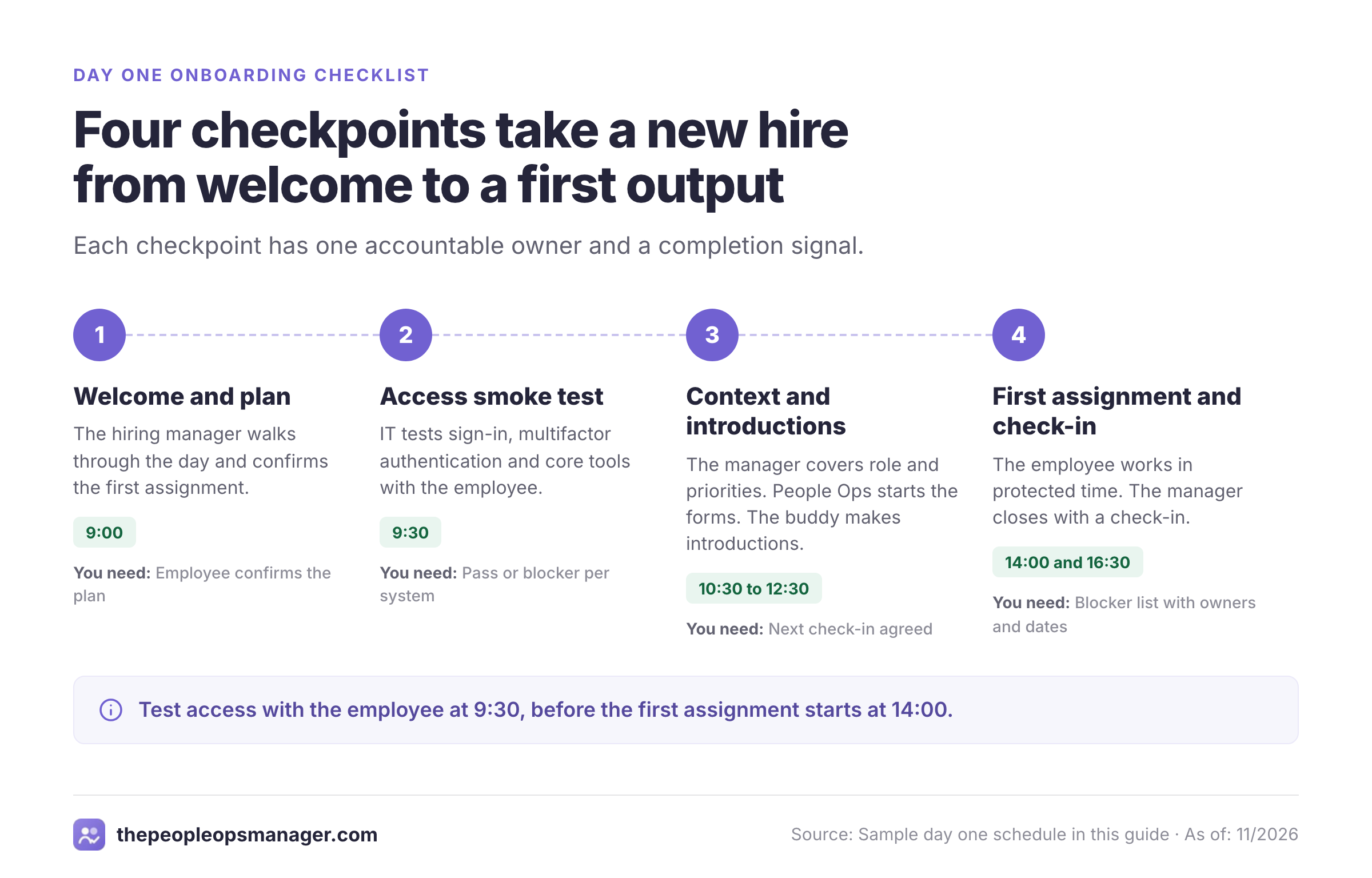
Begin with a short welcome and a device and account check. Follow with the manager conversation, then start the required forms in the HR system. After a lunch break, introduce the buddy and the key collaborators, reserve protected time for a small first assignment, and close with a check-in. Treat the sequence as flexible, but don't reorder the ends: access check first, first assignment last. A customer-facing employee may need shadowing before independent work, and a warehouse employee may need safety instruction before touching equipment.
- Hiring managerWelcome, walk through the day, confirm the first assignment 9:00
- ITDevice sign-in, multifactor setup and access smoke test with the employee 9:30
- Hiring managerRole, priorities, team norms, decision rights and questions 10:30
- People OpsStart required forms in the HR system; explain who answers which question 11:30
- BuddyLunch or break, then introductions to the closest collaborators 12:30
- EmployeeFirst assignment in protected time, with the reviewer reachable 14:00
- Hiring managerCheck-in: what's clear, what's confusing, what's blocked, plan for tomorrow 16:30
The times are an example for a 9:00 start, and they're easy to shift. For a remote hire in another time zone, send the agenda in the employee's local time and keep the first meeting early in their day. For more on structuring the orientation itself, see new hire orientation.
How do you verify device and application access?
Don't rely on an IT ticket marked resolved. Ask the employee to sign in to the device, complete multifactor authentication, open the collaboration tool, reach the knowledge base and open the application needed for the first assignment. Confirm the permission level is the one the role needs rather than broad administrator rights. Do it live, because a test account and the employee's own account can have different group memberships. Record a simple pass or blocker status for each system. The sample timeline allows an hour for it, with the employee present.
| System | Test with the employee | Pass when | Owner |
|---|---|---|---|
| Laptop and sign-in | Sign in and complete multifactor authentication | Employee reaches the desktop without IT typing a password | IT |
| Email and calendar | Send a test message and accept a meeting | Both work, and the right calendar is visible | IT |
| Chat and video | Join a call with camera and audio | Employee can hear, speak and share a screen | IT |
| Knowledge base and shared drive | Open the team handbook and the first assignment's folder | Files open, and permissions match the role | Hiring manager |
| Role application | Perform one read-only action | The action succeeds at role level, not admin level | IT |
| HR system | Log in and open the task list | Employee sees their own tasks only | People Ops |
For remote hires, also check the time zone, the shipping status, a backup contact method and the procedure for a device that arrives late. If access fails, don't leave the employee alone with a ticket form: offer a human support contact and a safe alternative activity. The manager shouldn't pressure IT to bypass security controls to meet a day one deadline.
How should HR handle paperwork and compliance on day one?
Use your organization's approved HR platform and legal review for forms, verification, notices and acknowledgments. Requirements depend on location and role, so don't treat a general checklist as legal advice; confirm them with the specialists who own them.
In the United States, Form I-9 has fixed timing. According to the USCIS Handbook for Employers (M-274), the employee must complete Section 1 no later than the first day of employment, and you may not ask someone who hasn't accepted a job offer to complete it. The employer must complete Section 2 within three business days of the date employment begins, by examining the original, acceptable, unexpired documents the employee presents; if the hire is for less than three business days, Section 2 is due by the first day of employment. If you're not sure whether a form applies, don't guess; ask the specialist who owns it. Check current USCIS guidance before relying on this, and route any questions to your authorized I-9 specialist.
State payroll forms, tax withholding, benefits notices and training obligations vary by location and employment arrangement. Three practices apply whichever form you're handling.
- Never ask a new hire to email identity documents or bank details to a general team inbox.
- Never put Social Security numbers, passport images, compensation details or medical information in the checklist.
- Store a neutral status such as "submitted in HRIS" plus the owner, and escalate missing or inconsistent records to the authorized team.
What should the manager cover in the first meeting?
Explain why the role exists, the outcomes the team needs and how the new employee's work connects to customers or internal partners. Name the first assignment, its definition of done and the person who reviews it. Clarify which decisions the employee can make alone and which need approval, describe recurring meetings, and say how to raise a blocker. Leave room for questions about expectations, terminology and team history.
Don't deliver a full performance framework on day one. The employee needs enough context to act with confidence, plus a clear plan for deeper conversations during the first week. End by agreeing on the next check-in.
What should a new hire accomplish on day one?
Pick a small task that proves the basic workflow works and produces a useful result. A marketing operations hire might review a sample campaign brief and list the missing handoff fields. A People Ops hire might map the owner of each onboarding step using a fictional case. A program manager might summarize the risks in a sample project update. An engineer might run the project locally and fix one documentation typo through the normal review process.
Avoid production changes, confidential customer data and complex independent decisions until training and permissions are complete; each carries risk before training is done. The task should be relevant, bounded and reviewable. A successful day one outcome isn't maximum output. It doesn't need to be impressive, but it does need to be possible. It's evidence that the employee understands the immediate goal, can reach the necessary tools, knows where to ask for help and has a next step.
How do you welcome a remote or hybrid employee?
A remote employee needs more than a video invitation. Send the agenda in the employee's time zone, explain how to join meetings, and give a reachable contact in case the primary chat tool fails. Use a few meaningful introductions rather than one large call with no context. Explain which decisions happen live, where written updates live, and what response times are realistic across time zones.
A hybrid employee also needs clear office attendance expectations, building access instructions and guidance on where to sit or book space. Don't assume the employee knows your communication conventions, and ask whether the schedule fits their working arrangement without requesting unnecessary personal details.
How do you track completion without creating busywork?
Keep one checklist with task, owner, due point, status, blocker and evidence location. Use four statuses: not started, in progress, blocked and complete. A submitted request isn't the same as the employee being able to use the service, so "complete" only means the completion signal in the template was met.
For sensitive compliance steps, link only to the approved system or record a neutral confirmation, never a copy of the document. Review blocked items at the end of the day and assign the next action. One source of truth prevents conflicting spreadsheets and chat threads. The checklist should help teams resolve issues, and it shouldn't become a second personnel database, and it should be archived according to your retention policy.
What if something isn't ready on the first day?
Name the blocker, assign an owner, give the employee an honest update, and agree on a workaround that doesn't weaken security or compliance.
| What's missing | Safe workaround for day one | Escalate to |
|---|---|---|
| Laptop delayed | Manager-led walkthrough, approved reading and introductions; no unapproved personal device | IT lead, same morning |
| Account or permission missing | Work through the access owner; do the part of the assignment that needs no access | Access owner, with the request evidence |
| Multifactor authentication fails | Human support call; don't share or bypass a code | IT support |
| Payroll or identity verification incomplete | Keep the employee informed, route to the specialist, record the status | The responsible specialist |
| Manager unavailable | Named deputy runs the welcome and first assignment | People Ops lead |
Don't mark a task complete because a ticket was created, and make the next check-in explicit. The employee shouldn't have to chase five departments to learn who's handling a problem. If the laptop hasn't shipped by the day before, say so then, not at 9:00. A visible blocker with an owner is better than a false green status, even though it looks worse in the status column.
How do you close day one and prepare for the first week?
Ask the employee what's clear, what's confusing and which tools or relationships are still missing. Confirm the next meeting, the first-week priorities and how to request help. The manager records access or workload issues, not a subjective judgment about the employee's personality or enthusiasm. People Ops reviews unresolved administrative tasks and makes sure their owners know the next deadline.
Invite feedback on the onboarding experience, but don't make the employee responsible for fixing the process. A short recap message can link the team handbook, the agreed assignment and the next check-in; the new hire welcome email template has wording you can adapt. Plainly put, a blocker nobody owns is a blocker nobody will fix, so don't let the day end on a vague "we'll sort it out"; say who'll do what by when. Follow through on blockers the next morning, before anything new is added.
How can you adapt the checklist for different roles?
Start with a shared core: welcome, equipment, access, manager meeting, team contacts, paperwork status and a first assignment. Then add role-specific tasks.
| Role type | Add to the core | Watch for |
|---|---|---|
| Sales | CRM orientation, customer communication rules, shadowing a call | Access to customer data before data handling training |
| Engineering | Repository access, local setup, secure development guidance | Production access granted on day one |
| Finance | Approval controls, data handling training | Payment or approval rights before authorization is recorded |
| Frontline or warehouse | Site safety, shift procedures, equipment authorization | Equipment use before safety instruction |
| Customer support | Ticketing tool, escalation paths, sample tickets | Live customer queues before training |
Don't assume the same access bundle suits every role. The manager and the access owner approve the role-specific portion before the start date, which keeps the checklist reusable without making it dangerously generic.
How do you measure whether day one worked?
Measure operations, not mood, because that's what you can act on. Four measures cover it.
- The day one readiness rate is the number of starters whose device and accounts passed the smoke test before the first assignment began, divided by all starters that day.
- Blockers without an owner are items still unassigned at the end-of-day check-in. The target is zero.
- Time to resolve is how long each blocker took from first report to a confirmed fix, tracked per owning team.
- Employee clarity is the share of starters who answer yes to one end-of-day question: "Do you know what you're doing tomorrow and whom to ask?"
A single satisfaction score hides the cause, and it won't tell you what to fix. Separate operational failures, such as late device delivery or an unclear manager handoff, from the normal learning curve, and fix the handoff that caused the problem. Collect only what you need to make a process decision, and don't use checklist completion as a proxy for individual performance. For a wider set of onboarding practices, see employee onboarding best practices.
Common day one mistakes
- Marking a ticket as done instead of testing access. The smoke test is non-negotiable, because a resolved ticket and a working account are different things.
- Filling the day with presentations. While orientation matters, orientation without a first assignment leaves the employee with nothing to practice on.
- Several owners for one line. When two teams share a task, each can assume the other confirmed it.
- Collecting sensitive documents through chat or email. Use the approved HR system and record only a status; there's no reason to keep copies.
- Granting broad access to save time. Approve role-level access, and add more later with a recorded decision. That's clearly the safer order.
- Skipping the end-of-day review. Without it, blockers carry over unseen, and they're still open on day two.
Frequently asked questions
What should a new employee do on their first day?
Meet the manager, test access to essential tools, learn where to get help, and complete one small, reviewable task that's relevant to the role.
Who is responsible for day one onboarding?
People Ops coordinates the process. The hiring manager, IT, payroll and the buddy each own their assigned tasks, and there's one accountable owner per line.
Should all onboarding paperwork be completed on day one?
No. Follow the applicable legal deadlines and your company's process, because they aren't the same for every form. In the US, for example, Form I-9 Section 1 is due no later than the first day of employment and Section 2 within three business days of the start date, while other forms have different timing.
How do you onboard a remote employee on day one?
Confirm device delivery before the start date, send the agenda in the employee's time zone, test secure access together on a call, and name a support contact and a first assignment, so the employee isn't left waiting for instructions.
How long should a day one onboarding schedule be?
Plan a normal working day with breaks, protected time for a small first task and a short end-of-day check-in. A packed calendar of presentations isn't as useful as clear access and a first outcome.
How do you know day one onboarding worked?
The employee can use the essential tools, knows what's next and whom to ask, and every blocker has an owner and a date.