
The best compensation management software depends on which part of pay you are stuck on. Some teams lack market data and cannot say what a role should pay. Others have the data but run the annual raise cycle in spreadsheets, and managers email back their numbers. A third group already owns an HRIS and only needs a compensation module added to it. This page compares eight tools across those three situations and spells out what each one does, what it costs and who should skip it.
Prices and features come from vendor pages, help centers and review sites read between November 4 and 7, 2026. Most vendors in this category sell by quote, so we write "quote only" rather than repeat a third party's estimate. Ratings come from G2, and praise and complaint lines are G2's own summarized themes, not quotes. We did not run hands-on trials, so every entry describes documented features, not our own testing.
- tools compared
- 8
- jobs: data, cycles, HRIS add-on
- 3
- per seat per month, Lattice Compensation add-on
- +$6
- yearly floor for 250 people, Ravio
- £5,400
What Is Compensation Management Software?
Compensation management software is the system a company uses to decide, record and communicate pay: market benchmarks, salary bands, merit and bonus budgets, manager recommendations, approvals and the letters that tell employees what changed. It replaces the spreadsheet that holds every salary and gets emailed to managers once a year.
Three things sit under the label, and they are sold differently. Market data tells you what a role pays. Cycle software runs the budget, manager input and approvals for raises and bonuses. An HRIS module puts bands and cycles on the employee record you already keep. Many products cover two of the three, and almost none cover all three well. Sales commission tools such as QuotaPath or Xactly are a different category (incentive pay for sellers) and are not compared here.
Best Compensation Management Software by Situation
 Best for live market dataPaveA free data tier and custom peer groups on paid plans, with planning as an add-on.
 Best for a merit-cycle sandboxWorkleap CompensationTest budget scenarios before launch, then send branded letters. Syncs with nine HR and payroll systems.
 Best for a compensation analyst's toolkitPayscaleSeparate products for market pricing, survey management and merit cycles.
 Best if you already run Lattice reviewsLatticeCompensation is a $6 add-on to the same platform that holds performance ratings.
 Best if BambooHR is your HRISBambooHRCycles, bands and Mercer benchmarks arrive with the Elite plan.
 Best for job levels before payRavioMaps employees to a levelling framework, then benchmarks them.
Compensation Management Software at a Glance
| Tool | What it is | What it hands to the next step | Starting price | G2 rating | What it is |
|---|---|---|---|---|---|
| Pave | Compensation data and planning platform | Market data to pay ranges to manager merit decisions | Market Data Lite is free; all other plans and add-ons are quote only | 4.7 (46) | Pave sells compensation data in tiers (a free Lite tier, then Pro and agentic plans) and adds Compensation Planning, Team View and Total Rewards as add-ons on its top plan. |
| Workleap Compensation | Compensation planning for small and mid-size teams | Pay bands to budget pools to merit letters | Quote only; pricing page not public | 4.4 (1,231) | Workleap Compensation builds pay bands, runs merit cycles with multiple budget pools and a sandbox mode, and uses Mercer market data. It connects to nine named HR and payroll systems. |
| Payscale | Compensation data and planning suite | Survey data to job pricing to merit budgets | Quote only; no public list price | 4.2 (703) | Payscale sells several products: Payfactors for market data and pricing, MarketPay for survey management and pricing workflows, and Paycycle for merit cycles from budget to approval. |
 Salary.com CompAnalyst | Compensation data and planning suite | Job match to market price to salary structure | Quote only; priced by company size, modules and data depth | 4.4 (1,086) | CompAnalyst covers market pricing with AI-guided job matching, salary structures, planning and pay equity workflows, and connects to HRIS systems such as ADP Workforce Now, UKG and BambooHR. |
| Ravio | Compensation benchmarking and levelling | HR data to job levels to market benchmarks | Quote only; Ravio states pricing for a 250-person company starts at £5,400 per year | 4.7 (10) | Ravio connects companies to 350,000+ live benchmark points covering salary, equity, variable pay and benefits, and helps map employees to its job levelling framework. |
| Lattice | Performance management platform | Performance $10 per seat per month, billed annually, $4,000 minimum annual agreement | 4.7 (4,114) | Lattice is a performance management platform sold as annual per-seat modules: Performance, Goals & OKRs and Engagement, with Compensation and Grow as add-ons. | |
| BambooHR | HRIS and employee lifecycle | HR record with applicant tracking and performance; payroll, benefits and time as add-ons | Core $10 / $10.25, Pro $17 / $17.50, Elite $25 per employee per month; payroll, benefits administration and time & attendance quote only | 4.4 (8,306) | An HR-first platform for employee records, hiring, time off, manager workflows, and optional US payroll and benefits. Core and Pro prices conflict within its official page. |
 Rippling | Workforce platform: HR, IT and finance | HRIS record drives payroll, benefits, time, recruiting, performance, devices and app access | From $8 per employee per month plus a monthly base fee; full module quote required | 4.7 (14,761) | A modular platform with a shared employee data model across HR, payroll, IT identity and device management, and finance products. |
 The People Ops Manager Our product | Onboarding coordination | Shows who is ready for day one, what is blocked and who owns it | Subscription via Stripe Checkout, card required | No reviews yet | The People Ops Manager coordinates onboarding and offboarding across HR, IT, finance and hiring managers, and shows who is ready for day one, what is blocked and what still needs approval. |
Prices checked on November 7, 2026 (Lattice, BambooHR and Rippling earlier in October). Quote only means the vendor publishes no price.
How a Compensation Cycle Splits Between Teams
Compensation software is only as good as the handoffs around it. A merit cycle touches five owners, and the tool you pick decides which of them still works in a spreadsheet. The sequence below is the one every tool in this list is built around.
- Total rewards or HRSet the pay philosophy, bands and the merit guideline matrix 8 to 10 weeks before the effective date
- FinanceApprove the merit, promotion and bonus budget pools 6 to 8 weeks before
- HRIS adminSync current salary, level, location and performance rating into the tool 6 weeks before
- ManagersPropose raises inside guidelines and budget, with notes for outliers 3 to 4 weeks before
- HR and executivesReview outliers, calibrate across teams and approve in order 2 weeks before
- PayrollLoad approved changes and send employee letters On the effective date
The timings are a common planning pattern, not a rule from any vendor. Shrink them for a team under 100 people.
What To Check Before You Buy
Four questions separate the products faster than a feature list does.
- Where does the market data come from? Pave, Payscale, Salary.com and Ravio own their data. Lattice and BambooHR license Mercer data, and Workleap uses Mercer plus whatever third-party data you import.
- Who runs the cycle? If one compensation analyst runs it, Payscale or Salary.com fit. If every manager recommends raises, look at how clean the manager view is.
- Does it write back to payroll? Several tools export a file for payroll to load. Check whether your payroll system gets a sync or a CSV.
- Is the price published? Only Lattice, BambooHR and Rippling publish a per-seat number. For everyone else, ask for the price before you invest time in a demo.
Pave
Pave
Pave sells compensation data in tiers (a free Lite tier, then Pro and agentic plans) and adds Compensation Planning, Team View and Total Rewards as add-ons on its top plan.
Pave starts from the data. A free tier gives you benchmarks, and planning is an add-on once you buy the top data plan.
Market Data Lite is free and covers benchmarks from more than 9,000 companies, AI job matching, 290+ job families, the U.S. and one additional market. Market Data Pro adds custom peer groups, 60+ countries, 90+ metros, a recent-hire filter, advanced equity data and unlimited exports. The agentic plans add job architecture building, new-job pricing and MCP access on top.
Compensation Planning, Team View, Total Rewards and Visual Offer Letter are add-ons that pair with the Agentic Workflows plan. Pave's pricing page promotes merit simulations through its agent but does not describe them in detail.
- you want benchmarks from a live company pool and custom peer groups
- you want managers to make merit calls inside the same tool as the data
- you need a published price: every paid plan and add-on is quote only
- you want planning without buying the top data plan, because the planning add-on pairs with Agentic Workflows
- Users like
- compensation management and ease of use, per G2 summaries
- Users dislike
- insufficient detail and limited data in benchmarking and budgeting, per G2 summaries
- Source: G2, 46 reviews
How it works in practice
A compensation lead picks a peer group (for example, companies of a similar size and stage), matches internal jobs to benchmark jobs with the AI matcher, and prices each role. Managers then see the result through Team View. Reviewers on G2 praise the comp management and ease of use, and a compensation manager there says managers use it outside the annual cycle. The recurring complaint is detail: benchmark and budget depth is thinner than reviewers expect.
- Starting price
- Market Data Lite is free; all other plans and add-ons are quote only
- Free tier
- Market Data Lite
- Pro
- Custom peer groups, 60+ countries, 90+ metros, unlimited exports
- Planning
- Compensation Planning add-on on Agentic Workflows
- Integration
- Pave lists a Rippling integration
- Pricing
- Every paid plan and add-on is quote only
Workleap Compensation
Workleap Compensation
Workleap Compensation builds pay bands, runs merit cycles with multiple budget pools and a sandbox mode, and uses Mercer market data. It connects to nine named HR and payroll systems.
The deciding feature is sandbox mode: you set budget pools, try several review scenarios and only then launch the cycle.
Workleap builds pay bands, shares them with managers and lets you set geographic pay zones across regions and currencies. A cycle can hold several budget pools, such as merit and promotion, with spend forecast before launch. You set merit guidelines by performance or another factor, flag outliers and configure the approval chain, then send branded compensation letters. Benchmarks come from Mercer, and you can import third-party survey data to sit beside it.
Workleap says customers save two to four weeks on the review process. That is the vendor's claim, not an independent number.
- you want a sandbox to test merit scenarios before launching a cycle
- you run BambooHR, HiBob, ADP, UKG or Workday and want a native sync
- you need bonus-cycle features: the product page describes merit cycles only
- you want a rating specific to this product: G2 shows the Workleap company rating
- Users like
- compensation management scores strongest on Workleap's G2 profile
- Users dislike
- the rating covers all Workleap products, not Compensation alone
- Source: G2, 1,231 reviews

How it works in practice
The HRIS sync pulls salary, level and performance rating. HR configures guidelines and pools, finance signs the pools, and managers see only their own team. Outliers surface for HR before the approval chain starts. The G2 rating shown here covers every Workleap product, including its engagement tools, so read it as a company signal.
- Starting price
- Quote only; pricing page not public
- Cycle
- Multiple budget pools, sandbox mode, approval chains, branded letters
- Data
- Mercer benchmarks plus imported third-party data
- Integrations
- BambooHR, ADP Workforce Now, Dayforce, HiBob, UKG Pro, Namely, Paylocity, Paycor, Workday
- Claimed saving
- 2 to 4 weeks off the review process, per Workleap
- Native syncs
- BambooHR, ADP Workforce Now, Dayforce, HiBob, UKG Pro, Namely, Paylocity, Paycor, Workday
- Not described
- A bonus cycle
Payscale
Payscale
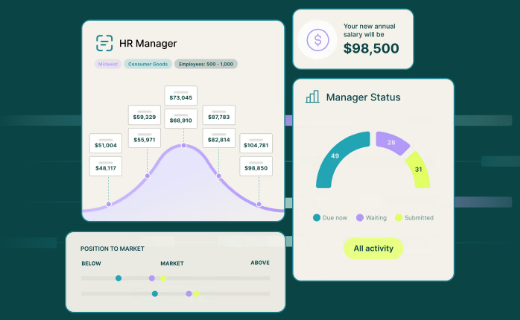
Payscale sells several products: Payfactors for market data and pricing, MarketPay for survey management and pricing workflows, and Paycycle for merit cycles from budget to approval.
Payscale is a family of products, and the right one depends on whether your bottleneck is data, pricing or the merit cycle.
Payfactors supplies market data, job pricing and pay ranges. MarketPay manages survey data and pricing workflows. Paycycle automates the merit process from budget allocation to approval and lets managers collaborate. Payscale lists integrations with Workday, SAP, ADP, Oracle, UKG, Paylocity, Gusto, BambooHR and Paycom.
- a compensation analyst owns market pricing and survey data
- you want data, pricing and merit cycles from one vendor, bought as separate products
- you want one product to buy and learn: the suite spans several, and Payscale's own site uses different product names in places
- you need a cost figure before a demo: Payscale quotes Payfactors, MarketPay and Paycycle as separate products
- Users like
- pricing and benchmarking depth, per G2 category scores
- Users dislike
- budgeting scores below pricing: 7.4 for Payfactors, 7.8 for MarketPay on G2 compensation budgeting
- Source: G2, 703 reviews
How it works in practice
A compensation analyst prices jobs in Payfactors or MarketPay and builds the ranges. Those ranges feed the cycle, where Paycycle handles budgets and manager approvals. One outside reviewer reads Payscale as a data-and-pricing product with planning layered on, and G2's budgeting scores sit below its pricing strengths. Payscale's own site uses different product names in places, so ask which products your quote contains.
- Starting price
- Quote only; no public list price
- Payfactors
- Market data, job pricing, pay ranges; G2 4.2 from 703 reviews
- MarketPay
- Survey management and pricing workflows; G2 4.4 from 286 reviews
- Paycycle
- Merit increase process from budget allocation to approval
- Integrations
- Workday, SAP, ADP, Oracle, UKG, Paylocity, Gusto, BambooHR, Paycom
- Products
- Payfactors, MarketPay, Paycycle
- Scores
- G2 compensation budgeting: Payfactors 7.4, MarketPay 7.8
Salary.com CompAnalyst
Salary.com CompAnalyst
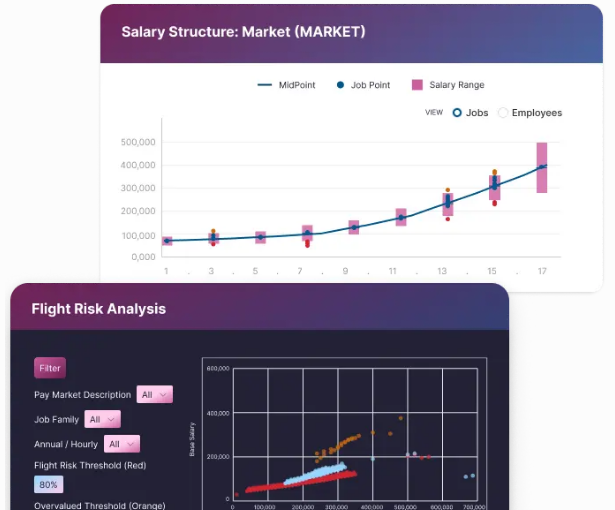
CompAnalyst covers market pricing with AI-guided job matching, salary structures, planning and pay equity workflows, and connects to HRIS systems such as ADP Workforce Now, UKG and BambooHR.
CompAnalyst is the choice when the question is "what does this exact job pay", answered from a large job-title database.
It matches your jobs to market data with AI-guided job matching, builds salary structures and covers planning, bonus management, compensation statements and pay equity workflows. Native HRIS connections are listed for ADP Workforce Now, UKG and BambooHR, and ADP offers a CompAnalyst connector inside Workforce Now.
- you want a large survey and job-title database behind your pay ranges
- you run ADP Workforce Now, which has a CompAnalyst connector
- interface speed matters most: G2 reviewers often call it cumbersome
- you work in a niche industry, where reviewers report thin data
- Users like
- ease of use, support and market data, per G2 summaries
- Users dislike
- interface design and data accuracy concerns, per G2 summaries
- Source: G2, 1,086 reviews
How it works in practice
The analyst matches each internal job to a benchmark, picks the market percentile that fits the pay philosophy and builds structures. Planning and statements follow. G2 reviewers praise ease of use, support and the market data. The complaints are the interface, which some call cumbersome, data accuracy flagged by about 22 reviewers in one summary and thin data in niche industries. Some reviewers say advanced tools unlock only on paid tiers.
- Starting price
- Quote only; priced by company size, modules and data depth
- Features
- Job pricing, salary structures, planning, pay equity, reporting
- Integrations
- ADP Workforce Now, UKG, BambooHR, Paycom, Paylocity
- Rating scope
- G2 rating covers the Salary.com product line
- Pricing
- Quote only, based on company size, modules and data depth
Ravio
Ravio
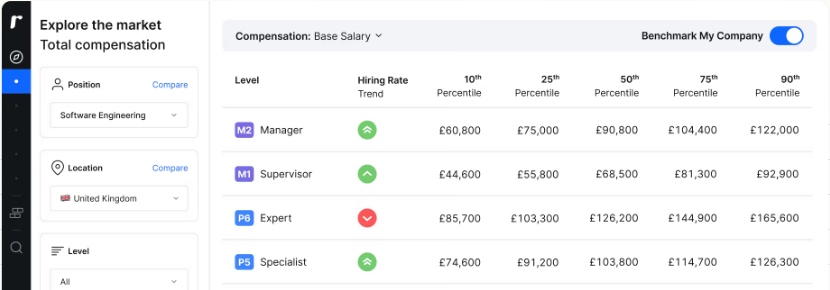
Ravio connects companies to 350,000+ live benchmark points covering salary, equity, variable pay and benefits, and helps map employees to its job levelling framework.
Ravio fixes the step before pay: deciding what level each person is. Benchmarks follow once the levels exist.
Ravio connects companies to 350,000+ live benchmark points covering salary, equity, variable pay and benefits. Customers connect their HR system and get expert help mapping employees to Ravio's job levelling framework. Ravio says pricing depends on company size, modules and data needs, and that a 250-person company starts at £5,400 per year.
- you need to map roles to levels before you can price them
- you hire across Europe and the U.S. and want benchmarks for both
- you need merit cycles and budget approvals: G2 files Ravio under pay equity, not planning
- you need a USD price: Ravio publishes its floor in pounds
How it works in practice
Ravio's value shows up when job titles are inconsistent. A team maps titles to levels once, then benchmarks hold across countries and functions. G2 lists Ravio under pay equity, not compensation planning, which fits a benchmarking-first product. Ravio has 10 G2 reviews, so the 4.7 rating is an early signal.
- Starting price
- Quote only; Ravio states pricing for a 250-person company starts at £5,400 per year
- Data
- 350,000+ live benchmarking data points
- Price floor
- £5,400 per year at 250 people
- Levelling
- Expert-guided mapping of employees to Ravio's job levelling framework
- G2 category
- Pay equity, not compensation planning
Lattice
Lattice
Lattice is a performance management platform sold as annual per-seat modules: Performance, Goals & OKRs and Engagement, with Compensation and Grow as add-ons.
Lattice Compensation is an add-on to the performance platform, so ratings and raises live in one system.
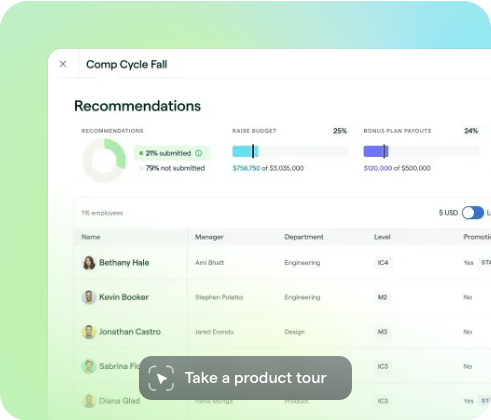
Lattice runs org-wide cycles with clear budgets and secure collaboration. Admins set increase targets, distribute budgets, give raise guidance and customize statements, while analytics track budget pacing during the cycle. You can build, visualize and share bands for each role. Lattice's FAQ says salary benchmarking is powered by Mercer data. A changelog entry says admins can edit any step of an approval chain in draft and active cycles and preview the affected employees before saving.
- you want review cycles with calibration, promotions and PIPs in one plan
- you will buy goals and engagement later and want to price them as separate modules
- you have fewer than about 33 people: the $4,000 minimum annual agreement is the real floor
- you need monthly billing: Lattice bills all contracts annually
- Users like
- ease of use, per G2 summaries
- Users dislike
- navigation that can feel clunky, per G2 summaries
- Source: G2, 4,114 reviews
How it works in practice
Reviews and calibration produce ratings. The compensation cycle reads those ratings, applies guidelines and sends recommendations to approvers. The rating shown here is for the Performance product, not for Compensation. Lattice documents a Workday integration as a system of record and includes external HRIS user IDs in compensation exports.
- Starting price
- Performance $10 per seat per month, billed annually, $4,000 minimum annual agreement
- Plans
- Performance $10, Goals & OKRs $8, Engagement $4 per seat per month; Compensation +$6, Grow +$4
- Minimum
- $4,000 annual agreement
- Calibration
- Performance plan; applies to manager ratings only
- Compensation
- Add-on at +$6 per seat per month; benchmarks powered by Mercer data per Lattice's FAQ
- Price
- +$6 per seat per month on top of the base plan (Performance is $10)
For a wider view of the platform around it, see our guide to performance management software.
BambooHR
BambooHR
An HR-first platform for employee records, hiring, time off, manager workflows, and optional US payroll and benefits. Core and Pro prices conflict within its official page.
If BambooHR is your HRIS, compensation arrives with the Elite plan instead of as a second vendor.
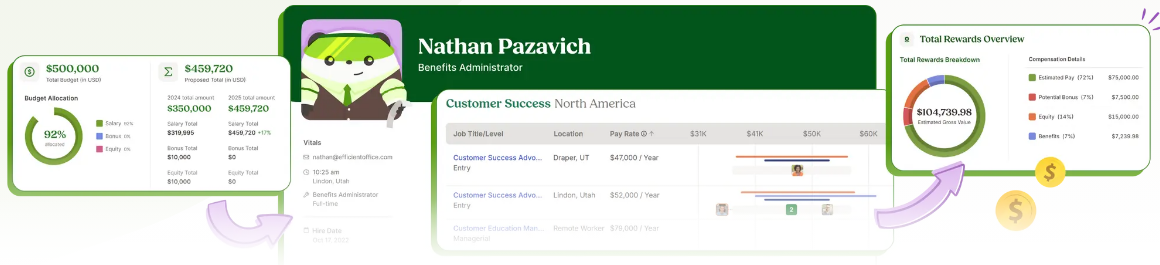
Compensation Planning is tied to Elite. In BambooHR you open Settings, then Compensation, then Compensation Planning and create a cycle with a name, compensation types, dates, a cycle window, due dates and currency. Full admins create, edit and publish cycles. The plan also lists approval workflows built on the directory, budget allocation, review notifications, Levels & Bands and Mercer benchmarks for North America, plus worldwide tech benchmarks.
- HR owns employee records and onboarding
- performance and engagement features can be scoped by plan
- existing IT identity stack remains in place
- you want the HR platform to provision devices and app access
- you require native international payroll
- Users like
- ease of use and a clean, simple interface
- Users dislike
- configuration difficulty and missing workflow-specific features; advanced reporting is limited
- Source: G2, 8,306 reviews
How it works in practice
Because the salary history already sits on the employee record, there is no sync to build. An admin who is not in any approval workflow sees a blank worksheet area in a live cycle, which trips up first-time admins. G2 reviewers praise BambooHR's ease of use and criticize configuration difficulty and limited advanced reporting. Read more in our BambooHR review.
- Starting price
- Core $10 / $10.25, Pro $17 / $17.50, Elite $25 per employee per month; payroll, benefits administration and time & attendance quote only
- Plans
- 25 employees or fewer pay a flat $250, $425 or $650 a month; payroll, benefits and time tracking are quote only
- Applicant tracking
- Included on every plan, with 5 open jobs on Core, 25 on Pro and 50 on Elite
- Integrations
- 165 verified listings on G2; BambooHR's onboarding page says 150+
- Performance
- Part of Pro ($17 per employee per month): review cycles, 360, goals, 1:1s; no calibration documented
- US Payroll
- Paid add-on
- Global Employment
- Powered by Remote
- Published pricing conflict
- Core $10 tile versus $10.25 FAQ; Pro $17 tile versus $17.50 FAQ
- Core
- HR records, hiring, onboarding and reporting
- Pro
- Performance reviews and manager workflows
- Elite
- Compensation planning and advanced analytics
- Payroll
- US add-on; price by quote
- Price discrepancy
- Cards $10/$17; FAQ $10.25/$17.50 for larger teams
- Compensation
- Elite plan: comp cycles, worksheets, approvals, Levels & Bands, Mercer benchmarks
- Plan needed
- Elite, $25 per employee per month
- Benchmarks
- Mercer; you can also bring your own data
Rippling
Rippling
A modular platform with a shared employee data model across HR, payroll, IT identity and device management, and finance products.
Rippling keeps compensation bands on the same record as payroll, so an offer or a raise can check the approved range automatically.
According to Rippling's blog, bands live on the employee record next to payroll and HR data, which supports reporting on compa-ratios and pay equity. Recruiters and managers see approved ranges in their workflows and exceptions require a request. Approved amounts flow into the budget when you use bands with headcount planning. Rippling also describes a Carta Total Comp integration that filters market data by location, title, level and company valuation.
- HR and IT jointly own onboarding and offboarding automation
- global payroll or EOR is in scope
- identity and device workflows are consolidation targets
- you only need basic HR records and time off
- you lack owners for configuration and access policies
- Users like
- ease of use with a single login (6,967 mentions)
- Users dislike
- missing features such as reporting and support response (1,241 mentions), slow performance (885) and a steep learning curve (857)
- Source: G2, 14,761 reviews
How it works in practice
The strength is control inside one platform: the band, the offer, the payroll change and the budget share one record. The weakness is that Rippling's public pages describe bands and budgets in more detail than merit-cycle worksheets, and a compensation module quote depends on what else you buy. See our Rippling review for the wider platform.
- Starting price
- From $8 per employee per month plus a monthly base fee; full module quote required
- Integrations
- 179 verified on G2; Rippling's own page claims 650+
- Capterra
- 4.9 from 4,886 reviews (October 2026)
- Performance
- Module with reviews, goals, 360, 1:1s and calibration; price not published
- US Payroll
- Separate product; starting rates depend on billing term
- IT
- Identity, access, device and inventory products
- Market data
- Via Carta Total Comp, per Rippling
- Price
- Platform from $8 per employee per month plus a base fee; module price by quote
Which Compensation Software Fits Your Team?
| Situation | Tools to shortlist |
|---|---|
| No benchmarks yet, small team | Pave (free tier), Ravio |
| Analyst-run, large job catalog | Payscale, Salary.com CompAnalyst |
| Managers recommend raises, mid-size company | Workleap, Pave |
| Already on a performance platform | Lattice |
| Already on an HRIS | BambooHR Elite, Rippling |
Smaller teams should check their HRIS first, since HRIS software increasingly ships bands and cycles in a higher plan. Larger ones should read our overview of human capital management software before adding a standalone vendor.
Frequently Asked Questions
What is the best compensation management software?
The best compensation management software depends on the job. Pave suits teams that want live market data, Workleap suits teams that want to test merit scenarios, Payscale and Salary.com suit analyst-run programs, and BambooHR Elite or Lattice suit teams that already run those platforms.
How much does compensation management software cost?
Compensation management software is mostly quote only, because most vendors publish no price. Lattice lists Compensation at +$6 per seat per month, BambooHR lists Elite at $25 per employee per month, and Ravio states a floor of £5,400 per year for 250 people. Pave has a free data tier. The rest are quote only.
Is compensation management software the same as payroll?
No. Payroll pays people the amounts on record. Compensation software decides those amounts, approves changes and then sends them to payroll. Our guide to payroll software covers the other side.
Do I need it for a team under 100 people?
A team under 100 people often does not need compensation management software. A spreadsheet with a pay band table works while one person owns the cycle. The case for software starts when several managers recommend raises, when you hire in multiple locations or when audit trails matter.
What is the difference between salary benchmarking and compensation planning?
Benchmarking compares your pay with the market. Planning allocates a budget across employees, collects manager recommendations and routes approvals. Pave, Payscale and Salary.com cover both, while Ravio focuses on benchmarking and levelling.
Where does the market data come from?
Pave, Payscale, Salary.com and Ravio run their own data sets. Lattice and BambooHR use Mercer data, and Workleap uses Mercer plus data you import.