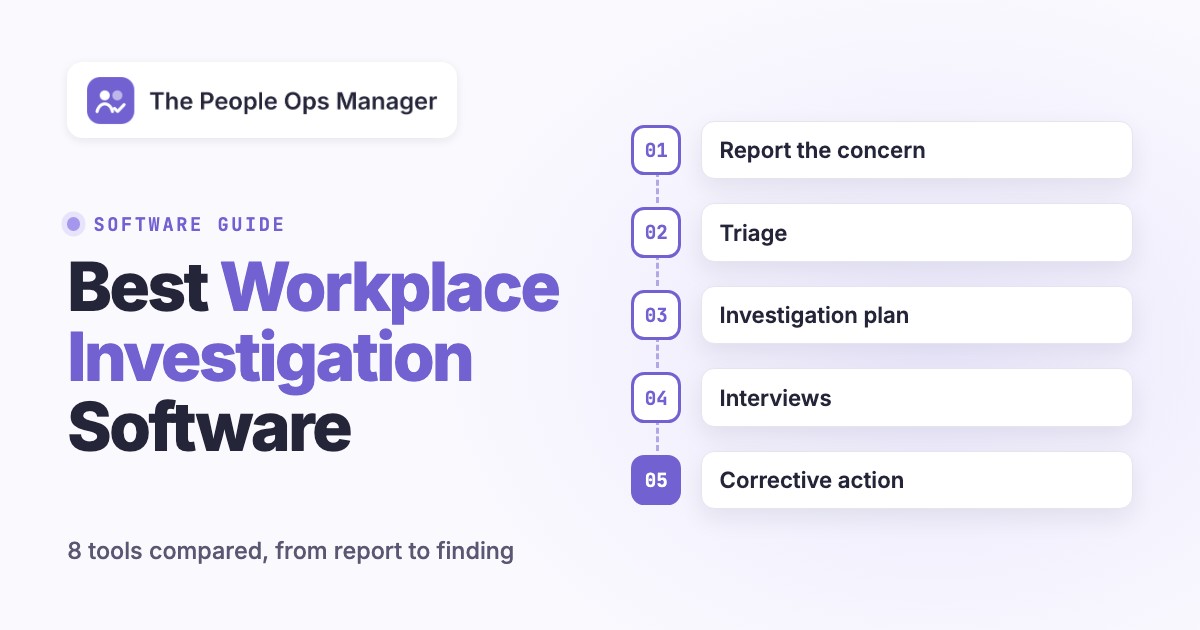
Workplace investigation software is where HR and employee relations teams take in a complaint, run the investigation and keep the record that shows what they did about it. This guide compares eight tools by the one capability that usually decides the purchase: how reports come in, who can see a case, how the investigation plan and findings are recorded, and which HR systems feed the case. We read vendor pricing, product and help pages for each tool and took ratings and review counts from G2's product pages in November 2026; we didn't run these products ourselves.
- tools compared
- 8
- publish a starting price
- 2
- default EEOC charge window, 300 with a state agency
- 180 days
- minimum federal retention for personnel records
- 1 year
Workplace Investigation Software at a Glance
 Best guided method for ER teamsHR AcuityEvery case runs Plan, Investigate, Determine, with interview templates and two-way anonymous messaging.
 Best for multi-allegation casesCase IQEach allegation gets its own Issue record and Outcome, with routing rules and a Mark Confidential flag.
 Best published entry priceAllVoicesAnonymous intake and a three-step investigation workflow, from $275 per month.
 Best staffed hotlineNAVEX EthicsPoint24/7 phone, web and mobile intake with tier-based case routing; Essentials from $1,980 a year.
 Best if you already run ServiceNowServiceNow HR Service DeliveryThe Employee Relations app adds allegations, interviews and restricted cases to HR Service Delivery.
 Best for discipline after the findingPulpstreamComplaint cases hand off into warning and PIP workflows on one no-code platform.
 Best when security shares the caseResolverHotline, incidents and investigations with chain-of-custody evidence tracking, owned by Kroll.
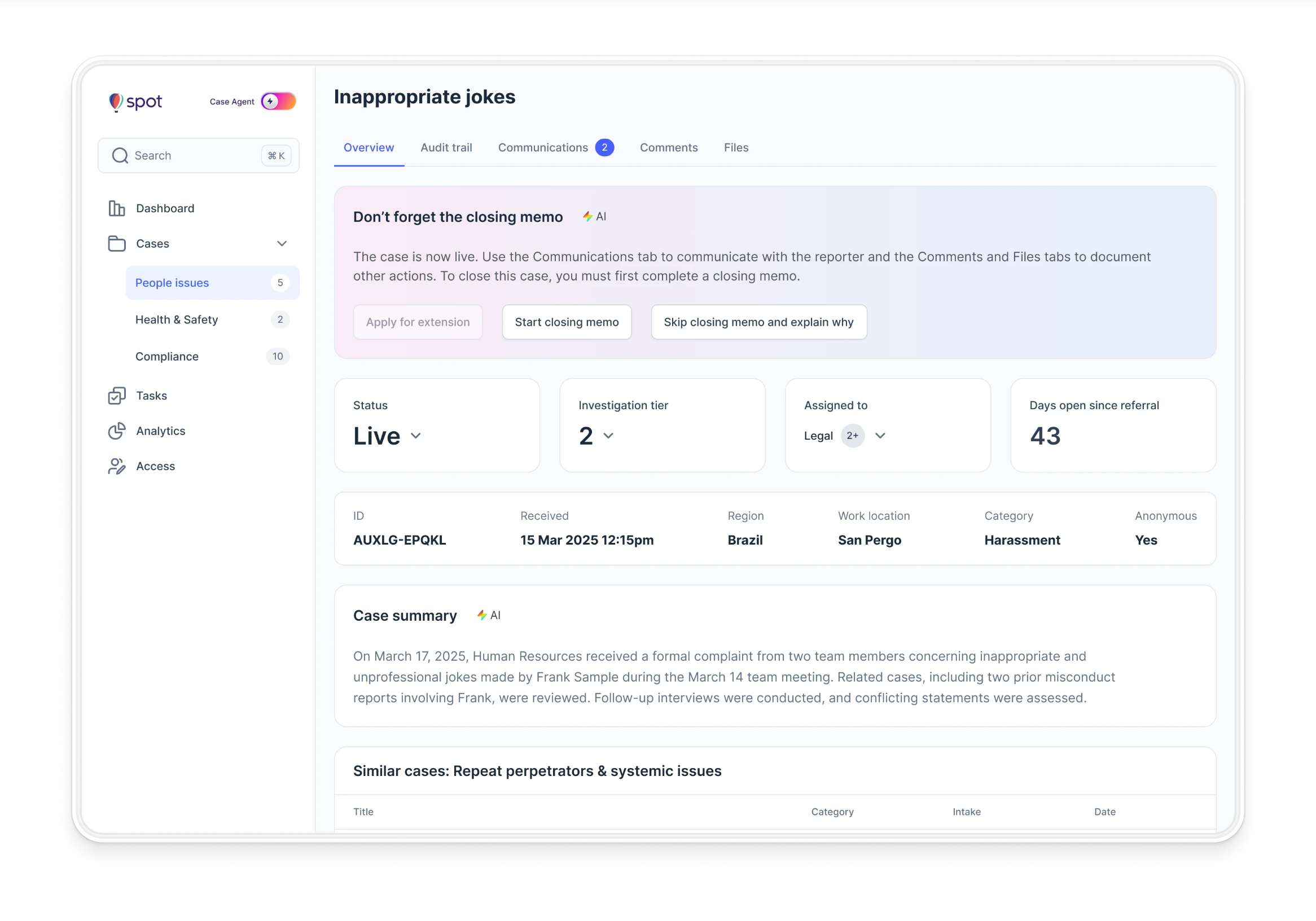
 Best for frontline reportingSpotQR-code web app, WhatsApp and a voice hotline feed one case list with repeat-actor detection.
 Our product · for the offboarding after a findingThe People Ops ManagerNot an investigation tool; coordinates access removal and offboarding tasks with recorded approvals.
| Tool | Built around | Part of the investigation it owns | Starting price (USD) | G2 rating |
|---|---|---|---|---|
| HR Acuity | Employee relations case management and investigations | Owns intake through findings and aftercare: anonymous report, case record, interview plan, determination, ThroughCare follow-up | Quote only | 4.6 (202) |
| Case IQ | Investigative case management (HR, ethics, compliance) | Owns intake, triage rules, assignment, interviews, evidence, issue-level outcomes and audit history | Quote only (implementation fee plus annual subscription) | 4.4 (125) |
| AllVoices | Employee relations case management and investigations | Owns intake, investigator assignment, plan, interviews, findings, summary report and corrective-action tracking | From $275/month (quote) | 4.5 (95) |
| NAVEX EthicsPoint | Ethics hotline and incident case management | Owns hotline and web intake, anonymous reporter follow-up, case routing by tier, assignment and case reporting | Essentials from $1,980/year (up to 250 employees); Professional quote only | 3.8 (87) |
| ServiceNow HR Service Delivery | Enterprise HR case management | ER case inside HR Service Delivery: allegations, parties, interviews, evidence, corrective actions | Quote only (HR Foundation, HR Advanced, HR Prime) | 4.3 (446) |
| Pulpstream | No-code HR case management (employee relations, investigations, discipline) | Intake through resolution of ER complaints, plus the discipline or PIP that follows | Quote only | No reviews yet |
| Resolver | Ethics, compliance and investigations case management (Kroll) | Hotline intake, AI triage, investigation case file, evidence chain of custody and board-level trend reporting | Quote only | 4.3 (180) |
| Spot | Anonymous incident reporting and investigation case management | Owns intake (AI interview, WhatsApp, email, hotline, QR web app), anonymous two-way follow-up, case workflow, approvals and trend analytics | Quote only | Only 4 G2 reviews |
| The People Ops Manager Our product | Onboarding coordination | Shows who is ready for day one, what is blocked and who owns it | Subscription via Stripe Checkout, card required | No reviews yet |
Prices as listed on vendor pages, checked November 27, 2026. Quote only means the vendor publishes no price.
What Is Workplace Investigation Software?
Workplace investigation software is a case management system built for HR and employee relations (ER) teams that records a complaint about harassment, discrimination, retaliation or other misconduct, guides the investigation through plan, interviews, evidence and findings, and keeps a time-stamped record of every step and every person who opened the case. It replaces the mix of email threads, shared folders and spreadsheets most HR teams start with, but it doesn't replace the investigator's judgment.
What sets it apart isn't the case list, though; it's confidentiality and structure. An investigation file holds statements about named employees, so the tool has to limit who sees each case, log every view and edit, and keep the reporter's identity hidden when they report anonymously. It also has to record each allegation and its outcome separately, because one complaint often contains several issues, and they don't always end with the same finding.
Three kinds of software show up next to these tools and are often confused with them:
| Software type | Built for | What it lacks for a workplace investigation |
|---|---|---|
| HR help desk or ticketing (Zendesk, Freshservice, a generic HR case queue) | Routine HR questions with service levels | Allegation records, interview forms, case-level restrictions and investigation reports |
| Ethics hotline only | Taking reports by phone and web, often anonymously | Interview plans and findings unless a case module is added |
| Private investigator or police case software | Surveillance, evidence chains and billing for outside investigators | Links to the HRIS, employee relations categories and corrective actions |
A spreadsheet is still enough for a company with a handful of complaints a year and one HR person who handles all of them, kept in a locked file next to a restricted folder, as long as it records the date of each step and who did it. That stops working quickly, however. Dedicated software pays off when several people investigate, when cases need to be hidden from some HR staff, when employees want to report anonymously, or when leadership asks for trends by department and case type.
How a Workplace Investigation Runs and Who Owns Each Step
A workplace investigation moves through six stages, and each has a different owner. The timeline below is what the tools in this guide are built to track; the column on the right shows where a typical stack hands the case from one system to the next.
- Employee, witness or managerReport the concern by hotline, web form, chat or to a manager, named or anonymous Day 0
- HR or ER leadTriage: case type and severity, interim steps such as separating the parties, conflict check, assign an investigator First 1 to 2 business days
- InvestigatorInvestigation plan: allegations, policies at issue, witnesses, documents and data to preserve Before the first interview
- InvestigatorInterviews with the complainant, the subject and witnesses; evidence logged to the case Weeks 1 to 3
- Investigator, legalFindings per allegation (substantiated, not substantiated, inconclusive) and the written report After the last interview
- HR, manager, ITCorrective action, outcome letters to both parties, retaliation check-ins, access removal if employment ends Closing and after
The stages are the same everywhere, but the tools don't cover the same ones. Two things decide whether a tool fits this sequence. First, where the report enters: a hotline vendor such as NAVEX takes the call and hands the case to your team, while ServiceNow and Pulpstream expect the report to come from their own portal or an HR agent. Second, where the case ends: tools differ in whether corrective actions, discipline letters and follow-up check-ins are part of the case or handed back to the HRIS.
Workplace Investigation Software Reviewed
The eight tools below are grouped by what they were built from: HR Acuity, Case IQ and AllVoices are dedicated employee relations platforms, NAVEX EthicsPoint and Spot start from the report, ServiceNow and Pulpstream add investigations to a wider HR platform, and Resolver comes from security and compliance. Each entry explains the capability that decides the purchase, then how a case runs inside the tool, what it connects to and when to skip it.
HR Acuity
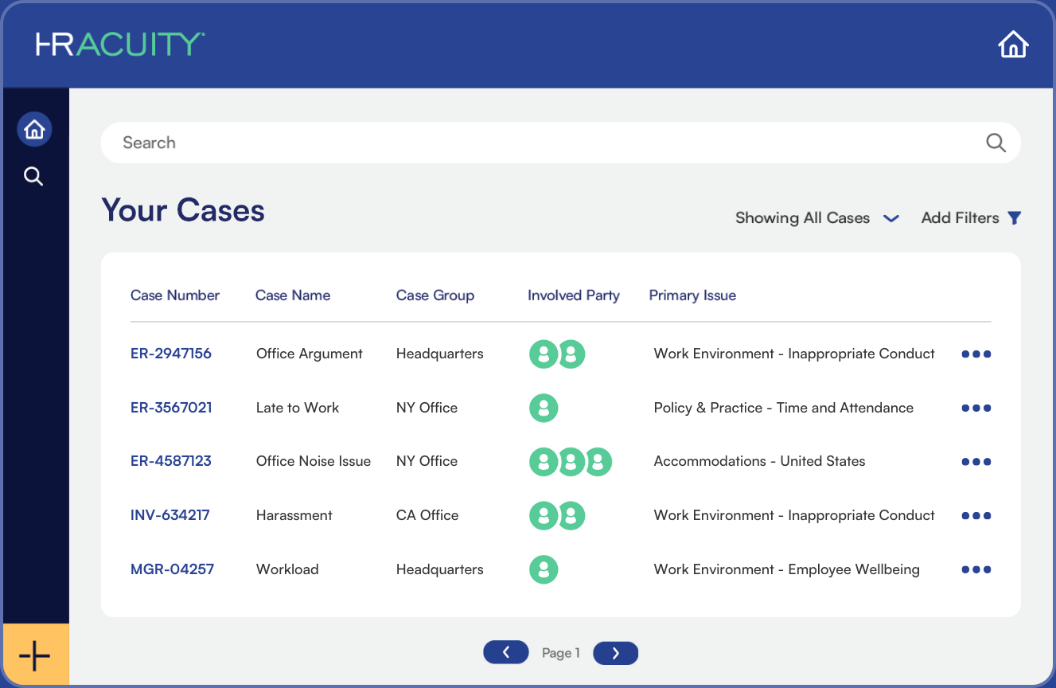
HR Acuity is an employee relations platform that runs investigations through a Plan, Investigate, Determine methodology with interview templates, role-based permissions and an audit log, fed by web and phone anonymous reporting.
The deciding capability is the investigation method: every case follows Plan, Investigate, Determine, so two investigators produce files with the same structure.
In the Plan step the investigator sets the interview protocols, working from HR Acuity's interview templates, and its AI companion, olivER, generates interview questions. The Investigate step is where the interviews are conducted and documented on the case. The Determine step records the findings, collects stakeholder approvals and schedules retaliation check-ins; follow-up work after the decision runs through ThroughCare, a set of aftercare tasks and reminders.
Intake comes from HR Acuity's anonymous reporting, which came with the 2022 acquisition of Speakfully: web and phone reports with live agents, in 35 languages across 56 countries, each turned into a structured case record. Reporters check status with a PIN, and investigators can write back through two-way anonymous messaging without learning who the reporter is. Access is role-based, cases can be marked as attorney-client privileged, and the audit log starts when the case opens.
The Workday connection goes further than an employee sync: sensitive issues raised through Workday Help can escalate into a confidential HR Acuity case. ADP, UKG, SAP, BambooHR, Rippling, Paylocity and others connect by API, SFTP or flat file.
- you want every case to follow the same Plan, Investigate, Determine sequence, with interview templates and AI-drafted interview questions inside the plan
- you run Workday and want two-way employee sync plus escalation of sensitive Workday Help tickets into a confidential ER case
- anonymous reporters need web and phone intake in 35 languages and a PIN to check status and reply to investigators
- your HR team wants to add custom fields and automated intake rules without the vendor
- you only need a staffed hotline: HR Acuity is sold as a full ER case platform with ThroughCare aftercare and trend reporting
- Starting price
- Quote only
- Investigation method
- Plan, Investigate, Determine with interview templates and protocols
- Intake
- Web and phone, 35 languages, two-way anonymous messaging
- AI
- olivER: interview questions, summaries, timelines
- Access control
- Role-based permissions, attorney-client privilege support, audit log
- Integrations
- Workday HCM and Workday Help, ADP, UKG, SAP, BambooHR, Rippling, Paylocity, REST API, SFTP
- Aftercare
- ThroughCare task sets and reminders
- Ownership
- Acquired Speakfully (anonymous reporting) in November 2022
- Method
- Plan, Investigate, Determine
- Workday
- Two-way sync, Workday Help escalation
- Price
- Quote only
Case IQ
Case IQ, formerly i-Sight, is an investigative case management platform with configurable HR case types, Issue and Outcome forms, rule-based routing, confidential case flags and the Clairia AI assistant.
The deciding capability is the allegation-level record: each allegation in a complaint becomes its own Issue with its own Outcome.
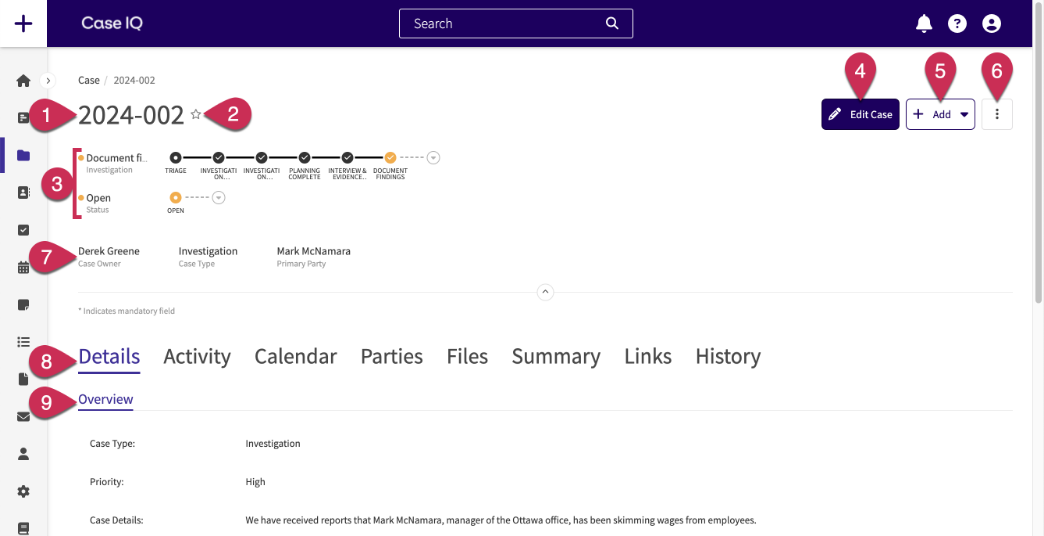
Case IQ, called i-Sight until May 2023, structures an HR case with separate forms: an Issue for each allegation, an Outcome on each Issue (substantiated or not, plus the corrective action), Interview forms for the complainant, the subject and each witness, and Evidence forms. The case page has tabs for Details, Activity, Calendar, Parties, Files, Links and History, and History is the audit trail of who changed what.
Reports arrive through a web portal, the phone hotline or email; anonymous reporters can create a username and password to follow their case. Intake forms support 30+ field types with conditional logic, and routing rules assign cases by severity, case type, region or investigator workload. Access is set by case type, sensitivity level and individual case, and a Mark Confidential flag limits a case to users who hold that permission. The 24/7 Whistleblower Hotline, which came with the 2023 purchase of WhistleBlower Security, covers 100+ languages.
Clairia, the AI assistant, writes case summaries, timelines and witness interview questions. Employee data comes from Workday, ADP, Ceridian, SAP SuccessFactors, BambooHR or PeopleSoft, with single sign-on through Okta or Azure AD.
- one complaint often holds several allegations and you want a separate Issue record and Outcome (substantiated or not, corrective action) for each
- routing rules should assign cases by severity, case type, region or workload, and a Mark Confidential flag should hide sensitive cases
- HR, ethics and compliance want one platform with the 24/7 Whistleblower Hotline in 100+ languages
- you want to start without a project: quotes include a one-time implementation fee on top of the annual subscription
- your reports team expects drag-and-drop simplicity: report building in Case IQ needs setup
- Starting price
- Quote only (implementation fee plus annual subscription)
- Former name
- i-Sight, renamed Case IQ on May 1, 2023
- Intake
- Web portal, phone hotline, email, intake forms with 30+ field types
- HR forms
- Issue, Outcome, Interview, Recovery, Evidence
- Access control
- Role-based by case type, sensitivity and case; Mark Confidential flag
- AI
- Clairia: summaries, timelines, witness interview questions, Playbooks
- Integrations
- Workday, ADP, Ceridian, SAP SuccessFactors, BambooHR, PeopleSoft, Okta, Azure AD, REST API
- Reporting
- Dashboards with 75+ chart types
- Case structure
- Issue and Outcome per allegation, Interview and Evidence forms
- Access
- By case type, sensitivity and case; Mark Confidential
- Hotline
- 24/7, 100+ languages
- Price
- Quote only, plus a one-time implementation fee
AllVoices
AllVoices combines anonymous reporting, an HR case manager and a three-step investigation workflow (Prepare, Discovery, Resolution) in which its AI assistant Vera drafts the investigation plan, summary report and recommendations.
The deciding capability is anonymous intake that stays a conversation: no login or PIN for the reporter, and two-way chat with HR afterward.
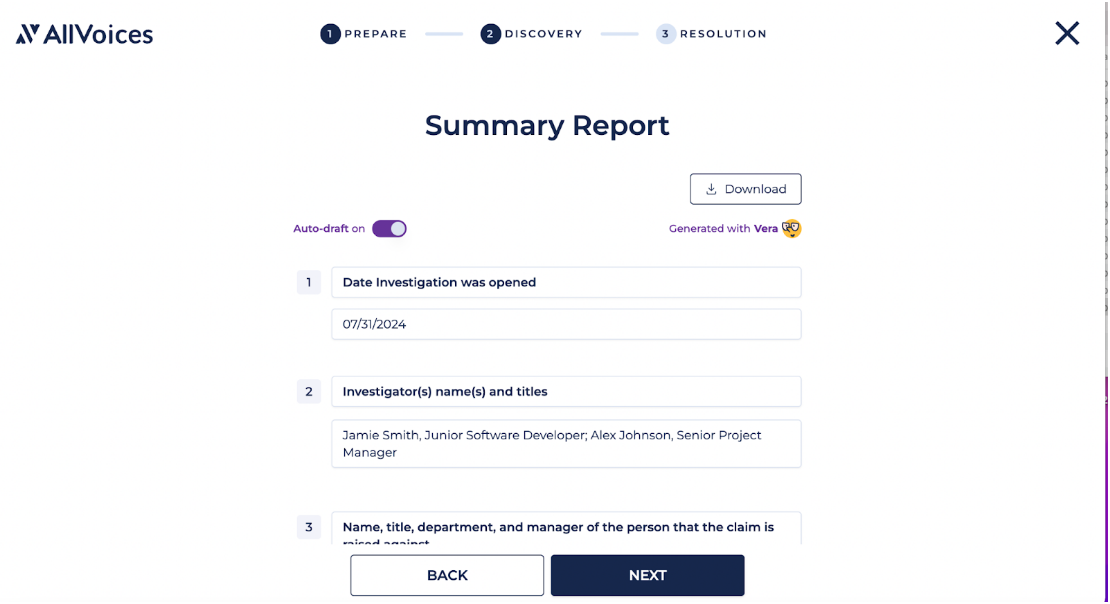
AllVoices runs an investigation in three steps. Prepare: the case owner assigns an investigator, who gets an email notice, and fills in the investigation plan with the issue summary, start date, who raised it, who it is against, witnesses and evidence uploads. Discovery: AllVoices creates interview and credibility assessment templates for each party in the plan, its AI assistant Vera runs a policy analysis, the investigator enters factual findings, and Vera drafts a summary report that locks once it is published. Resolution: recommendations become Take Action tasks with owners.
Roles are strict. Owner, Primary Admin and Sub Admin can edit an investigation, a Viewer can only read it, and the Manager role cannot see the investigation at all. A case can be flagged as attorney-client privileged, but that flag doesn't replace counsel's own instructions.
AllVoices lists 50+ HR system connections, including Workday, BambooHR, Gusto, ADP, UKG and Rippling, plus Jira and ServiceNow for handoffs and Power BI, Snowflake and Tableau for reporting. It is also the only tool here besides NAVEX that publishes a starting price.
- you want interview and credibility assessment templates created for every party named in the investigation plan
- employees should report anonymously without logins or PINs and keep chatting with HR afterward
- a published entry point matters: pricing starts at $275 per month before headcount and admin seats set the quote
- managers need to see investigation details: the Manager role has no access to the investigation workflow
- you edit reports after sign-off: a published summary report locks until support turns the lock off
- Starting price
- From $275/month (quote)
- Intake
- Anonymous without login or PIN, employee and whistleblower hotline
- Investigation steps
- Prepare (investigator, plan, evidence), Discovery (interviews, credibility, findings, report), Resolution (recommendations, Take Action)
- AI
- Vera pre-fills plans, runs policy analysis, drafts summary reports and recommendations; no LLM training on customer data
- Roles
- Owner, Primary Admin, Sub Admin, Viewer; Manager has no access
- Integrations
- 50+ HRIS incl. Workday, BambooHR, Gusto, ADP, UKG, Rippling; Jira, ServiceNow; Power BI, Snowflake, Tableau
- Security
- SOC 2 Type 2, AES-256
- Steps
- Prepare, Discovery, Resolution
- Price
- From $275 per month, quoted by headcount and admin seats
NAVEX EthicsPoint
NAVEX One EthicsPoint takes reports by phone, web, mobile and the Nira AI intake, gives anonymous reporters a Report Key for follow-up, and routes cases into tier-based case management with role-scoped access.
The deciding capability is the staffed hotline: reports come in 24/7 by phone, web and mobile from employees, contractors and suppliers, then route into tier-based case management.
EthicsPoint, now sold on the NAVEX One platform, takes reports through a 24/7 phone line, web and mobile forms, and Nira, an AI chat intake with a live agent as fallback. A separate form records concerns raised outside the hotline, such as a complaint made to a manager, and cases from other systems can be imported. Anonymous reporters get a Report Key and password to follow up; neither can be reset, so a reporter who loses the key has to file a new report.
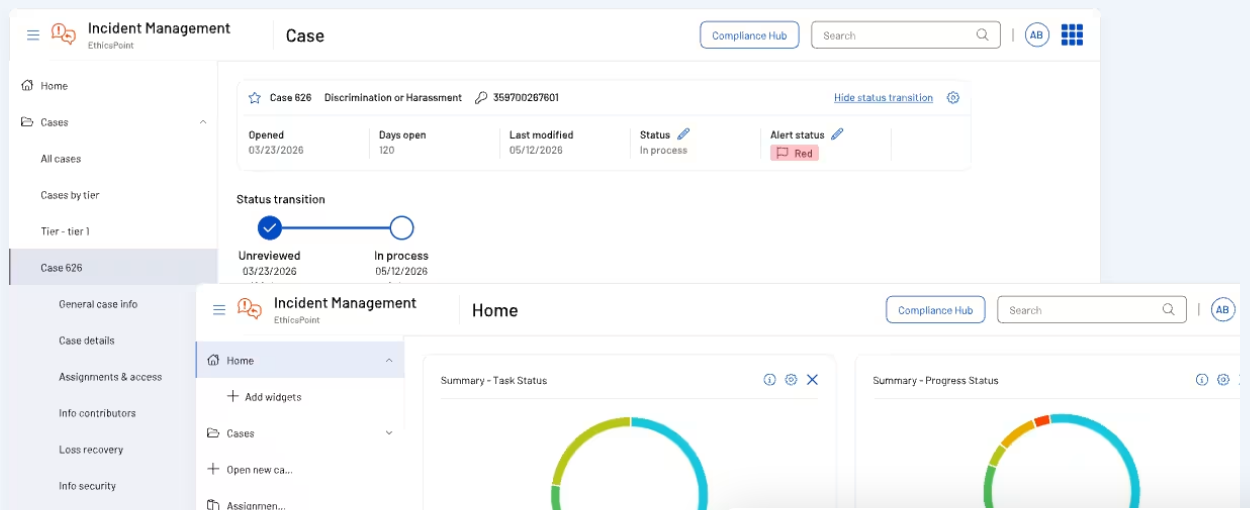
Cases sit in tiers, for example regions or subsidiaries, and users only see cases in the tiers they are assigned to. Case numbers can run system-wide, per tier, or change when a case moves to another tier. Admin roles are System, Tier and Platform Administrator, and built-in views cover Overdue, Red Alert, Unassigned and Watchlist cases. Your admins can't create new tiers, though; they're requested from NAVEX support.
EthicsPoint Professional adds bulk reassignment, up to two custom workflows, AI-linked related cases, screening that keeps people named in a report from seeing it, a log of who viewed or edited each case, and Power BI dashboards with incident benchmarks. Essentials is the small-business tier.
- you need a staffed 24/7 phone hotline plus web and mobile intake open to employees, contractors and suppliers
- cases must be split into tiers such as regions or subsidiaries, each with its own administrators and case numbering
- a company of up to 250 employees wants a hotline from $1,980 a year on EthicsPoint Essentials
- HR investigators want interview plans and findings templates: EthicsPoint centers on intake, routing and case tracking
- you need more than two custom workflows, the cap on EthicsPoint Professional
- Starting price
- Essentials from $1,980/year (up to 250 employees); Professional quote only
- Tiers
- EthicsPoint Essentials (SMB) and EthicsPoint Professional (enterprise) on NAVEX One
- Intake
- 24/7 phone, web, mobile, Nira AI chat
- Anonymous follow-up
- Report Key and password, no reset
- Access model
- Tier-based case visibility; System, Tier and Platform Administrator roles
- Professional extras
- Bulk reassignment, up to 2 custom workflows, AI-Related Cases, implicated-party screening, view/edit activity log
- Analytics
- Incident benchmarks, Power BI dashboards, premium analytics, REST and SOAP APIs
- Access
- Tier-based; System, Tier and Platform Administrator
- Professional
- Implicated-party screening, view and edit log, 2 custom workflows
- Price
- Essentials from $1,980 per year (up to 250 employees); Professional quote only
ServiceNow HR Service Delivery
ServiceNow HR Service Delivery (HRSD) is a suite on the ServiceNow AI Platform for HR case and knowledge management, an Employee Center portal, lifecycle events and journeys, HR documents and AI agents.
The deciding capability is case restriction inside a platform you may already own: the Employee Relations app limits each ER case to a named group, even if collaborators were added before.
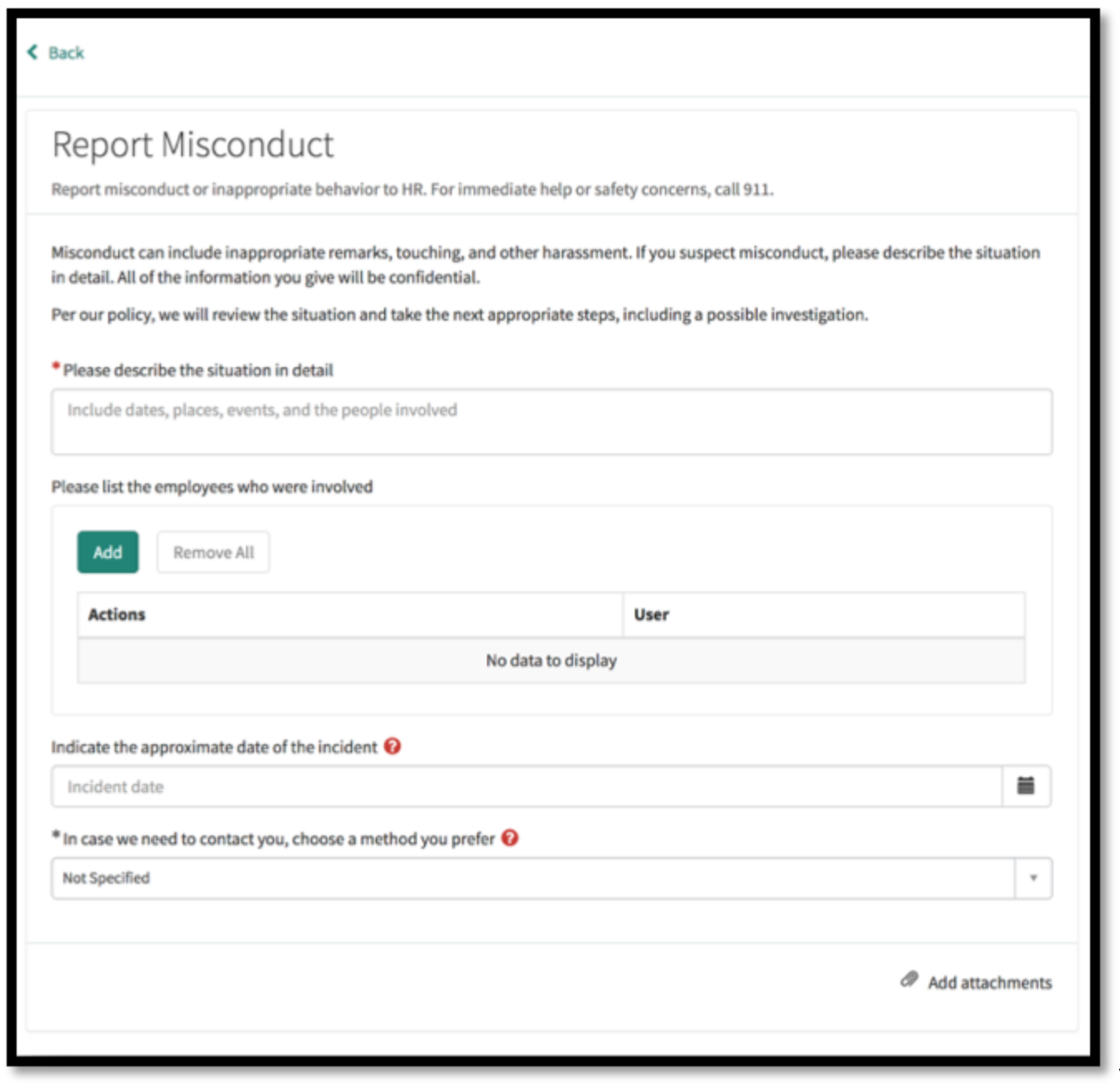
Employee Relations isn't a separate product; it's an app inside ServiceNow HR Service Delivery. Its HR services, Accommodation Request, Report Discrimination, Report Misconduct and Performance improvement plan, sit under one Employee Relations case category. Employees report through Employee Center or the Anonymous Report Center, which signs them out of Employee Center before they write the report; HR agents can also open a case in Agent Workspace and skip verification when the reporter is anonymous or outside the company.
The ER case has tabs for Involved Parties (complainant, subject, witness), Allegations with types and subtypes, Interviews, Evidence, Corrective Actions and Allegation Outcomes, plus a Case Timeline. Interviews are built from templates, scheduling syncs with Outlook, and the reporter never sees interview records. Corrective actions (verbal or written warning, suspension, termination) carry a due date and status per involved party.
Access is the strong point, whereas a hosted hotline isn't part of the package. By default only the HR Confidential group, whose members need the sn_hr_er.confidential role, sees restricted cases, and a Restrict button limits a case to a named group, overriding collaborators. A case can also be restricted when the assigned investigator is one of the involved parties. Matching rules route new cases to the investigator with the fewest open cases, the right skills and the same country.
- you already run ServiceNow and want ER cases in the same HR case platform, Employee Center portal and reporting
- you need a Restrict button that limits an ER case to a named group and overrides collaborators added earlier
- investigators should get cases by matching rules: fewest open cases, required skills and the same country as the case
- you don't run ServiceNow today: Employee Relations comes inside HR Service Delivery, sold as HR Foundation, HR Advanced or HR Prime
- you want a staffed phone hotline in the box: intake is Employee Center, the Anonymous Report Center and agent-logged cases
- Starting price
- Quote only (HR Foundation, HR Advanced, HR Prime)
- Case access
- Sensitive HR data restricted to HR roles
- Pricing
- Not published
- Case tabs
- Involved Parties, Allegations, Interviews, Evidence, Corrective Actions, Allegation Outcomes
- Anonymous intake
- Anonymous Report Center
- Access
- HR Confidential group, Restrict button
- Routing
- Fewest cases, skills, same country
- Price
- Quote only
Pulpstream
Pulpstream is a no-code HR process platform whose Employee Relationship Management module handles complaint intake, multi-investigator cases, evidence, discipline and PIP workflows with HRIS sync to systems such as Workday, UKG and ADP.
The deciding capability is what happens after the finding: a complaint case can hand off into verbal warning, written warning or performance improvement plan workflows on the same platform.
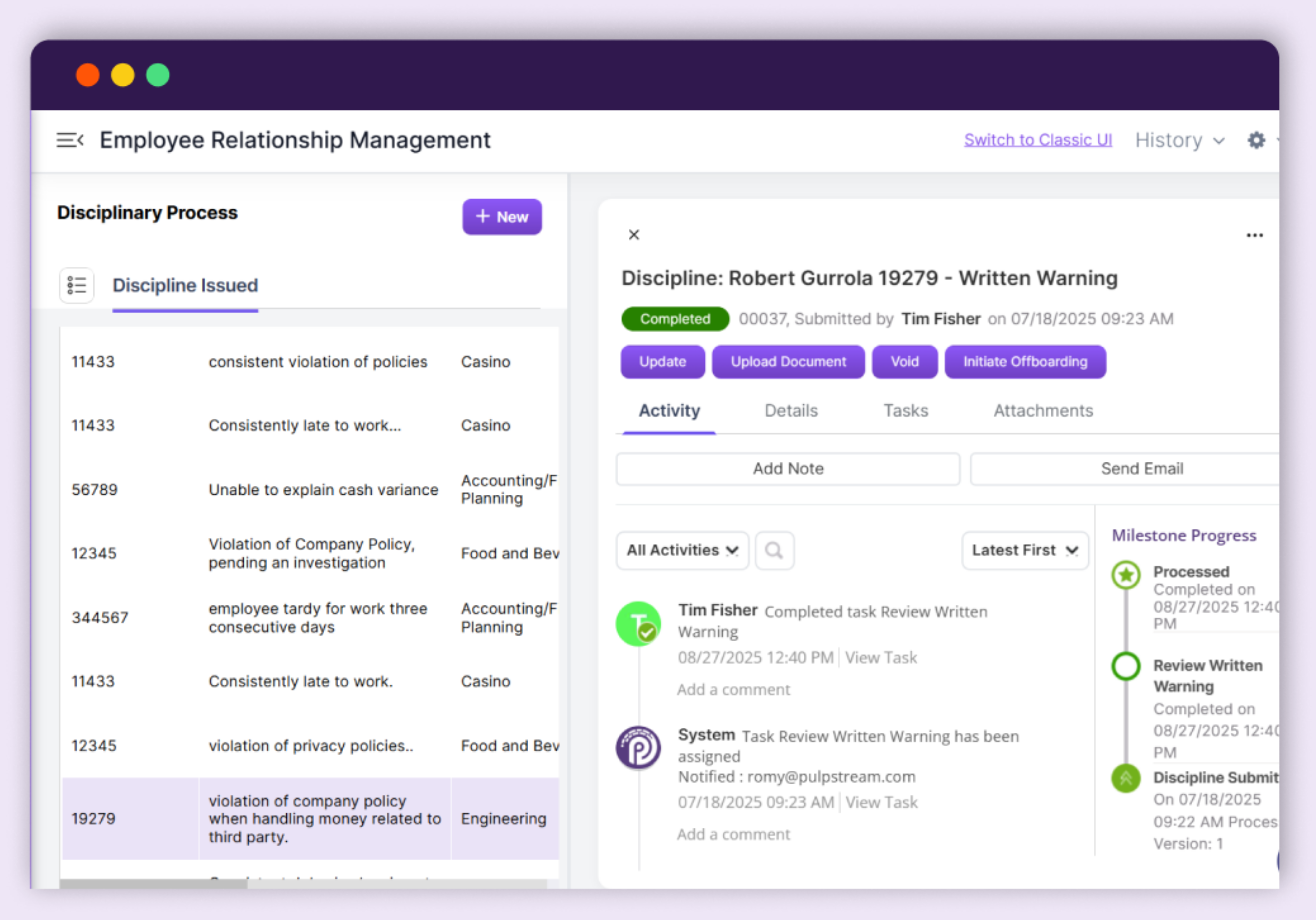
Pulpstream is a no-code platform for HR processes, and its Employee Relationship Management module covers complaint and investigation cases, progressive discipline and PIPs. Complaints come in by phone hotline, web portal, email or mobile app, anonymous submission is supported, and managers can log a conversation as a case. A case record shows Activity, Details, Tasks and Attachments with a milestone tracker and a time-stamped activity log.
Several investigators can work one case with defined roles and their own tasks, interview notes are kept on the case, and evidence files are encrypted. Dashboards show repeat complainants, departmental hotspots, time to resolution, investigator workload and case aging.
Pulpstream isn't sold as a fixed product; because the platform is configured per customer, it connects to HR systems by API or SFTP, naming Workday, Dayforce, UKG, ADP, SAP, Paylocity, Rippling, iSolved, Kronos and Namely. It lists SOC 1, SOC 2 Type II and HIPAA coverage and US hosting on AWS. Its AI features run on Anthropic Claude through AWS Bedrock and can be switched off per organization.
- a substantiated complaint should flow straight into verbal warning, written warning or PIP workflows with HR approval routing
- you want ER cases, discipline and leave cases on one no-code platform synced by API or SFTP with Workday, Dayforce, UKG or ADP
- your security review asks for SOC 1, SOC 2 Type II and HIPAA plus an AI feature you can switch off per organization
- you want a hosted ethics hotline with two-way anonymous chat listed as a feature
- you prefer to read help-center docs before a demo: Pulpstream publishes product pages but no public documentation
- Starting price
- Quote only
- Intake
- Hotline, web portal, email, mobile app, manager-logged
- Case record
- Activity, Details, Tasks and Attachments tabs with Milestone Progress and timestamped activity log
- Investigators
- Multiple investigators per case with defined roles and task management
- Reporting
- Case status dashboards, repeat complainant and hotspot patterns, time-to-resolution, investigator workload, aging reports
- Integrations
- API or SFTP to Workday, Dayforce, UKG, ADP, Rippling and more
- Security
- SOC 1, SOC 2 Type II, HIPAA, US AWS hosting
- AI
- Pulpstream AI on Anthropic Claude via AWS Bedrock, can be turned off per organization
- Module
- Employee Relationship Management: complaints, discipline, PIPs
- Price
- Quote only
Resolver
Resolver, owned by Kroll since 2022, combines a whistleblower hotline with anonymous two-way messaging, AI triage, role-restricted investigation cases, chain-of-custody evidence tracking and ECI-benchmarked reporting.
The deciding capability is evidence handling: chain-of-custody tracking and link analysis across people, assets and locations, for cases that HR shares with security or fraud teams.
Resolver, owned by Kroll since March 2022, sells Ethics and Compliance (the hotline), Enterprise Investigations and Incident Management as modules on one platform. Reports come in through the hotline or secure web reporting in several languages, with anonymous two-way messaging. Resolver AI summarizes and classifies each report, and rules assign it.
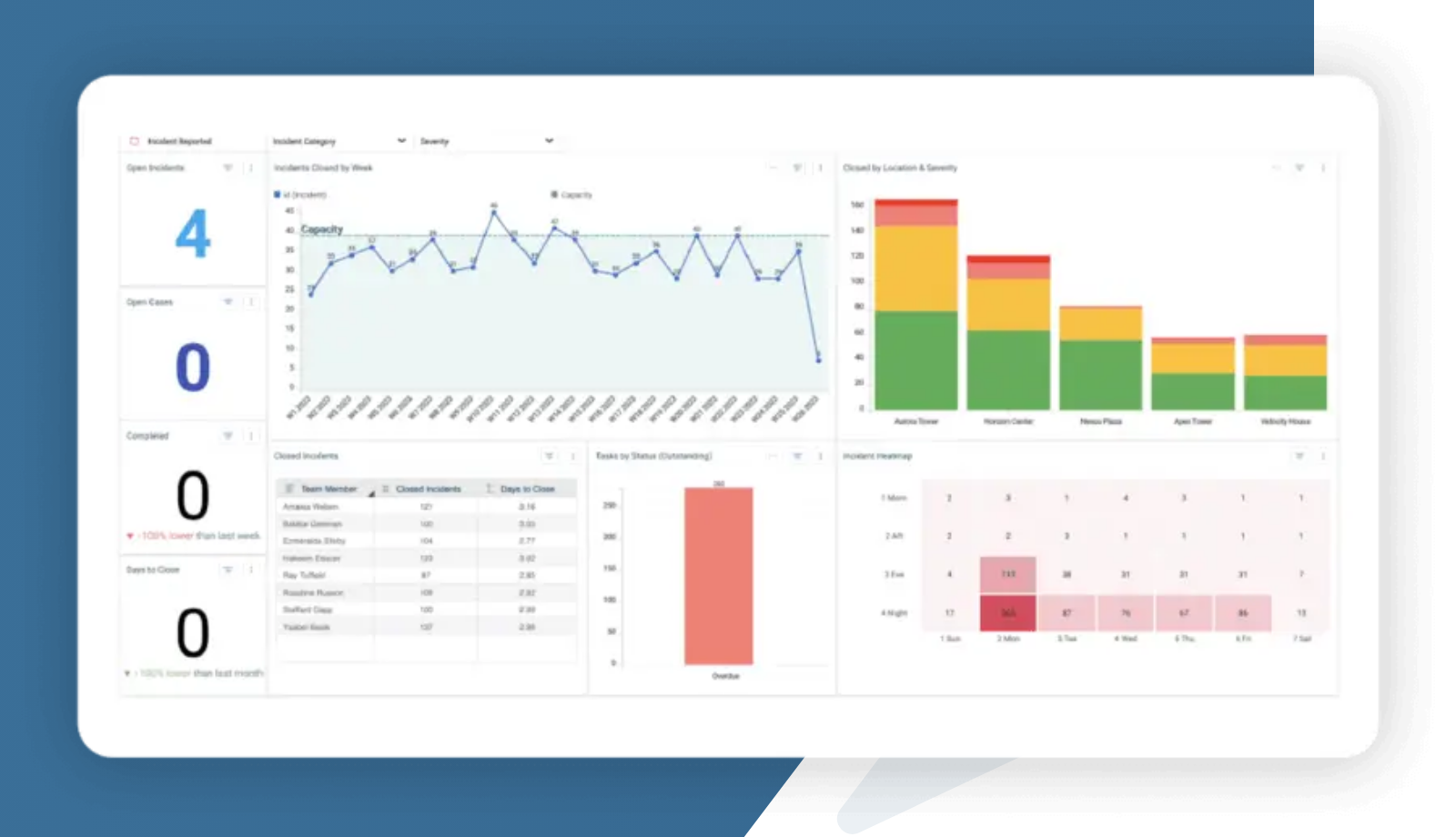
A case has a Case Name, Description, Case Focus (a person or a location), Business Unit, Related Incidents and Priority, and moves through Draft, Open and Closed. Only users in the Incident Investigator and Case Manager groups can see cases. Investigations follow guided playbooks with corrective action tasks; interviews and documents sit in the same case, and evidence carries a chain-of-custody and location record.
Resolver's pages name SOX, Dodd-Frank, the FCPA and California SB 553 among the rules it supports, and offer AI executive summaries and benchmarking against the Ethics and Compliance Initiative framework for board reporting. Pricing depends on the modules and the number of active users.
- investigations involve security or fraud evidence that needs chain-of-custody tracking and link analysis across people, assets and locations
- HR, ethics, security and legal should share one hotline, incident and case platform with Resolver AI triage
- the board expects AI executive summaries and benchmarks against the ECI framework
- you want named HRIS connectors on the spec sheet: Resolver cites 100+ integrations without naming an HRIS
- your case load is only employee relations: cases come with hotline, incident and security modules priced by active users
- Starting price
- Quote only
- Intake
- Hotline, secure web reporting, anonymous two-way communication, multilingual reporting
- Case fields
- Case Name, Description, Case Focus (person or location), Business Unit, Related Incidents, Priority
- Workflow states
- Draft, Open, Closed; cases visible only to Incident Investigator and Case Manager groups
- Evidence
- Chain of custody, link analysis
- AI
- Resolver AI summarizes reports, classifies incident types, drafts executive summaries
- Regulations referenced
- SOX, Dodd-Frank, FCPA, California SB 553, EU Whistleblower Directive
- Ownership
- Acquired by Kroll on March 30, 2022
- Modules
- Ethics and Compliance, Enterprise Investigations, Incident Management
- Case states
- Draft, Open, Closed
- Visibility
- Incident Investigator and Case Manager groups
- Price
- Quote only, by modules and active users
Spot
Spot collects reports through an AI-guided web app, WhatsApp, email and a frontline hotline, then runs each case through configurable workflows with deadlines, approvals, repeat-actor detection and HRIS sync.
The deciding capability is reach: a QR-code web app with no login, WhatsApp, a forwarding email address and a voice hotline for basic phones all feed one case list.
Spot started as an AI chatbot for harassment reports. Today it doesn't stop at intake; it runs the case afterward as well. When an employee reports, an AI interview asks follow-up questions about dates and witnesses, and investigators can message anonymous reporters both ways; AI summaries remove identifying language.
Workflows are configured per case type with deadlines, and an investigator who wants more time has to give a written reason. Sign-off can route through Employee Relations, line managers and Legal, and a closing memo form records the outcome. Smart Comparators link open and closed cases by person, location or a custom rule, such as the same incident type within 90 days in California, which is how repeat behavior shows up. Each team, for example HR, Legal or Security, sees only its own cases, and every action is logged.
Spot syncs both ways with Workday, BambooHR, Zenefits, Deel, HiBob, UKG, SAP, ADP and EQS, so closed outcomes reach personnel files, and supports SAML sign-on with Okta and OneLogin. It lists SOC 2 Type 2 and a HIPAA BAA on request. Data is hosted in the EU (Ireland) by default, with US hosting on request.
- frontline staff lack company email: a QR-code web app without login, WhatsApp and a voice hotline for basic phones feed the same case list
- you want Smart Comparators to link open and closed cases by person, location or a rule such as the same incident type within 90 days
- closed outcomes should sync back to Workday, BambooHR, UKG, ADP, HiBob or SAP personnel files
- case data must sit in the US by default: Spot hosts in AWS eu-west-1 and offers US residency on request
- you want to trial it alone: buying starts with a 45-minute demo
- Starting price
- Quote only
- Intake channels
- Mobile web app (QR or link, no login), web form, WhatsApp Business, forwarded email address, Frontline Workers Hotline
- Anonymous follow-up
- Two-way messaging with anonymous reporters; AI summaries remove identifying language
- Workflow controls
- Tiers, Timelines & Reminders with written reason required for deadline extensions; closing memo form
- Approvals
- Employee Relations, line managers, Legal
- HRIS connectors
- Workday, BambooHR, Zenefits, Deel, HiBob, UKG, SAP, ADP, EQS; SAML SSO with Okta, OneLogin
- Security
- SOC 2 Type 2, HIPAA BAA on request, AES-256 at rest, mandatory TOTP 2FA for admins
- Metrics
- Time to first response, time to close, caseload per investigator, share of anonymous cases
- Intake
- QR web app without login, web form, WhatsApp, email, frontline voice hotline
- Repeat behavior
- Smart Comparators across open and closed cases
- Hosting
- EU by default, US on request
- Price
- Quote only
Questions to Ask in a Demo
A demo shows the tool the way the vendor wants it seen, not the way your messiest case will look. Bring one real, anonymized case from last year and ask the vendor to run it through the system while you watch. The eight tests below separate the tools above faster than a feature list does.
- Submit an anonymous report, then reply to it as HR: can the reporter answer without revealing who they are, and what happens if they lose their key or PIN?
- Add an HR colleague who is named in the complaint: can you hide the case from them, and does that override earlier sharing?
- Open the audit log: does it record every view, not only edits, with user and time?
- Record two allegations in one complaint with different outcomes: does the report show both separately?
- Export the full case file, including interview notes and attachments, as you would for counsel or an agency
- Set a retention rule: can closed cases be kept for a set period and then deleted, with a hold on cases tied to a charge or lawsuit?
- Check the HRIS sync: which fields come in (department, manager, location), and does anything write back?
- Pull a trend report by department, case type and time to close for the last 12 months
Security questions belong in the same session: ask for the SOC 2 Type II report, where case data is hosted (Spot, for example, hosts in the EU unless you ask for US hosting), and whether the vendor's AI features train on your case data.
What Workplace Investigation Software Costs
Workplace investigation software is almost always sold on a quote, so you won't see most prices until a sales call. Of the eight tools here, only AllVoices and NAVEX publish a starting price, and both say the final price depends on company size.
| Workplace investigation tool | Published starting price (USD) | What sets the quote |
|---|---|---|
| HR Acuity | Quote only | Modules and company size |
| Case IQ | Quote only | Annual subscription plus a one-time implementation fee |
| AllVoices | From $275 per month | Employee count and number of people with case access |
| NAVEX EthicsPoint | Essentials from $1,980 per year for up to 250 employees | Tier (Essentials or Professional) and company size |
| ServiceNow HR Service Delivery | Quote only | Package (HR Foundation, HR Advanced, HR Prime) |
| Pulpstream | Quote only | Configured implementation |
| Resolver | Quote only | Modules and number of active users |
| Spot | Quote only | Set after a 45-minute demo |
Three costs sit outside the license. Implementation can be a separate line, as with Case IQ. A staffed phone hotline is a service, not software, and is usually priced by headcount. And time: enterprise case platforms such as NAVEX One usually need a rollout project, so plan it before a busy review season.
Record Rules Your Case File Has to Survive
Workplace investigation software doesn't make an investigation lawful. It does decide whether you can show later what happened and when. Four US federal rules shape what the case file needs to hold, and each one depends on dates the software records.
- Retention. Under 29 CFR 1602.14, employers keep personnel and employment records for one year from the date the record was made or the action was taken, whichever is later, and for one year after an involuntary termination. Once a charge or lawsuit is filed under Title VII, the ADA or GINA, all relevant records must be kept until final disposition. A retention setting that deletes closed cases automatically needs a hold for those cases.
- Deadlines. The EEOC's time limits are 180 calendar days to file a charge, or 300 days where a state or local agency enforces a similar law. For ongoing harassment, the clock runs from the last incident, and the EEOC looks at all incidents.
- Prompt correction. On its harassment page, the EEOC says an employer can avoid liability for a supervisor's hostile-environment harassment only if it reasonably tried to prevent and promptly correct the behavior and the employee unreasonably failed to use the preventive or corrective options. For harassment by co-workers or non-employees, the employer is liable if it knew or should have known and did not take prompt and appropriate corrective action. Dates on intake, interim steps and corrective action are the evidence for "prompt".
- Coverage. Title VII and the ADA apply to employers with 15 or more employees, the ADEA to 20 or more.
For the wider compliance calendar around these rules, see our guide to HR compliance and the HR compliance checklist. If your HR team already runs a service desk for routine questions, our comparison of HR service delivery software shows where general HR cases end and ER cases need their own tool.
FAQ
Who should conduct a workplace investigation?
A workplace investigation is usually run by an HR or employee relations specialist who has no reporting line to, or personal tie with, the complainant or the subject. Many employers bring in an outside investigator or employment counsel when the subject is a senior leader, when HR itself is involved, or when a lawsuit looks likely. In ServiceNow, a case can be restricted when the assigned investigator is one of the involved parties.
Can an HRIS or HR help desk handle workplace investigations?
A general HR help desk such as Zendesk or Freshservice can log that a complaint exists, but it usually lacks allegation records, interview forms, case-level restrictions and investigation reports, so the investigation itself ends up in email and shared folders. The exception in this list is ServiceNow HR Service Delivery, whose Employee Relations app adds those pieces for companies that already run ServiceNow.
What is the difference between an ethics hotline and investigation software?
An ethics hotline takes reports by phone, web or chat and passes them on; investigation software runs the case after that, with the plan, interviews, findings and corrective action. Several vendors sell both: NAVEX pairs EthicsPoint with case management, Case IQ owns a whistleblower hotline, and HR Acuity added anonymous reporting through its Speakfully acquisition.
How long should workplace investigation records be kept?
Under federal EEOC rules (29 CFR 1602.14), personnel records are kept for at least one year from the record or the action, and for one year after an involuntary termination. If a charge or lawsuit is filed, all relevant records must be kept until it is finally resolved. State law and your own policy may require longer, so many employers set a longer retention period for closed investigation files.
Do small companies need workplace investigation software?
Small companies with a few complaints a year can manage with a restricted folder and a dated log, as long as access is limited and every step is recorded. A tool starts to pay off once several people investigate, employees want to report anonymously or leadership asks for trends. NAVEX EthicsPoint Essentials, at $1,980 a year for up to 250 employees, and AllVoices, from $275 a month, are the published entry points.
Is private investigator software the same as workplace investigation software?
No. Private investigator and police case software, such as tools built for surveillance, evidence chains and client billing, lacks the HR pieces: it has no HRIS connection, no employee relations case types such as harassment and retaliation, and no record of corrective actions and outcome letters for both parties. Use it only when an outside investigator runs the case on their own system.